Comparison8 min read
Arduino Uno vs ESP32-C3: Which Board Should You Start With?
A practical comparison between the classic Arduino Uno and the modern ESP32-C3 - performance, connectivity, learning curve, and which one fits your first project.
If you are new to microcontrollers, one of the first decisions you face is which board to buy. The Arduino Uno is the classic choice - the board that taught millions of people how to code hardware. The ESP32-C3 is a newer option built on the open-source RISC-V architecture with built-in Wi-Fi and Bluetooth. Both are excellent boards, but they serve different starting points.
The Arduino Uno R3 is based on the ATmega328P, an 8-bit AVR microcontroller running at 16 MHz. According to Arduino official documentation, it is the most used and documented board of the whole Arduino family. The ESP32-C3 comes from Espressif, the same company behind the original ESP32. It uses a single-core 32-bit RISC-V processor running at up to 160 MHz with built-in 2.4 GHz Wi-Fi and Bluetooth 5 (LE). This article compares them side by side to help you decide which one fits your goals.
Specs Comparison
The table below shows the key differences at a glance.
| Specification | Arduino Uno (R3) | ESP32-C3 DevKit |
|---|---|---|
| Processor | ATmega328P (8-bit AVR) | RISC-V 32-bit single-core |
| Clock speed | 16 MHz | Up to 160 MHz |
| Digital I/O pins | 14 (6 PWM) | 22 |
| Analog inputs | 6 (10-bit) | 4 (12-bit) |
| Flash memory | 32 KB | 4 MB |
| SRAM | 2 KB | 400 KB |
| EEPROM | 1 KB | None (uses flash) |
| Connectivity | USB (via UART) | Wi-Fi + Bluetooth 5 (LE) |
| Logic voltage | 5V | 3.3V |
| USB connector | USB-B | USB-C |
| Board price | $25-28 | $8-12 |
The ESP32-C3 is significantly more powerful on paper. It runs ten times faster, has over a hundred times more RAM, and includes wireless connectivity. But raw specs are not the only factor - especially for a beginner.
When To Choose The Arduino Uno
The Uno is the best board for learning the fundamentals of electronics. According to Arduino, the Uno is designed to be robust and beginner-friendly - you can tinker with it without worrying about doing something wrong, and in the worst case you can replace the ATmega328P chip for a few dollars. The chip is mounted in a DIP socket, not soldered, so replacing it takes seconds.
Here is what makes the Uno a great starting point:
- 5V logic works directly with most beginner sensors and modules without level shifters.
- The ATmega328P chip is replaceable - if you damage it, just pop in a new one.
- Huge community with thousands of tutorials written specifically for the Uno.
- USB-B power and data simultaneously - no extra battery needed for learning.
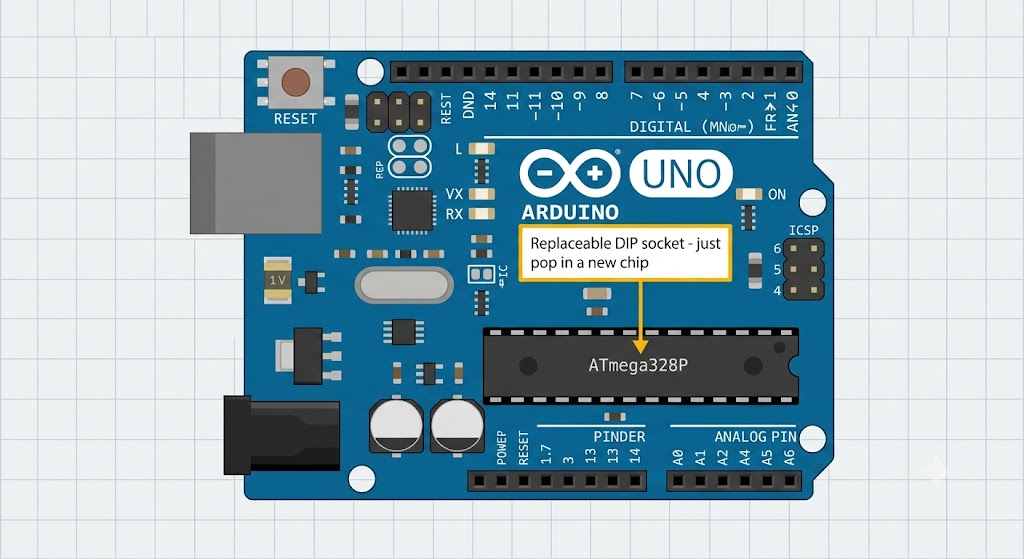
Arduino Uno R3 board with labeled components
Community and Resources
The Arduino Uno has the largest collection of tutorials, library examples, and forum answers of any microcontroller board. If you get stuck on a basic project - and you will, everyone does - someone has already solved that exact problem on an Uno. The official Arduino documentation states the Uno is the most used and documented board of the whole family, which means every sensor and module has at least one tutorial written for it.
If your needs go beyond what the Uno offers - like wireless connectivity or more processing power - the ESP32-C3 might be a better fit. Let us look at what makes it different.
When To Choose The ESP32-C3
The ESP32-C3 is the better choice if your goal is connected devices. Espressif designed the ESP32-C3 as a cost-effective RISC-V SoC for secure IoT applications. It runs at up to 160 MHz with 22 GPIOs, 400 KB of SRAM, and 4 MB of flash. The DevKitM-1 board includes a USB-C connector, a built-in RGB LED, and a 3.3V voltage regulator.
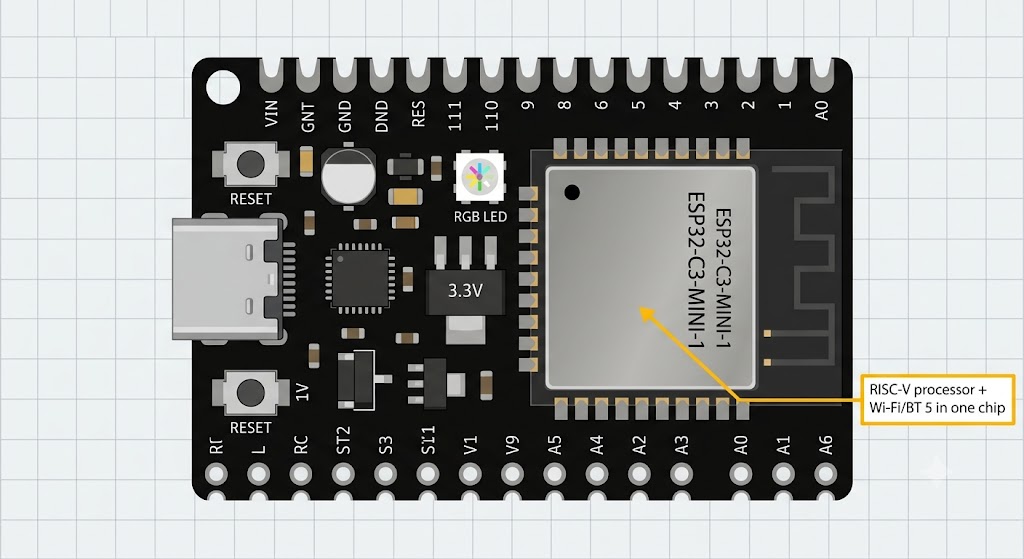
ESP32-C3 DevKitM-1 board with labeled components
Built-in Wi-Fi and Bluetooth
The ESP32-C3 has 2.4 GHz Wi-Fi and Bluetooth 5 (LE) built directly into the chip. You do not need an external module, extra wiring, or AT commands. Your sketch can connect to your home network, send data to a web server, or communicate with your phone using Bluetooth - all from the same board running your sensor code. The hardware includes RSA-3072 secure boot and AES-128/256-XTS flash encryption for secure communication.
RISC-V Architecture
The ESP32-C3 uses an open-source RISC-V processor core. RISC-V is a modern instruction set architecture gaining adoption across the semiconductor industry. Unlike the proprietary ARM cores or the aging AVR architecture used in the Uno, RISC-V is free and open - anyone can design a chip around it without paying licensing fees. Learning on RISC-V introduces you to an architecture you will encounter in other chips beyond the Arduino ecosystem.
Security Features
The ESP32-C3 includes hardware security features the Uno simply does not have: RSA-3072 secure boot ensures only authorized firmware runs on the chip, AES-128/256-XTS flash encryption protects stored data, and a digital signature peripheral provides secure device identity. For commercial IoT products, these features are essential. For learning, they give you exposure to real-world security concepts.
Best Use Cases
The table below shows which board fits different types of projects. The right choice depends on what you want to build, not just which board is more powerful on paper.
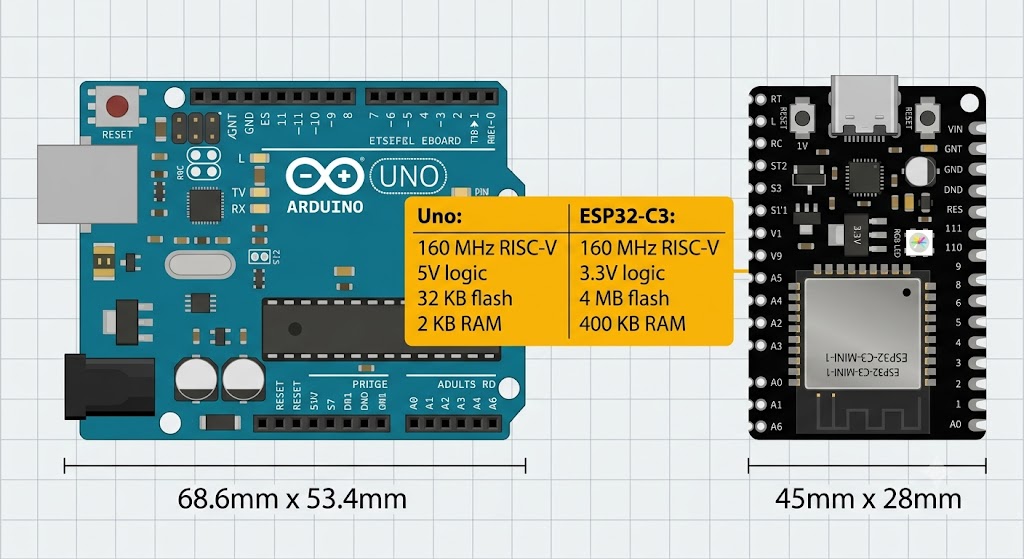
Arduino Uno vs ESP32-C3 size and spec comparison
| Project Type | Recommended Board | Why |
|---|---|---|
| Learning electronics basics | Arduino Uno | 5V logic, replaceable chip, huge beginner tutorial library. |
| IoT weather station | ESP32-C3 | Built-in Wi-Fi sends data directly to the cloud. |
| Robot car | Either | Uno is simpler for motor control; ESP32 adds wireless remote control. |
| Wearable or battery project | ESP32-C3 | Low-power modes and BLE designed for extended battery life. |
| Classroom teaching | Arduino Uno | Standardized curriculum, replaceable chip, robust USB connection. |
| Commercial IoT product | ESP32-C3 | Secure boot, flash encryption, certified Wi-Fi/Bluetooth stack. |
Summary
Both boards are valid choices. The Arduino Uno is the gentlest introduction to microcontrollers with unmatched community support and 5V compatibility. The ESP32-C3 is a more powerful platform that introduces wireless connectivity, RISC-V architecture, and modern security features.
Pick the Uno if you want the smoothest learning curve and plan to work with classic sensors and modules. Pick the ESP32-C3 if you want to build connected devices and are comfortable with a slightly steeper start.
You do not need to choose right now. The IoTSimulator supports both boards - you can try the Arduino Uno simulator and the ESP32-C3 DevKit simulator side by side without buying any hardware.
Categories for this post
Tags
#arduino #esp32 #comparison #beginner #guide #RISC-V #AVR

About The Author
Muhammad Ichsanul FadhilI am a 21-year-old IoT enthusiast who loves microcontrollers and exploring new components. I built IoTSimulator to help beginners learn without needing a pile of hardware.