Arduino Flood Early Warning & Water Level Monitor with Ultrasonic

Live project track
Have you ever watched storm water slowly creep up a street drain or riverbank during heavy monsoon rain? By the time muddy water spills across the pavement and enters doorways, it is often too late to move cars, secure electrical appliances, or evacuate families safely. Detecting rising water before it reaches road level gives emergency crews and neighborhood teams precious minutes to act.
Building an automated flood monitoring station provides early visibility without requiring someone to stand in dangerous floodwaters with a measuring stick. When mounted safely under a bridge or drainage roof, the system tracks the water level continuously, illuminating a tall visual column of light and sounding a piercing audio siren when water reaches the danger mark.
In this project, you will build an automated water level monitor and emergency warning station using an Arduino Uno, an HC-SR04 ultrasonic distance sensor, a 10-segment LED bar graph, and a piezo buzzer. The core concept you will master is: inverted clearance ranging — measuring the shrinking air gap above a rising liquid surface and mapping that physical distance into an intuitive multi-stage visual and audible alert ladder.
Before assembling the sensor probe and LED indicator bar, take a look at the system architecture diagram below. It illustrates how the ultrasonic distance sensor, multi-stage LED bar, active buzzer, and water basin interact in our automated alert station:
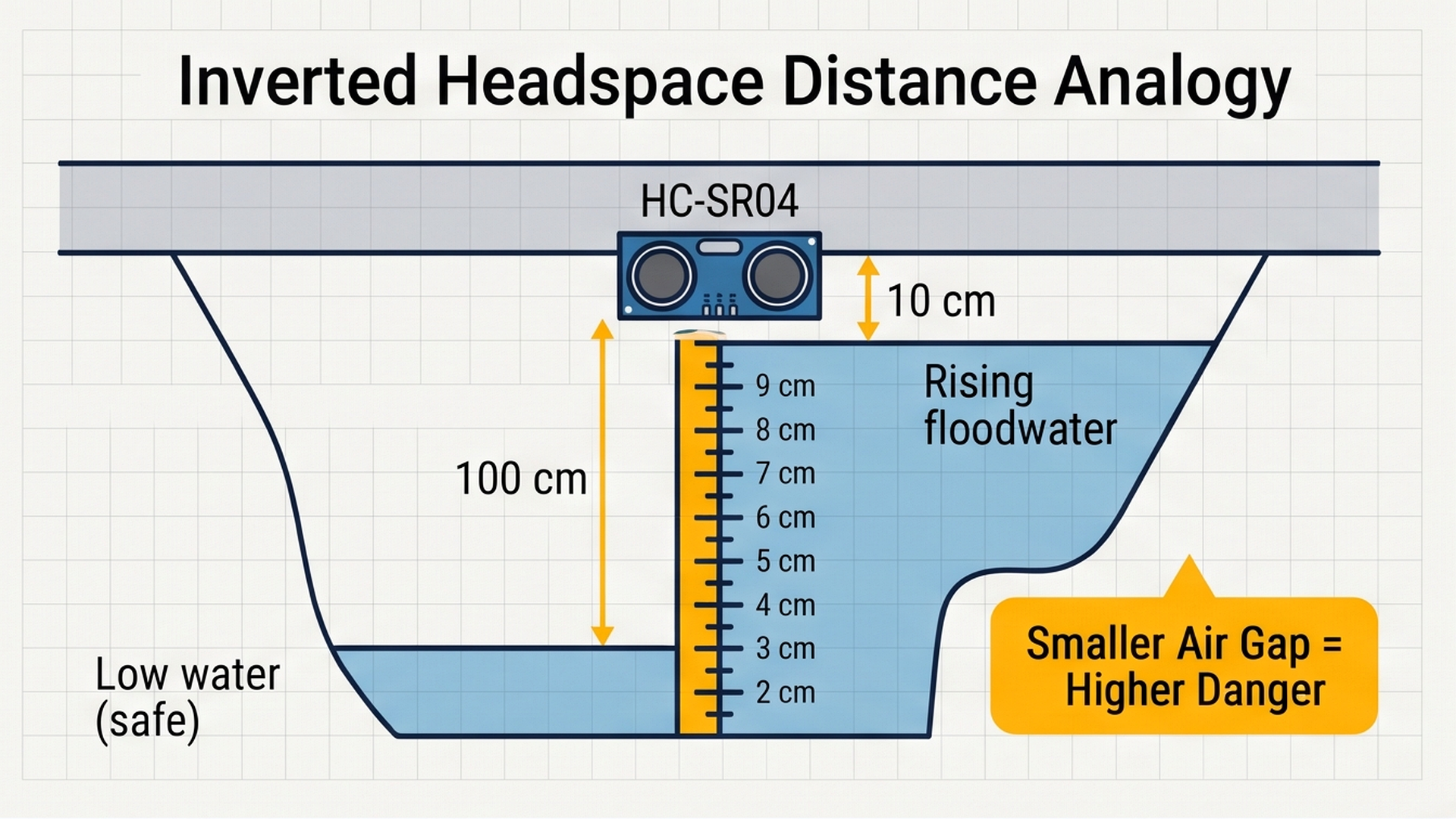
As visualized in the system diagram, rising flood water continuously compresses the air gap between the water surface and the sensor above. In the next section, we explore the physics of ultrasonic sound pulses and how echo timings translate into precise millimeter water levels.
Part 1 — Understand the Core Idea: Measuring the Empty Gap
To understand how an overhead sensor tracks water levels, imagine holding a tape measure from the ceiling down toward a bucket on the floor. When the bucket is completely empty, the distance from the ceiling to the bottom is large (say, 100 centimeters). But as water fills the bucket, the water surface moves closer and closer to your tape measure. When the water is 5 centimeters from the rim, the empty gap has shrunk to almost nothing!
Notice the relationship: a smaller distance reading means a fuller bucket. Our flood monitor uses this exact principle of inverted clearance:
- Clearance Gap (Headspace): The distance measured by the ultrasonic sensor from its fixed mounting position down to the water surface.
- Water Height Index: The calculation performed by the Arduino. When the clearance gap is large (100 cm), water is low and safe (0 LED segments lit). When the gap shrinks to 5 cm, water is dangerously high (all 10 LED segments lit).
The schematic below illustrates how high-frequency 40 kHz acoustic chirp pulses bounce off the rising water line and return to the receiver transducer:
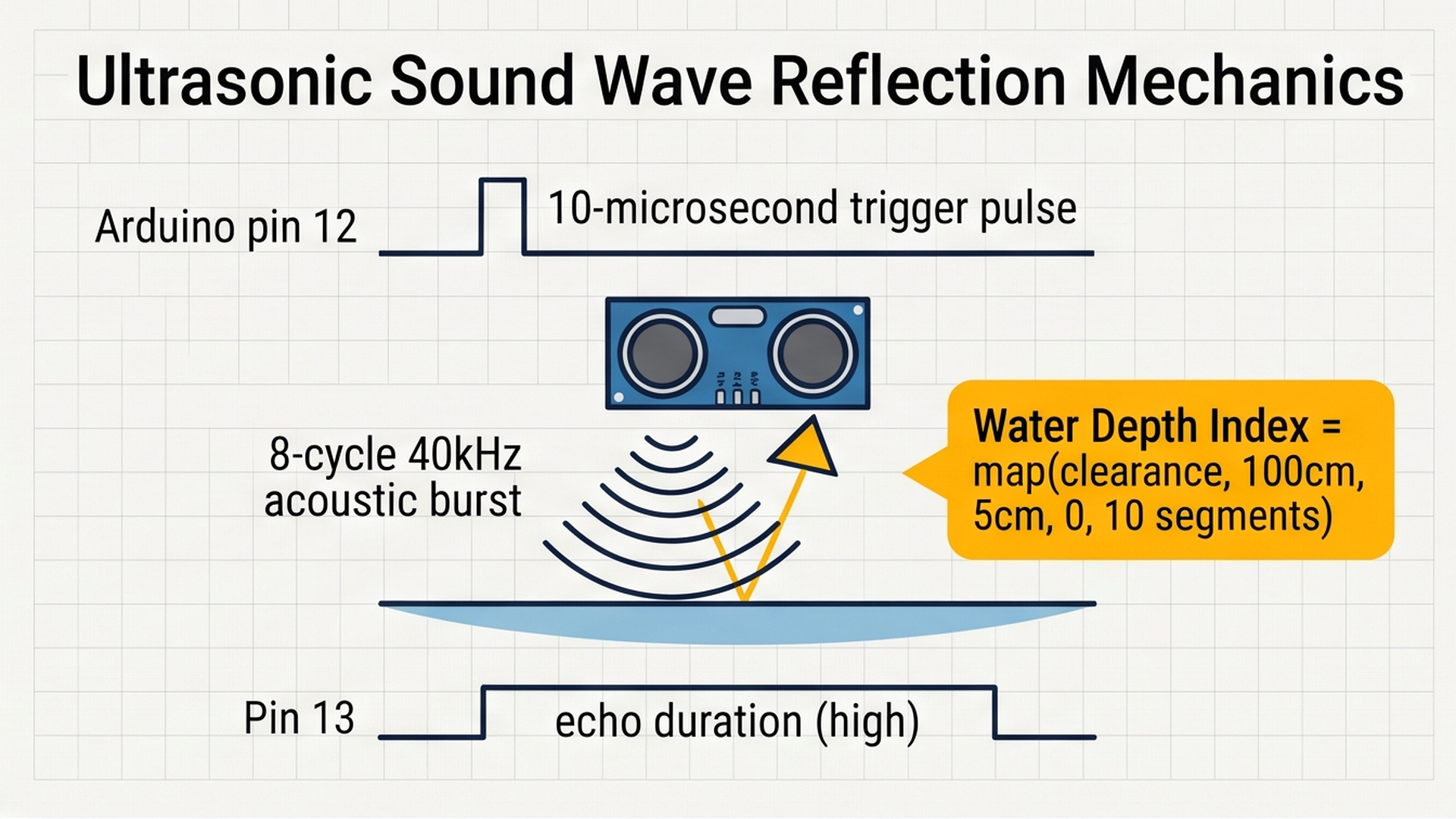
Because the acoustic echo arrives faster as the water level rises, measuring the microseconds between pulse trigger and echo return gives our Arduino an immediate, millimeter-accurate gauge of flood threat.
How does the ultrasonic sensor measure this gap without touching the water? It uses high-frequency sound echoes:
- The Arduino sends a brief 10-microsecond electrical pulse to the sensor's
TRIGpin. - The transmitter cylinder emits a burst of 8 ultrasonic pulses at 40,000 Hz. These high-frequency acoustic waves travel downward through the air at roughly 340 meters per second.
- When the sound waves hit the flat surface of the water, they reflect back upward like an echo shouting off a canyon wall.
- The receiver cylinder detects the returning echo and keeps its
ECHOpin HIGH for the exact round-trip flight duration. We calculate distance in centimeters using the speed of sound:Distance = (Duration × 0.034) / 2.
Here is how our monitoring station classifies flood risk across the 10-segment LED bar graph:
| Risk Level | Clearance Gap | LED Bar Graph Display | Buzzer Audio Siren | Field Assessment |
|---|---|---|---|---|
| Safe Baseline | 65 cm to 100 cm | 1 to 3 Green Segments (D2–D4) | Silent | Normal river flow; drainage capacity is wide open. |
| Moderate Caution | 35 cm to 65 cm | 4 to 7 Yellow Segments (D5–D8) | Silent | Drainage canal filling steadily; maintenance teams placed on standby. |
| Critical Flood Threat | Under 25 cm | 8 to 10 Red Segments (D9–D11) | Pulsing 1200 Hz Siren | Water overflowing banks; immediate evacuation required! |
Because sound waves reflect cleanly off calm water surfaces, ultrasonic sensors provide accurate water depth tracking without submerging any electrical wires in dirty water.
Part 2 — Build the Circuit: Wiring Sensor, LED Bus, and Siren
Before plugging wires into pins, let us understand how electrical power is routed across our station:
- 5V (Positive Power Bus): Supplies regulated 5V power from the Arduino Uno to power the ultrasonic sensor's acoustic pulse transmitter and receiver amplifier circuit.
- GND (Common Ground): Acts as the shared return line for all electrical current. All 10 LED segment cathodes must tie back to Arduino GND, along with the ultrasonic ground and buzzer ground, so all control voltages share the same 0V baseline.
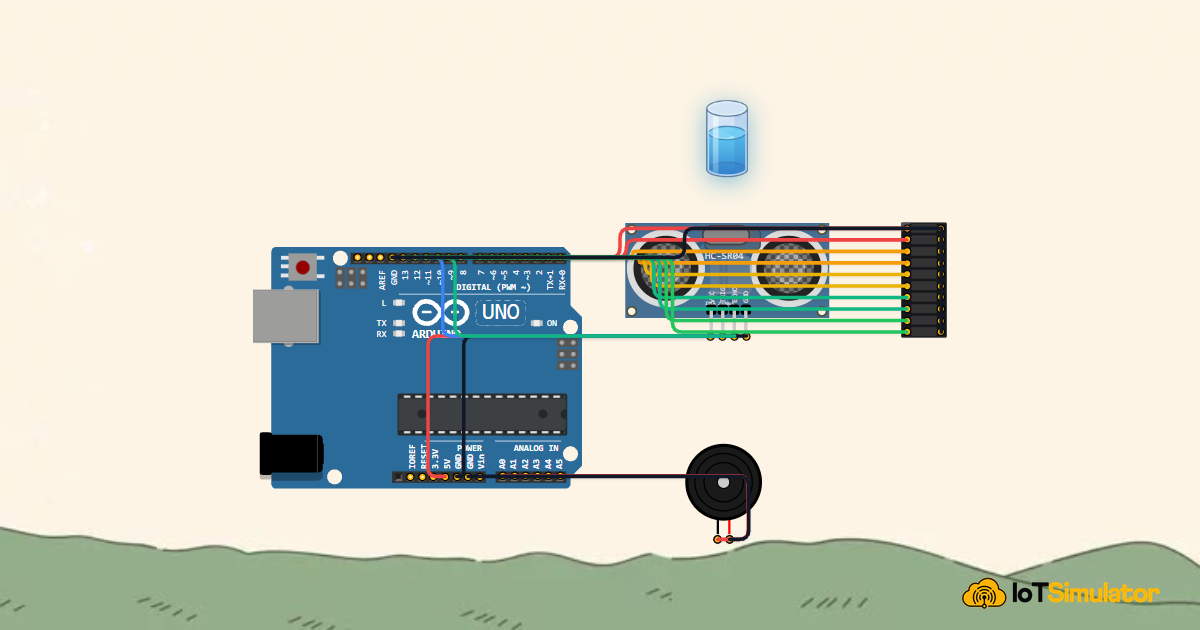
To ensure every indicator LED and buzzer circuit is wired safely without drawing excessive current from the microcontroller, study the complete wiring layout below:
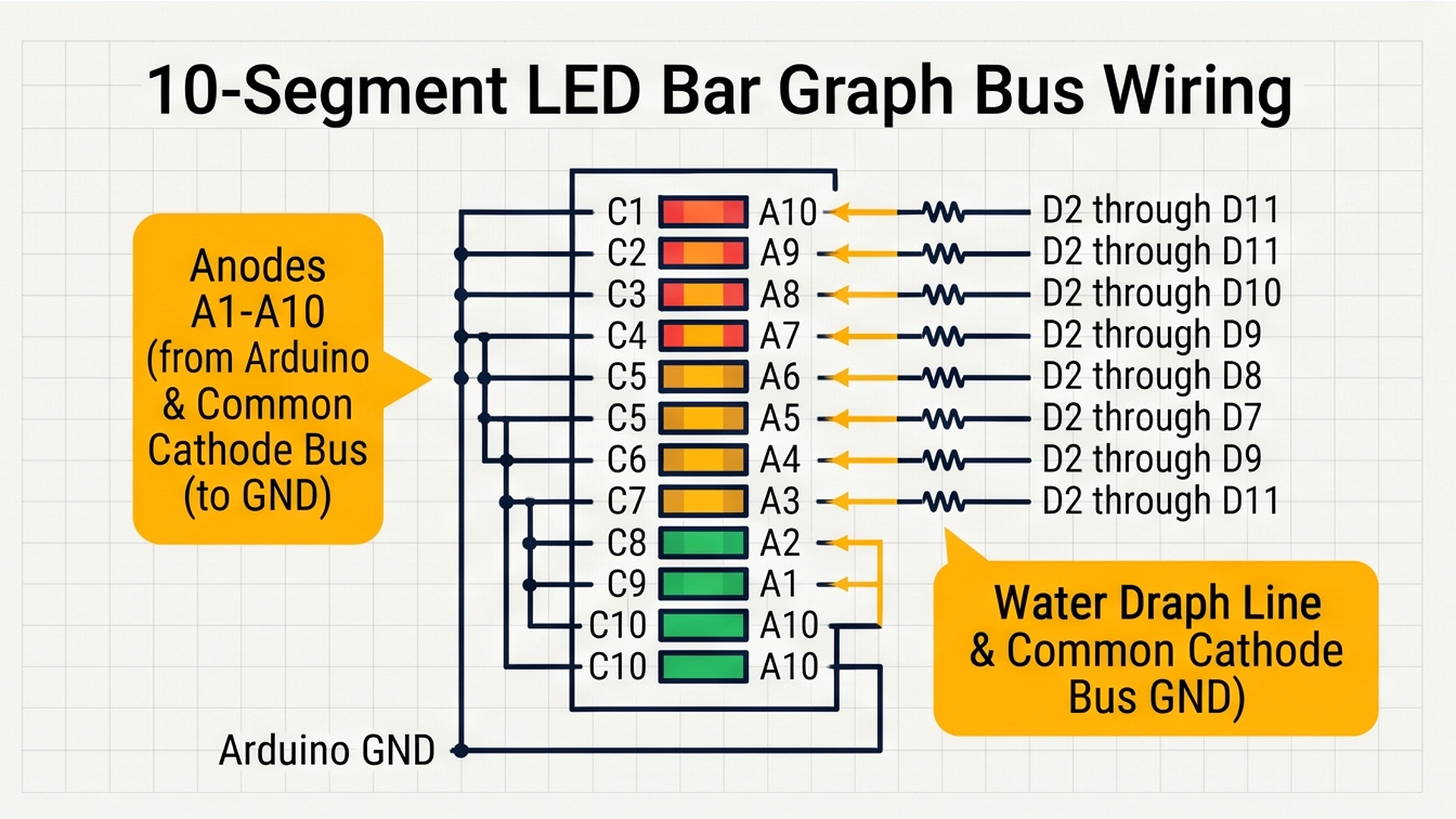
Follow the step-by-step wiring tables below to connect each component to your Arduino Uno:
Why Did We Choose These Specific Pins?
Notice how our pin layout is neat and grouped logically:
- Sequential Pins D2 through D11 for the LED Bar: Using ten consecutive digital pins allows us to control the entire 10-segment display with a simple
for (int i = 0; i < 10; i++)loop. This keeps the code concise, fast, and easy to understand. - Digital Pins 12 and 13 for Ultrasonic Sonar: Pin 12 and Pin 13 are standard digital pins with low capacitance, ideal for cleanly generating microsecond-level trigger pulses and reading echo return edges.
- Analog Pin A0 for the Piezo Buzzer: On the Arduino Uno, analog pins A0 through A5 can also function as general-purpose digital input/output pins. Using pin A0 for our buzzer siren keeps our digital side dedicated entirely to the 10-segment LED display.
Part 3 — Program the Behavior: Complete Arduino Sketch
Here is the full, tested firmware for the flood early warning station. You can copy this code directly into your sketch or run it straight inside the IoTSimulator workspace:
const int trigPin = 12;
const int echoPin = 13;
const int buzzerPin = A0;
const int barPins[] = {2, 3, 4, 5, 6, 7, 8, 9, 10, 11};

long readDistance() {
  digitalWrite(trigPin, LOW);
  delayMicroseconds(2);
  digitalWrite(trigPin, HIGH);
  delayMicroseconds(10);
  digitalWrite(trigPin, LOW);
  long duration = pulseIn(echoPin, HIGH, 30000);
  if (duration == 0) return 100; // Timeout fallback: tank is empty / clear
  return (duration * 0.034) / 2;
}

void setup() {
  Serial.begin(9600);
  Serial.println("[FLOOD]: Early Warning Monitoring Station Initializing...");

  pinMode(trigPin, OUTPUT);
  pinMode(echoPin, INPUT);
  pinMode(buzzerPin, OUTPUT);

  for (int i = 0; i < 10; i++) {
    pinMode(barPins[i], OUTPUT);
    digitalWrite(barPins[i], LOW);
  }

  Serial.println("[FLOOD]: Ready. Monitoring River & Water Level Height.");
}

void loop() {
  long dist = readDistance();

  // As water rises closer to the sensor (dist shrinks from 100cm down to 5cm),
  // the waterLevel bar index climbs from 0 up to 10 illuminated segments.
  int waterLevel = map(constrain(dist, 5, 100), 100, 5, 0, 10);

  // Update 10-segment LED bar graph
  for (int i = 0; i < 10; i++) {
    if (i < waterLevel) {
      digitalWrite(barPins[i], HIGH);
    } else {
      digitalWrite(barPins[i], LOW);
    }
  }

  // Critical flood threshold: Level 8 or higher activates emergency siren
  if (waterLevel >= 8) {
    tone(buzzerPin, 1200, 100);
    Serial.print("[ALERT]: Critical Water Level! Clearance = ");
    Serial.print(dist);
    Serial.print("cm | Bar = ");
    Serial.print(waterLevel);
    Serial.println("/10 | EVACUATION SIREN ACTIVE!");
  } else {
    noTone(buzzerPin);
    Serial.print("[Status]: Water Clearance = ");
    Serial.print(dist);
    Serial.print("cm | Bar = ");
    Serial.print(waterLevel);
    Serial.println("/10 | Normal");
  }

  delay(200);
}
To understand how the firmware decides which LED segments to illuminate and when to pulse the audio alarm during each loop cycle, examine the danger threshold mapping below:
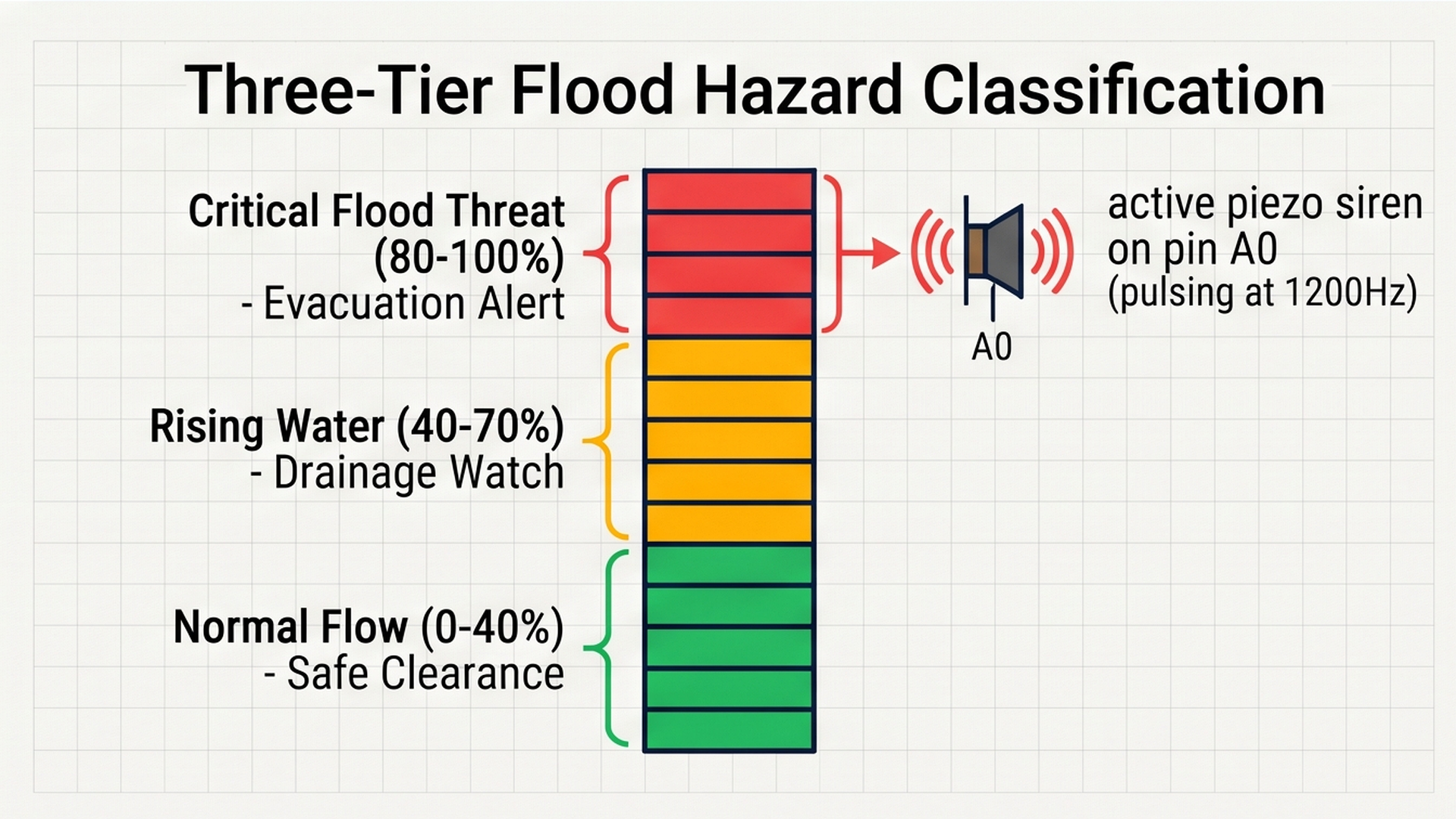
By partitioning the total basin height into clear green, yellow, and red safety zones, the Arduino provides instantaneous visual and acoustic awareness for rapid evacuation. Now let us examine the firmware logic step by step.
How the Code Works, Step by Step
Let us walk through each major section of the sketch so you understand how the microcontroller calculates danger levels.
1. Pin Array and the readDistance() Helper Function
Notice how we define the display pins using an array: const int barPins[] = {2, 3, 4, 5, 6, 7, 8, 9, 10, 11};. This array holds the pin numbers in order from lowest (segment 1) to highest (segment 10).
Inside readDistance(), we send the required 10-microsecond trigger pulse. We read the echo duration using pulseIn(echoPin, HIGH, 30000). The 30000 microsecond timeout prevents the Arduino from freezing if sound waves scatter. The math (duration * 0.034) / 2 calculates one-way distance in centimeters.
2. Inverting Distance with map() and constrain()
The most important line in the entire program is: int waterLevel = map(constrain(dist, 5, 100), 100, 5, 0, 10);
Let us break down what this line does:
constrain(dist, 5, 100)clamps the distance reading so it never drops below 5 cm or climbs above 100 cm. This protects our calculation from odd glitches if debris floats past.map(..., 100, 5, 0, 10)maps the numbers in reverse! Notice the order: 100 cm corresponds to 0 segments, while 5 cm corresponds to all 10 segments. As distance decreases,waterLevelincreases!
3. Lighting the Rising Bar Column
A simple loop updates all ten LEDs: for (int i = 0; i < 10; i++). If index i < waterLevel, that pin is written HIGH. Otherwise, it is written LOW. This creates a solid, rising column of light like mercury in a thermometer.
4. Critical Hazard Siren on Pin A0
If waterLevel >= 8 (meaning floodwater is within 25 cm of the sensor), the Arduino activates the emergency buzzer using tone(buzzerPin, 1200, 100). This generates a clear 1200 Hz tone that sounds every 200 milliseconds. When water recedes below level 8, noTone(buzzerPin) silences the alarm immediately.
Part 4 — Practical Testing in the Simulator
Follow these quick steps to test your flood monitoring station inside the IoTSimulator workspace:
- Test Normal Standby: Press the green Run button. With the interactive Water Tank Actor set to low water (around 10% to 20%), observe the LED bar graph: only 1 or 2 bottom green segments light up, and the buzzer is completely silent.
- Simulate Heavy Rainfall: Click on the interactive Water Tank Actor and drag its water level slider upward past 50%. Watch the LED bar graph illuminate upward through the yellow warning segments (pins D6, D7, and D8).
- Trigger Emergency Evacuation Level: Drag the water level slider past 85%. Notice the red LEDs (pins D9, D10, and D11) illuminate to full height, and listen to the urgent 1200 Hz audio siren ring continuously. The Serial Monitor streams
[ALERT]: CRITICAL FLOOD LEVEL!messages. - Simulate Flood Recession: Drag the tank slider back down to 30%. The red segments turn off, the audio siren immediately silences, and the system returns to calm green standby.
Part 5 — Troubleshooting Common Beginner Mistakes
If your physical build or simulation does not behave as expected, check these common issues:
- LED bar graph does not light up or only one LED turns on: LED bar graph modules have distinct polarity. If you install the module backward (swapping anodes and cathodes), current will be blocked. Double check that all cathode pins on the ground side connect to GND and that each individual anode pin connects to its corresponding digital pin.
- Ultrasonic sensor returns sporadic 0 cm or 100 cm readings over real water: Sound waves reflect off calm water like a flat mirror. However, if water is churning with heavy rapids or thick foam, the acoustic sound waves can scatter sideways instead of bouncing straight back. In real river installations, engineers mount the sensor inside a vertical PVC 'stilling tube' with small drainage holes at the bottom to calm surface ripples.
- All LEDs appear dim when several are turned on: If multiple LEDs share one digital pin or are powered without proper current limiting, the microcontroller's internal voltage regulator can drop. In real builds, always place a 220-ohm or 330-ohm resistor in series with each LED anode line.
- Buzzer does not make sound on pin A0: Make sure you declare
pinMode(buzzerPin, OUTPUT);insetup(). Analog pins on the Arduino Uno work perfectly as digital output pins, but they must be initialized as outputs first.
Part 6 — Taking It Further: Next Engineering Steps
Once your basic flood monitor is running smoothly, consider expanding its capabilities with these practical additions:
- Add a Solar-Powered Rechargeable Battery: Pair your Arduino Uno with a small 10W solar panel and a 3.7V 18650 lithium battery power bank so your flood monitor continues watching river channels even when severe storms knock out municipal power lines.
- Connect an Automated Sump Pump Relay: Wire a 5V relay module to digital pin A1. When floodwater reaches level 7, the Arduino can automatically start a drainage sump pump to pump water out of the basement before it reaches living areas.
- Add LoRa or Cellular Telemetry: Connect a LoRa radio transmitter module to broadcast river level telemetry across distances of up to 10 kilometers to a central city disaster response hub without relying on damaged local Wi-Fi or cellular networks.
More in Arduino Uno
Arduino Single-Axis Solar Tracker with Dual LDRs and Servo
Arduino Fire Alarm & Gas Leak Detector with Siren and Relay
Arduino Smart Parking Barrier & Slot Counter with Ultrasonic Sensor
Arduino Automatic Plant Watering & Soil Moisture Irrigation System
Arduino Digital Kitchen Scale with HX711 Load Cell and LCD
More in Ultrasonic (HC-SR04)
More in LED Bar Graph
More in Buzzer
Arduino Fire Alarm & Gas Leak Detector with Siren and Relay
Arduino Smart Parking Barrier & Slot Counter with Ultrasonic Sensor
Build a 4-Key Piano Synthesizer with a Raspberry Pi Pico W
Build a Light Meter and Alarm with a Raspberry Pi Pico