Arduino Touchless Smart Dustbin with Ultrasonic Sensor and Servo

Live project track
Have you ever been cooking in the kitchen with your hands covered in sticky raw chicken juice, sticky dough, or vegetable peelings, and dreaded touching the trash can lid? Touching a dirty trash can lid spreads bacteria across kitchen countertops, faucet handles, and refrigerator doors. Stepping on foot pedals can be awkward when you are balancing a heavy, dripping cutting board.
A touchless smart dustbin solves this problem with pure electronic convenience. When you bring your hand or cutting board within 20 centimeters of the lid, an invisible ultrasonic beam detects your presence, commands a micro servo motor to flip the lid wide open, and waits politely while you scrape off your scraps. Three seconds after your hand leaves, the lid quietly closes itself.
In this project, you will build an automated touchless smart dustbin using an Arduino Uno, an HC-SR04 ultrasonic distance sensor, and an SG90 micro servo motor. The core concept you will master is: event-driven motion actuation — detecting a physical distance threshold, executing rapid mechanical movement, and using non-blocking millisecond timing to provide a seamless courtesy hold delay.
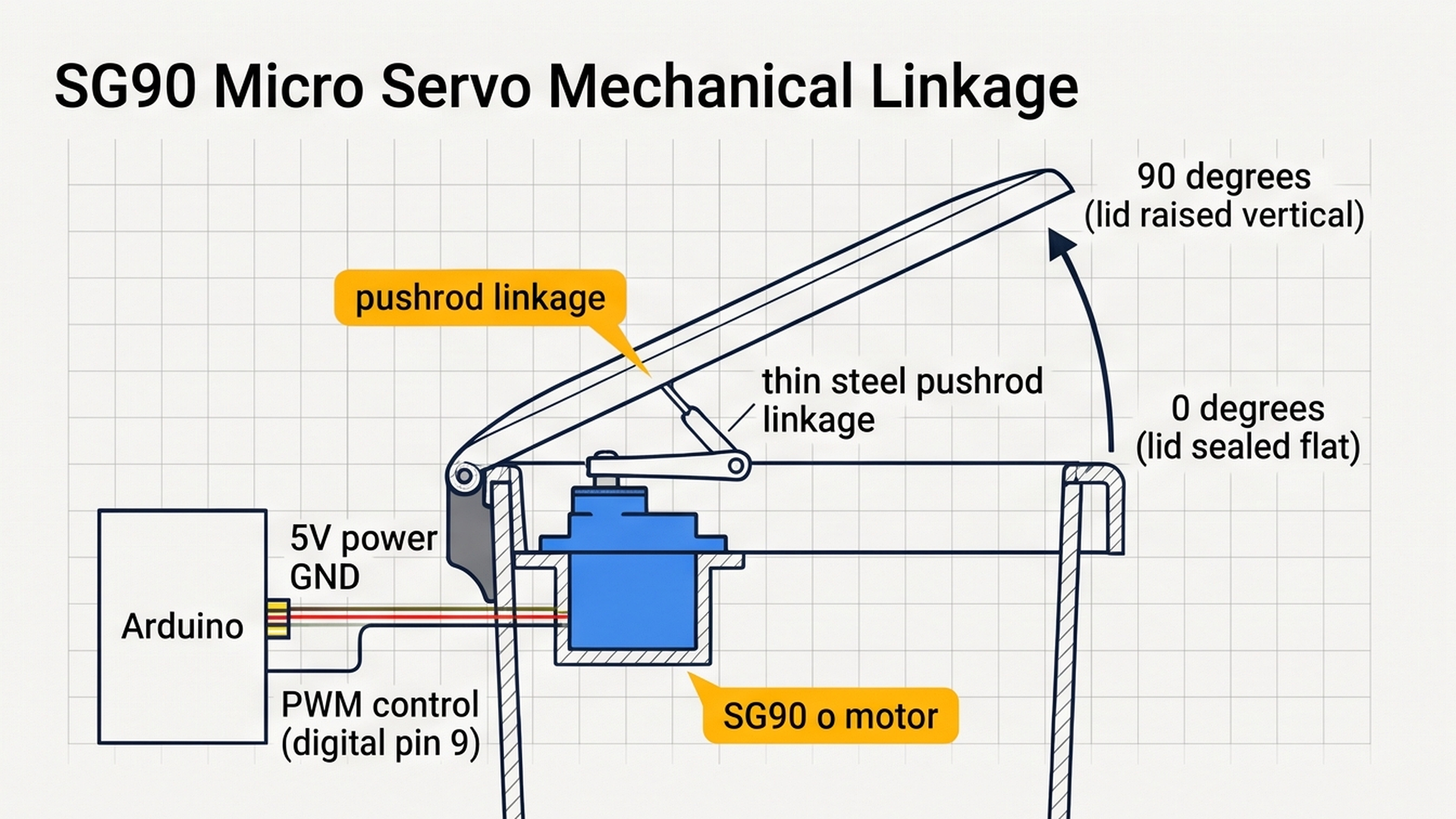
Before mounting sensors and running motor linkage wires, examine the physical layout of the touchless automated dustbin shown in the diagram below:
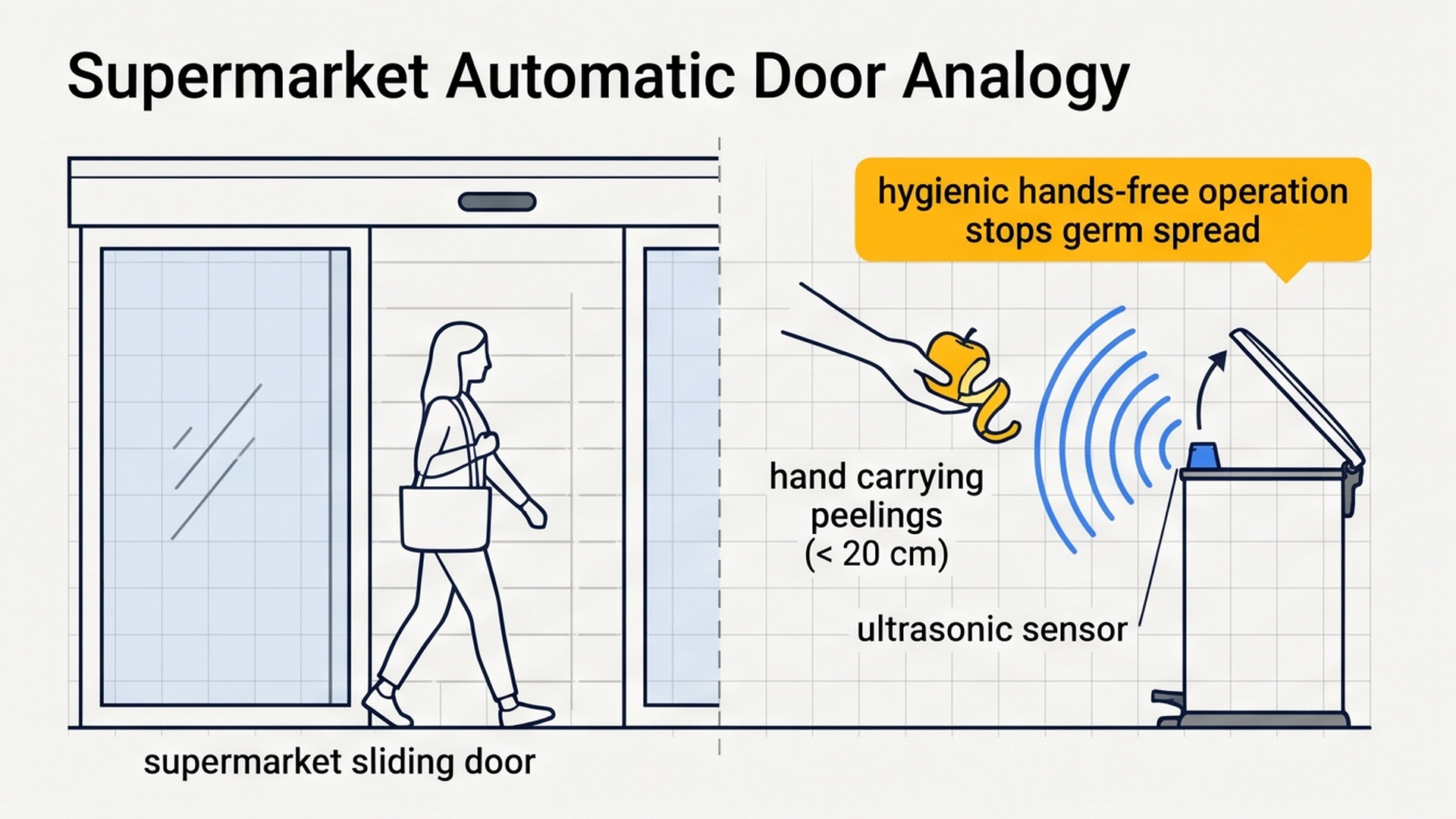
As shown in the mechanical overview, positioning the ultrasonic sensor near the bin mouth lets the system detect approaching hands without physical touch, hygienic cleanliness in kitchens and healthcare clinics. Next, we examine how distance thresholding directs servo motion.
Part 1 — Understand the Core Idea: The Automatic Sliding Door
To understand the logic behind a smart dustbin, think about walking into a grocery store through an automatic sliding glass door:
- As you walk up to the entrance, an overhead motion sensor spots you about two meters away.
- The electric motor slides the glass door open.
- Crucially, the door does not immediately slam shut on you! The door stays wide open as long as you are walking through the threshold.
- Only after you have safely passed through and the sensor sees clear air for a few seconds does the door glide quietly shut behind you.
Our smart trash can works on this exact same courtesy logic:
- The Proximity Zone: The HC-SR04 ultrasonic sensor looks upward into the air. If an object is between 2 cm and 20 cm away, the Arduino recognizes that a person is trying to throw something away.
- Opening Action: The SG90 micro servo arm rotates from 0 degrees (tightly sealed lid) to 90 degrees (fully opened vertical lid).
- The Courtesy Hold Timer: While you are scraping crumbs off a plate, your hand stays in front of the sensor. The Arduino continuously resets a timer variable (
lastOpenTime = millis()), keeping the lid open. Only after your hand pulls away and stays away for three full seconds does the lid return to 0 degrees.
The diagram below highlights the precise acoustic detection zone and sound wave bounce path that enables contactless motion triggering:
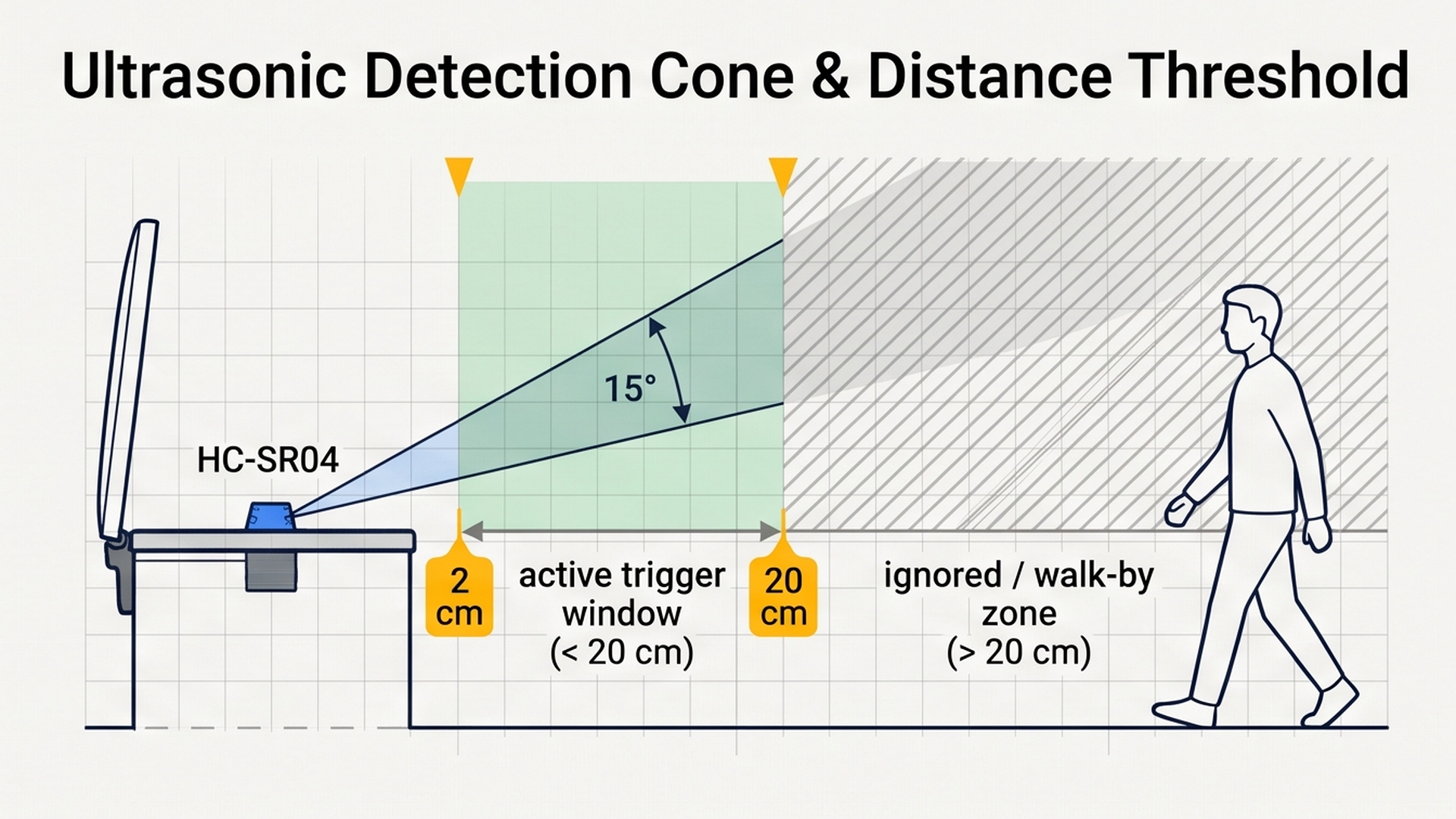
By focusing detection strictly within a 20-centimeter frontal window, the sensor ignores passing foot traffic and only triggers lid actuation when a user intentionally hovers trash over the bin.
Here is how our smart dustbin behaves across each operating state:
| User Action | Hand Distance | Servo Angle | Lid Position | Software State |
|---|---|---|---|---|
| Standing Away | > 20 cm (Clear Air) | 0 Degrees | Closed (Sealed) | isOpen = false; Waiting for hand. |
| Hand Approaching | Under 20 cm | Rotates to 90° | Opens Immediately | isOpen = true; lastOpenTime updated. |
| Scraping Food | Under 20 cm (Lingering) | Holds at 90° | Remains Open | Timer continually refreshed; lid stays open. |
| Hand Retracted (< 3s) | > 20 cm | Holds at 90° | Courtesy Window | Counting: millis() - lastOpenTime < 3000. |
| Finished (> 3s) | > 20 cm | Returns to 0° | Closed (Sealed) | 3-second timer expires; isOpen = false. |
Holding the lid open for 3 seconds after the hand pulls away prevents frustrating lid flapping while users scrape multiple bowls or plates.
Part 2 — Build the Circuit: Wiring Sonar and Servo
Before connecting jumper wires, let us understand how power flows through our touchless bin circuit:
- 5V (Positive Power Line): Supplies 5V electrical power from the Arduino to power both the HC-SR04 ultrasonic sound generator and the internal DC motor inside the SG90 micro servo.
- GND (Common Ground Line): Acts as the shared return line. Both the sensor ground and the servo ground must return to the Arduino GND terminals so all PWM control pulses have a solid 0V reference.
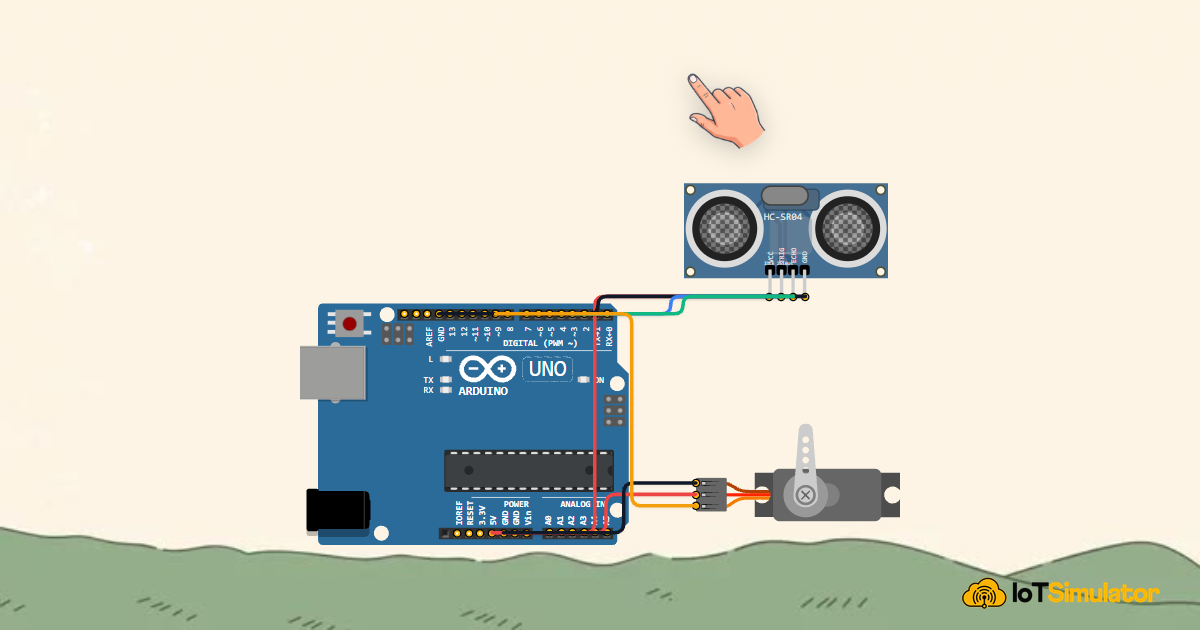
To assemble the electrical connections between the microcontroller, the ultrasonic rangefinder, and the SG90 mechanical servo motor cleanly, review the wiring diagram below:
Follow the simple connection tables below to wire each component to your Arduino Uno board:
Why Did We Choose These Specific Pins?
Understanding our pin layout will make you a better circuit designer:
- PWM Pin 9 for the SG90 Servo: Hobby RC servos require clean Pulse Width Modulation (PWM) repeating at 50 Hz (every 20 milliseconds). Digital pin 9 connects directly to Arduino Timer 1, which the
Servo.hlibrary uses to deliver rock-steady angular positioning without jitter or motor buzzing. - Digital Pins 2 and 3 for the Sonar: Ultrasonic ranging only requires fast digital input/output pulses. Using standard digital pins D2 and D3 leaves analog pins completely free for future expansions like battery meters or load cells.
Part 3 — Program the Behavior: Complete Arduino Sketch
Here is the full, tested firmware for the touchless smart dustbin. You can copy this code directly into your sketch or run it straight inside the IoTSimulator workspace:
#include <Servo.h>

Servo dustbinServo;

// Pin definitions matching our circuit
const int trigPin = 2;    // HC-SR04 Trigger pulse
const int echoPin = 3;    // HC-SR04 Echo pulse
const int servoPin = 9;   // SG90 Micro Servo PWM control

// Operating parameters
const int thresholdDistance = 20; // Open lid when hand is closer than 20 cm
unsigned long lastOpenTime = 0;   // Non-blocking timer tracking last detected motion
bool isOpen = false;              // Memory state tracking if lid is currently open

// Helper function: measures distance in centimeters using ultrasonic echo timing
long readDistance() {
  digitalWrite(trigPin, LOW);
  delayMicroseconds(2);
  digitalWrite(trigPin, HIGH);
  delayMicroseconds(10);
  digitalWrite(trigPin, LOW);
  long duration = pulseIn(echoPin, HIGH, 30000);
  if (duration == 0) return 400; // Timeout fallback: ceiling or air is clear
  return (duration * 0.034) / 2;
}

void setup() {
  Serial.begin(9600);
  Serial.println("[BIN]: Smart Touchless Dustbin System Initializing...");

  pinMode(trigPin, OUTPUT);
  pinMode(echoPin, INPUT);

  // Attach servo and initialize to closed lid position (0 degrees)
  dustbinServo.attach(servoPin);
  dustbinServo.write(0);

  Serial.println("[BIN]: Ready. Monitoring Proximity Above Lid.");
}

void loop() {
  long distance = readDistance();

  // Check if a hand hovers within the 2cm to 20cm trigger zone
  if (distance < thresholdDistance && distance > 1) {
    if (!isOpen) {
      Serial.print("[Sensor]: Hand detected at ");
      Serial.print(distance);
      Serial.println(" cm. Opening lid to 90 degrees...");
      dustbinServo.write(90); // Rotate servo arm to open lid
      isOpen = true;
    }
    // Continuously update timestamp while a hand remains above the bin
    lastOpenTime = millis();
  } else {
    // If hand has moved away, hold lid open for a 3-second courtesy window
    if (isOpen && (millis() - lastOpenTime > 3000)) {
      Serial.println("[Action]: 3-second timeout expired. Closing dustbin lid.");
      dustbinServo.write(0); // Return servo to resting closed angle
      isOpen = false;
    }
  }

  delay(100); // 100ms polling rate provides brisk, responsive sensing
}
To visualize how the firmware coordinates lid opening, wait durations, debounce timers, and smooth closure sequences, review the automated state machine timing flow below:
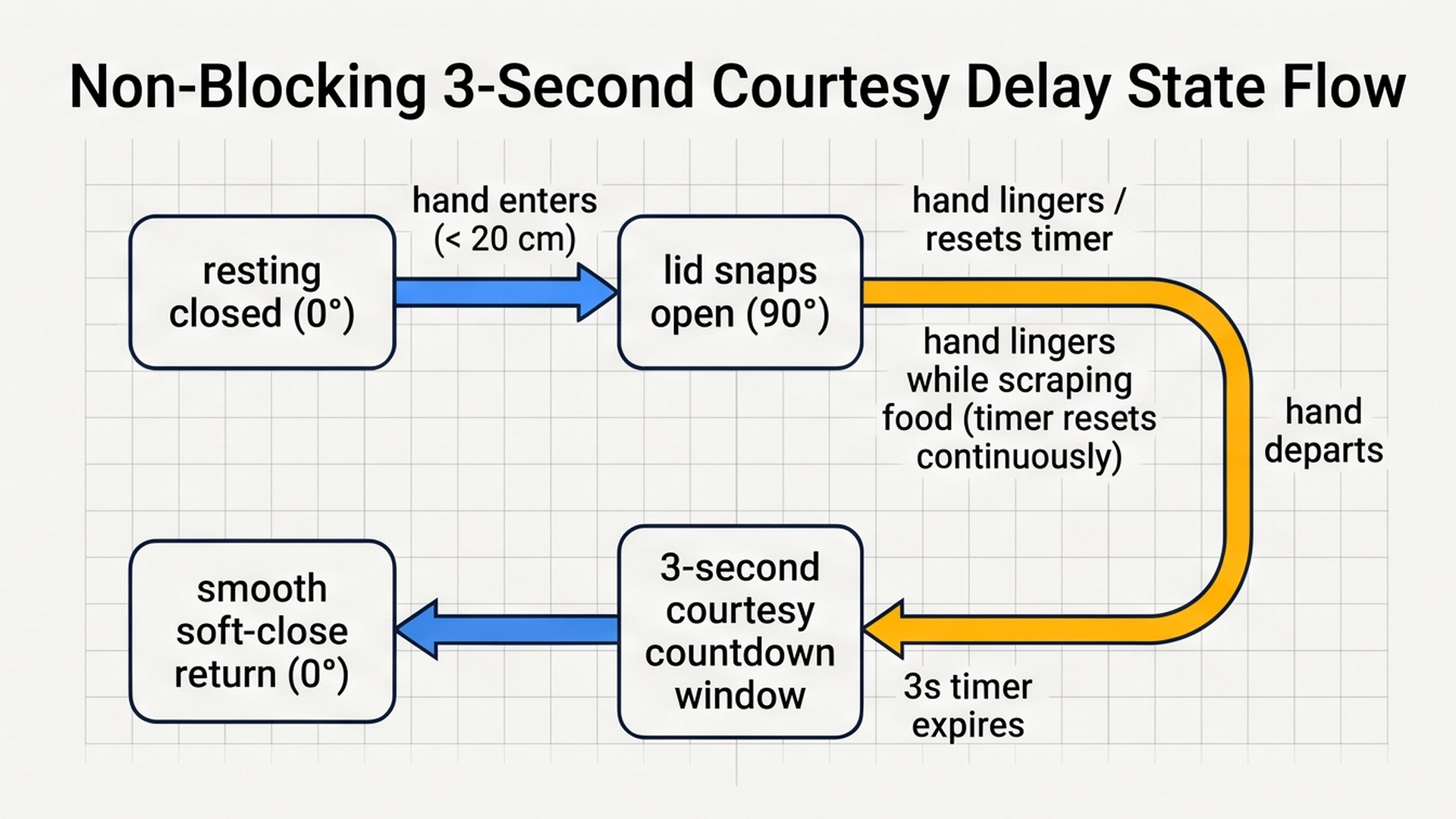
By holding the lid open for a gentle three-second window after hands withdraw, the code gives users ample time to discard waste while preventing premature lid snaps. Now let us explore the underlying code step by step.
How the Code Works, Step by Step
Let us look closely at each section of the code to understand how the microcontroller coordinates mechanical motion with sensor timing.
1. Servo Library and State Variables
At the top of the file, we include <Servo.h> and instantiate Servo dustbinServo;. This official library generates all necessary pulse-width timing in the background.
Notice our two state memory variables:
bool isOpen = false;: Remembers whether the lid is currently raised or closed. This prevents the Arduino from repeatedly commanding the servo to write 90 degrees on every loop cycle.unsigned long lastOpenTime = 0;: Stores the millisecond clock reading when a hand was most recently spotted. This enables non-blocking timing without using freezingdelay()calls!
2. Initializing Hardware in setup()
Inside setup(), we open serial communication at 9600 baud. We declare pinMode(trigPin, OUTPUT) and pinMode(echoPin, INPUT).
We attach the servo to digital pin 9 and immediately call dustbinServo.write(0). This ensures that whenever you plug your trash can into power, the lid automatically seeks its closed home position.
3. Detecting the Hand and Opening the Lid
Inside loop(), the Arduino reads distance every 100 milliseconds using long distance = readDistance();.
If distance < thresholdDistance && distance > 1, a hand is hovering in front of the sensor. If !isOpen is true, the Arduino executes dustbinServo.write(90), opening the lid, and sets isOpen = true.
Crucially, notice the line: lastOpenTime = millis();. Every time this loop runs while your hand is still scraping food, the clock timestamp is refreshed. The 3-second countdown cannot even begin until your hand completely leaves!
4. The 3-Second Courtesy Hold Delay
When your hand pulls away, distance exceeds 20 cm, jumping into the else branch. Here, the code checks: if (isOpen && (millis() - lastOpenTime > 3000)).
If the lid is open AND 3,000 milliseconds (3 seconds) have passed since your hand was last seen, the Arduino calls dustbinServo.write(0) to close the lid, and sets isOpen = false. The trash can is sealed tight once again, keeping kitchen odors locked inside.
Part 4 — Practical Testing in the Simulator
Follow these quick steps to test your touchless dustbin inside the IoTSimulator workspace:
- Test Initial Closed State: Press the green Run button. The SG90 servo arm rests at 0 degrees, keeping the lid shut.
- Simulate Hand Approach: Click on the interactive Hand Actor above the ultrasonic sensor or drag the distance slider down to 10 cm. Watch the servo arm immediately rotate 90 degrees to the open position! The Serial Monitor reports
Hand detected at 10 cm. Opening lid to 90 degrees.... - Test Lingering Presence: Keep the Hand Actor at 10 cm for several seconds. Notice that the servo stays wide open without twitching or closing prematurely.
- Simulate Hand Departure: Move the Hand Actor away to 50 cm. Watch the Serial Monitor: for 3 seconds, the servo holds still at 90 degrees. Exactly 3 seconds after the hand moved away, the servo arm rotates smoothly back to 0 degrees, and the Serial Monitor prints
3-second timeout expired. Closing dustbin lid.
Part 5 — Troubleshooting Common Beginner Mistakes
If your physical build or simulation does not behave smoothly, check these common beginner mistakes:
- Servo chatters, buzzes, or resets the Arduino when moving: Micro servos draw up to 500mA of electrical current when rotating a heavy plastic lid. If powered from a weak USB port or a dying 9V battery, this current spike causes a momentary voltage dip on the 5V line that restarts the Arduino! Place a 470µF electrolytic capacitor across the servo's 5V and GND terminals, or power the servo from an independent 5V power supply with a shared ground wire.
- Lid snaps open when people walk past across the room: Check the angle of your ultrasonic sensor. If the sensor points horizontally outward, it will detect people walking past the kitchen counter 2 meters away. Angle the sensor 45 degrees upward or mount it on the top rim pointing straight at the ceiling so it only detects hands hovering directly above the can.
- Lid slams down too fast: Standard
dustbinServo.write(0)moves the servo at maximum hardware speed. If you want a luxurious 'soft-close' lid, write a smallforloop that steps the servo from 90 down to 0 in 5-degree increments with a 15-millisecond delay between steps. - Lid does not open all the way to 90 degrees: Before screwing the plastic servo horn onto the brass motor gear, plug the servo into power and command it to
write(0)with your Arduino sketch. Once it seeks zero, press the plastic horn on by hand in the closed position, then tighten the center screw. This mechanical calibration ensures full 90-degree travel.
Part 6 — Taking It Further: Next Engineering Steps
Once your smart dustbin is running smoothly, consider expanding it with these awesome maker upgrades:
- Add an Internal Trash Fullness Sensor: Mount a second ultrasonic sensor inside the bin under the lid pointing down into the bag. When the trash level reaches 5 cm from the top, an amber LED can light up on the outside rim to remind you to take out the bag!
- Add an RGB Status Halo Ring: Place a small 8-pixel NeoPixel ring around the sensor opening. Glow soft pulsing cyan while waiting, flash bright emerald green when opening, and pulse warning amber during the 3-second closing countdown.
- Add an Automatic Odor Neutralizer Sprayer: Connect a 5V relay that triggers a mini piezoelectric misting disc with essential oils for one second every time the lid closes to keep the kitchen smelling fresh!
More in Arduino Uno
Arduino Single-Axis Solar Tracker with Dual LDRs and Servo
Arduino Fire Alarm & Gas Leak Detector with Siren and Relay
Arduino Smart Parking Barrier & Slot Counter with Ultrasonic Sensor
Arduino Automatic Plant Watering & Soil Moisture Irrigation System
Arduino Digital Kitchen Scale with HX711 Load Cell and LCD
More in Ultrasonic (HC-SR04)
More in Servo Motor
Arduino Single-Axis Solar Tracker with Dual LDRs and Servo
Arduino Smart Parking Barrier & Slot Counter with Ultrasonic Sensor
Control a Servo Positioner with a Raspberry Pi Pico
Control a Pan and Tilt Servo with an Arduino Mega and Joystick