
Arduino Smart Parking Barrier & Slot Counter with Ultrasonic Sensor

Live project track
Have you ever driven into a busy shopping mall or airport parking garage? Above the entrance gate, a bright digital sign tells you exactly how many spaces are open. As your car pulls up close to the barrier, a sensor detects your vehicle, a friendly chime sounds, and the motorized barrier arm smoothly lifts up into the air.
Once you drive through, the barrier lowers automatically, and the counter decrements by one. If all spaces are taken, the gate stays firmly shut, a red light turns on, and the screen warns: FULL — NO ENTRY. Behind this smooth experience is an automated parking control station.
In this project, you will build an automated parking barrier and vehicle counter using an Arduino Uno, two HC-SR04 ultrasonic distance sensors (one for entrance and one for exit), an SG90 micro servo motor, green and red traffic lights, an audio chime, and an I2C LCD screen. The core concept you will learn is: two-point vehicle tracking — detecting cars at separate entrance and exit points, maintaining an accurate space count, and controlling a motorized barrier automatically.
Before connecting breadboard jumper wires and writing firmware logic, examine the complete smart parking gate architecture illustrated in the diagram below:
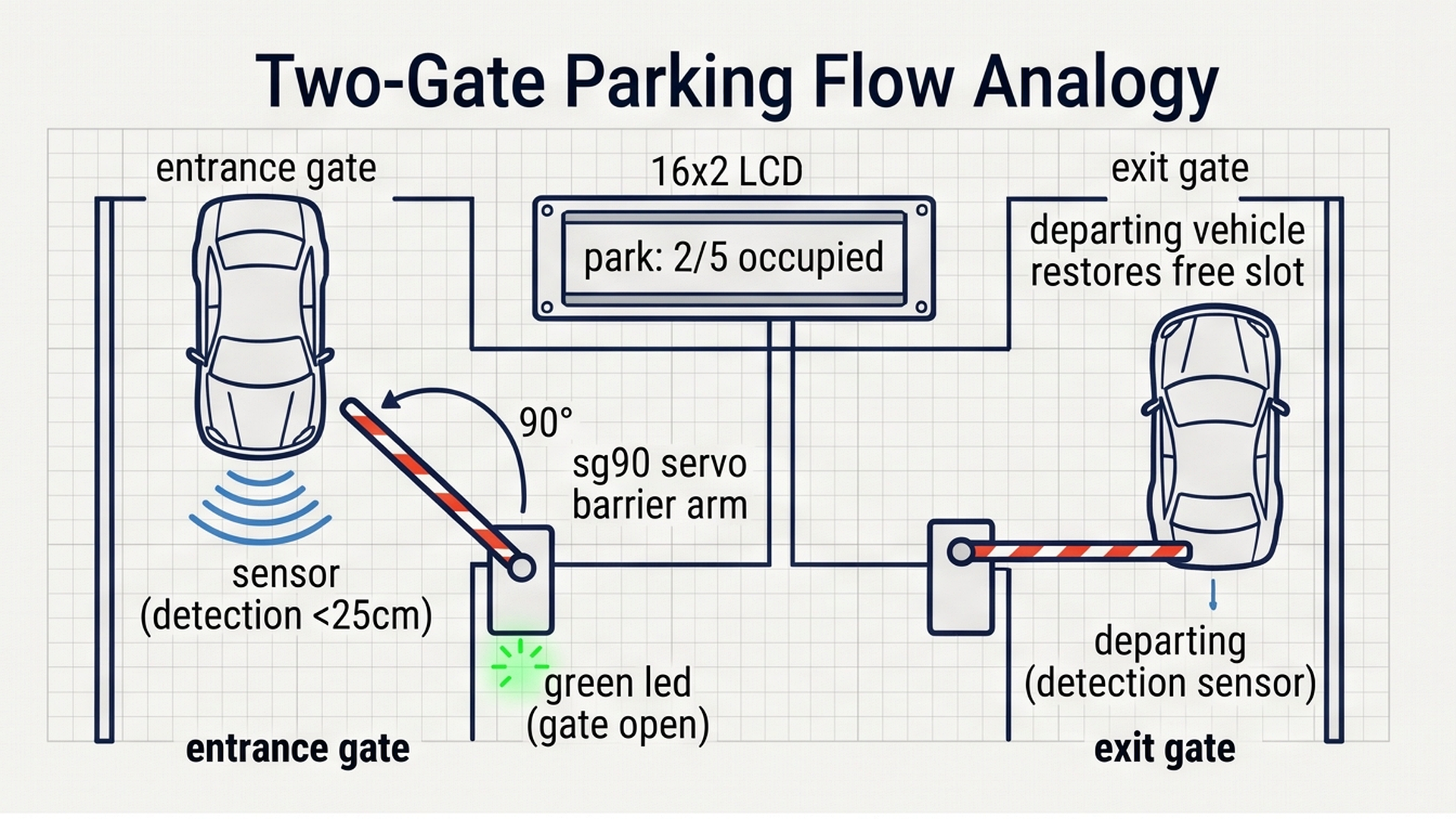
As visualized in the gate overview, vehicles passing through the access lane are detected by sonar echoes, causing the micro servo to smoothly rotate the barrier arm through 90 degrees. In the next section, we explore the physics of vehicle distance measurements and boom arm kinematics.
Part 1 — Understand the Core Idea: Entrance, Exit, and Capacity
To manage a parking lot without errors, a computer needs to know three basic things at all times: when a car arrives at the front gate, when a car leaves through the back gate, and whether there is any room left inside.
Think of it like a turnstile at a train station or amusement park. One gate counts people coming in, while another counts people walking out. By keeping track of both numbers, the computer always knows the exact number of people inside:
- The Entry Sonar monitors the arrival lane: When a car pulls up within 25 cm of the entrance, the system checks whether the lot has room. If spaces are open, the barrier lifts to 90 degrees, the green LED lights up, a pleasant 1200 Hz chime sounds, and the slot count increases by one.
- The Exit Sonar monitors the departure lane: When an existing car leaves and approaches the exit sensor, the barrier lifts to let them out, a 1000 Hz tone sounds, and the slot count decreases by one, freeing up a space for the next driver.
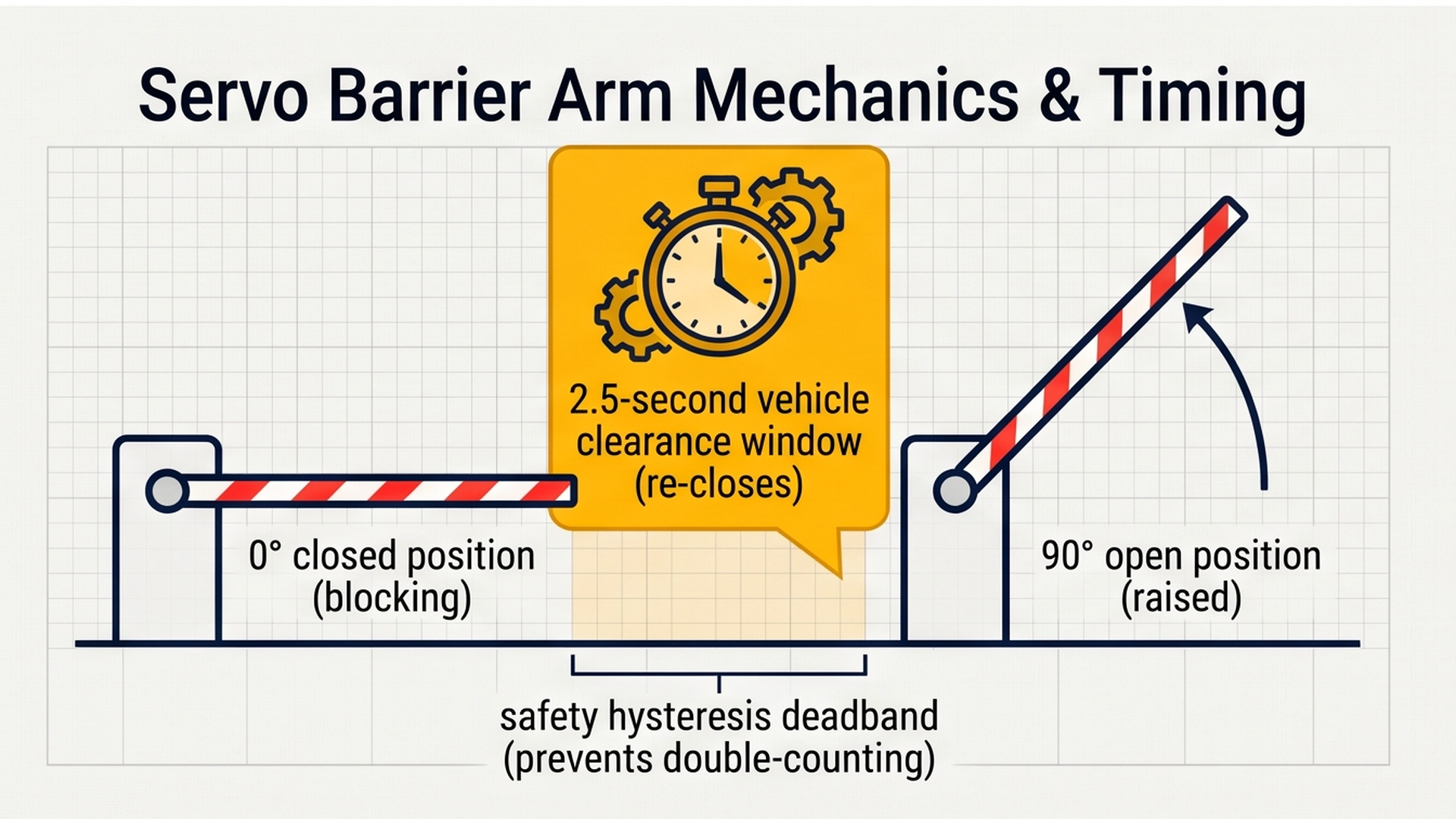
- Automatic Barrier Closing: After a vehicle triggers the gate, a non-blocking 2.5-second timer runs. Once the car moves clear of the beam, the servo automatically lowers the barrier arm back down to 0 degrees.
The acoustic radar diagram below illustrates how high-frequency 40 kHz sound waves bounce off approaching car bumpers to gauge entry position:
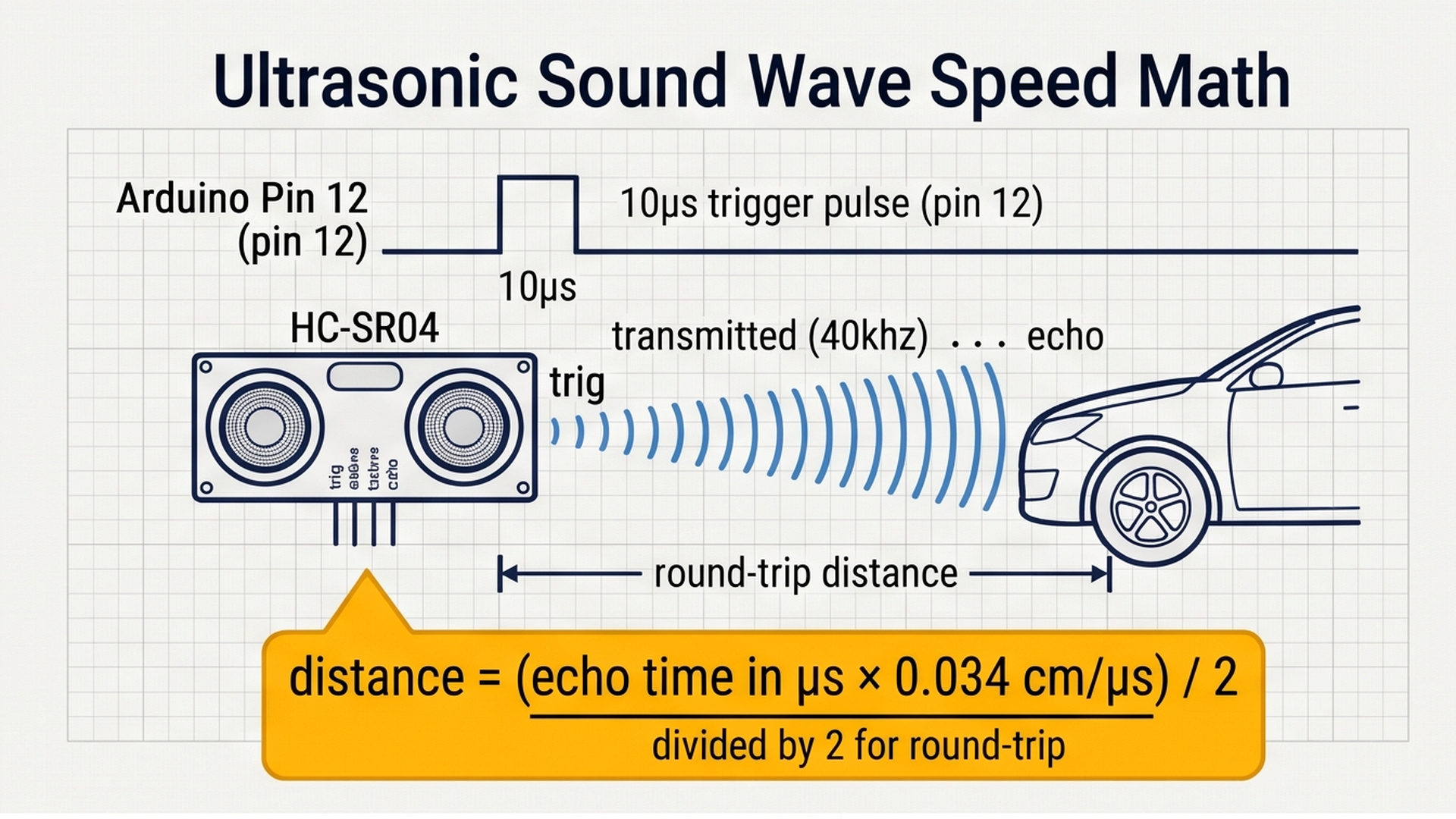
Because sound travels through air at approximately 343 meters per second, dividing the microsecond echo round-trip by 58 yields the exact distance in centimeters, allowing the controller to identify cars arriving at the gate threshold.
How does the ultrasonic sensor know a car is there? The HC-SR04 works like a tiny bat or submarine sonar:
- The Arduino sends a tiny 10-microsecond electrical pulse to the sensor's
TRIGpin. - The sensor transmits eight pulses of ultrasound at 40,000 Hz through its transmitter speaker cone. These high-frequency sound waves travel through the air at roughly 340 meters per second (or 0.034 cm per microsecond).
- When the sound waves bounce off the bumper of a car, the echo bounces back into the receiver microphone cone.
- The sensor pulls its
ECHOpin HIGH for the exact duration of the sound wave's round trip. We calculate the one-way distance using this simple formula:Distance (cm) = (Duration × 0.034) / 2.
Here is how our parking system behaves across each operating state:
| Parking Lot Condition | Entry Sensor | Exit Sensor | Servo Barrier | Indicator LEDs | LCD Screen Message |
|---|---|---|---|---|---|
| Spaces Available (< 5) | Car Close (< 25 cm) | Clear | Lifts to 90° (Open) | Green LED ON | PARK: x/5 | GATE: OPEN [GO] |
| Parking Lot Full (5/5) | Car Close (< 25 cm) | Clear | Locked at 0° (Closed) | Red LED ON | PARK: 5/5 | FULL! NO ENTRY |
| Vehicle Exiting | Clear | Car Close (< 25 cm) | Lifts to 90° (Open) | Green LED ON | PARK: x/5 | GATE: OPEN [GO] |
| Standby (Gate Closed) | Clear (> 35 cm) | Clear (> 35 cm) | Rests at 0° (Closed) | Green if space, Red if full | PARK: x/5 | GATE: CLOSED |
A built-in safety deadband (detecting below 25 cm and resetting above 35 cm) prevents cars from triggering duplicate count events while slowly passing through the gate.
Part 2 — Build the Circuit: Wiring Dual Sonars, Servo, and Lights
Before connecting wires to individual pins, let us understand how power flows through our parking station. Every circuit needs two fundamental power lines:
- 5V (Positive Power Line): Supplies steady electrical energy from the Arduino to power both ultrasonic sensors, the internal motor inside the SG90 servo, and the LCD backlight.
- GND (Ground Line): Serves as the return path for electrical current. All sensors, the servo motor, the LEDs, and the buzzer must share this common ground so their signal voltages measure accurately against a shared 0V reference.
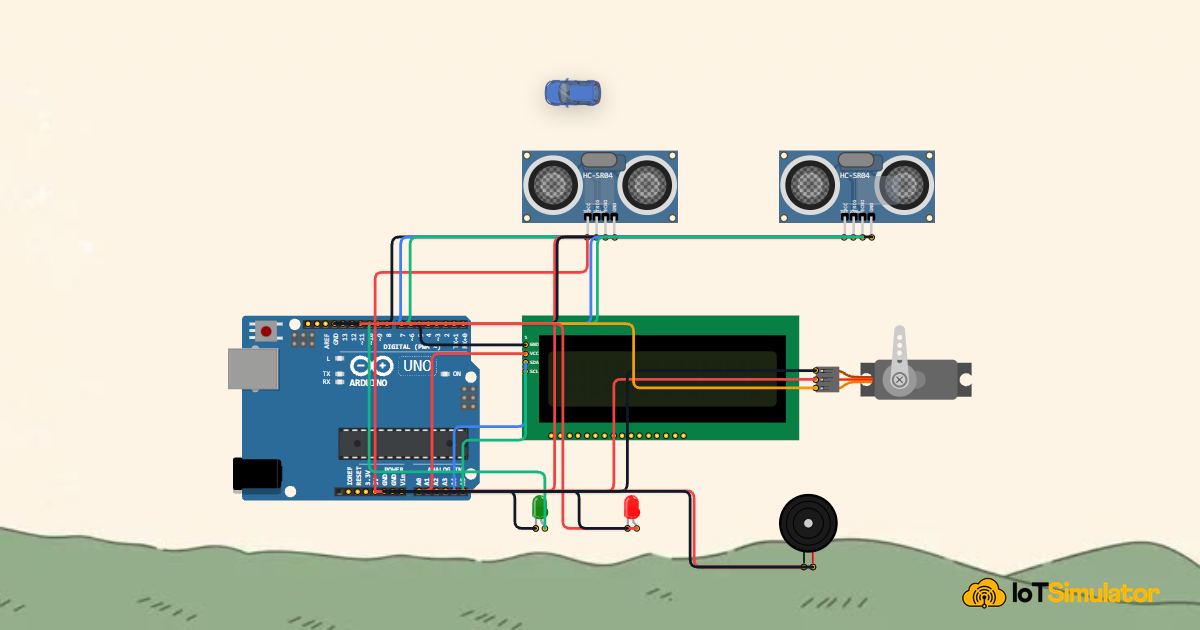
To wire the ultrasonic sensor, visual red/green indicator LEDs, alert buzzer, and gate servo motor safely, review the complete circuit wiring diagram below:
Follow the clear wiring tables below to connect each component to your Arduino Uno board:
Why Did We Choose These Specific Pins?
Understanding our pin layout will make you a better circuit designer:
- PWM Pin 9 for the SG90 Servo: Servo motors require precise pulse-width modulation (PWM) pulses repeating every 20 milliseconds (50 Hz). Digital pin 9 connects to Arduino Timer 1, which the
Servo.hlibrary uses to deliver rock-solid positioning pulses without arm jitter. - Digital Pins 12/13 and 7/8 for Dual Sonar: Ultrasonic sensors only need rapid digital input/output pulses. Using standard digital pins leaves analog pins free for other equipment.
- Analog Pin A0 for the Buzzer: Any analog pin on an Arduino Uno can also act as a standard digital output pin. Using A0 for our piezo chime keeps our digital pins clean and organized.
- I2C Bus on A4 and A5: Using the I2C protocol allows our 16x2 LCD screen to receive full sentences using just two wires instead of sixteen parallel wires!
Part 3 — Program the Behavior: Complete Arduino Sketch
Here is the full, tested firmware for the automated parking barrier station. You can copy this code directly into your sketch or run it straight inside the IoTSimulator workspace:
#include <Wire.h>
#include <LiquidCrystal_I2C.h>
#include <Servo.h>

// Pin definitions matching our circuit
const int trigInPin = 12;     // Entry Sonar Trigger
const int echoInPin = 13;     // Entry Sonar Echo
const int trigOutPin = 7;     // Exit Sonar Trigger
const int echoOutPin = 8;     // Exit Sonar Echo
const int servoPin = 9;       // SG90 Micro Servo Barrier
const int greenLedPin = 10;   // Green Access LED
const int redLedPin = 11;     // Red Full / Stop LED
const int buzzerPin = A0;     // Audible Chime Buzzer

// Parking lot capacity settings
const int MAX_SLOTS = 5;
int occupiedSlots = 2; // Default starting count: 2 occupied slots

// Peripheral controllers
LiquidCrystal_I2C lcd(0x27, 16, 2);
Servo barrierServo;

// State variables and non-blocking timers
unsigned long lastTelemetryTime = 0;
unsigned long gateOpenTimer = 0;
bool isGateOpen = false;
bool entryLocked = false;
bool exitLocked = false;

// Helper function: reads distance in centimeters using ultrasonic echo
long readDistance(int trigPin, int echoPin) {
  digitalWrite(trigPin, LOW);
  delayMicroseconds(2);
  digitalWrite(trigPin, HIGH);
  delayMicroseconds(10);
  digitalWrite(trigPin, LOW);
  long duration = pulseIn(echoPin, HIGH, 25000);
  if (duration <= 0) return 150; // Timeout fallback: lane is clear
  return (duration * 0.034) / 2;
}

// Helper function: updates the 16x2 LCD display
void updateDisplay() {
  lcd.setCursor(0, 0);
  lcd.print("PARK: ");
  lcd.print(occupiedSlots);
  lcd.print("/");
  lcd.print(MAX_SLOTS);
  lcd.print(" OCCUPIED");

  lcd.setCursor(0, 1);
  if (occupiedSlots >= MAX_SLOTS) {
    lcd.print("FULL! NO ENTRY  ");
  } else if (isGateOpen) {
    lcd.print("GATE: OPEN [GO] ");
  } else {
    lcd.print("GATE: CLOSED    ");
  }
}

void setup() {
  Serial.begin(9600);
  Serial.println("[PARKING]: Automated Smart Barrier System Initializing...");

  // Configure pins
  pinMode(trigInPin, OUTPUT);
  pinMode(echoInPin, INPUT);
  pinMode(trigOutPin, OUTPUT);
  pinMode(echoOutPin, INPUT);
  pinMode(greenLedPin, OUTPUT);
  pinMode(redLedPin, OUTPUT);
  pinMode(buzzerPin, OUTPUT);

  // Attach servo and set initial closed barrier position (0 degrees)
  barrierServo.attach(servoPin);
  barrierServo.write(0);

  // Initialize LCD display
  lcd.init();
  lcd.backlight();
  lcd.setCursor(0, 0);
  lcd.print(" SMART PARKING  ");
  lcd.setCursor(0, 1);
  lcd.print(" BARRIER SYSTEM ");
  delay(80);
  lcd.clear();

  // Initial status display and LEDs
  updateDisplay();
  digitalWrite(greenLedPin, HIGH);
  digitalWrite(redLedPin, LOW);

  Serial.println("[PARKING]: Ready. Monitoring Vehicle Proximity.");
}

void loop() {
  unsigned long currentMillis = millis();

  // Measure vehicle distance on both entrance and exit lanes
  long distIn = readDistance(trigInPin, echoInPin);
  long distOut = readDistance(trigOutPin, echoOutPin);

  // 1. Check for vehicle at Entry Gate
  if (distIn < 25 && !entryLocked) {
    if (occupiedSlots < MAX_SLOTS) {
      occupiedSlots++;
      isGateOpen = true;
      gateOpenTimer = currentMillis;
      entryLocked = true;

      barrierServo.write(90); // Lift barrier arm open
      tone(buzzerPin, 1200, 120);
      digitalWrite(greenLedPin, HIGH);
      digitalWrite(redLedPin, LOW);

      Serial.print("[GATE]: Vehicle Entered! Occupied = ");
      Serial.print(occupiedSlots);
      Serial.println("/5");
      updateDisplay();
    } else {
      // Parking lot is full - deny entry
      tone(buzzerPin, 400, 300); // Low warning buzz
      digitalWrite(greenLedPin, LOW);
      digitalWrite(redLedPin, HIGH);
      Serial.println("[GATE]: Entry Denied! Parking lot is full.");
      updateDisplay();
    }
  } else if (distIn >= 35) {
    entryLocked = false; // Reset lock once vehicle clears sensor beam
  }

  // 2. Check for vehicle at Exit Gate
  if (distOut < 25 && !exitLocked) {
    if (occupiedSlots > 0) {
      occupiedSlots--;
      isGateOpen = true;
      gateOpenTimer = currentMillis;
      exitLocked = true;

      barrierServo.write(90); // Lift barrier arm open
      tone(buzzerPin, 1000, 120);
      digitalWrite(greenLedPin, HIGH);
      digitalWrite(redLedPin, LOW);

      Serial.print("[GATE]: Vehicle Exited! Occupied = ");
      Serial.print(occupiedSlots);
      Serial.println("/5");
      updateDisplay();
    }
  } else if (distOut >= 35) {
    exitLocked = false; // Reset lock once vehicle departs
  }

  // 3. Automatically Close Barrier Gate after 2.5 seconds
  if (isGateOpen && (currentMillis - gateOpenTimer >= 2500)) {
    if (distIn >= 25 && distOut >= 25) {
      isGateOpen = false;
      barrierServo.write(0); // Lower barrier arm back down

      if (occupiedSlots >= MAX_SLOTS) {
        digitalWrite(greenLedPin, LOW);
        digitalWrite(redLedPin, HIGH);
      } else {
        digitalWrite(greenLedPin, HIGH);
        digitalWrite(redLedPin, LOW);
      }

      Serial.println("[GATE]: Barrier arm closed.");
      updateDisplay();
    }
  }

  // 4. Stream diagnostic telemetry once every second
  if (currentMillis - lastTelemetryTime >= 1000) {
    lastTelemetryTime = currentMillis;
    Serial.print("[Telemetry]: Occupied=");
    Serial.print(occupiedSlots);
    Serial.print("/5 | Gate=");
    Serial.print(isGateOpen ? "OPEN" : "CLOSED");
    Serial.print(" | DistIn=");
    Serial.print(distIn);
    Serial.print("cm | DistOut=");
    Serial.print(distOut);
    Serial.println("cm");
  }

  delay(50);
}
To visualize how the controller transitions between idle, gate opening, vehicle holding, and automatic gate lowering states during each loop cycle, examine the state transition flow below:
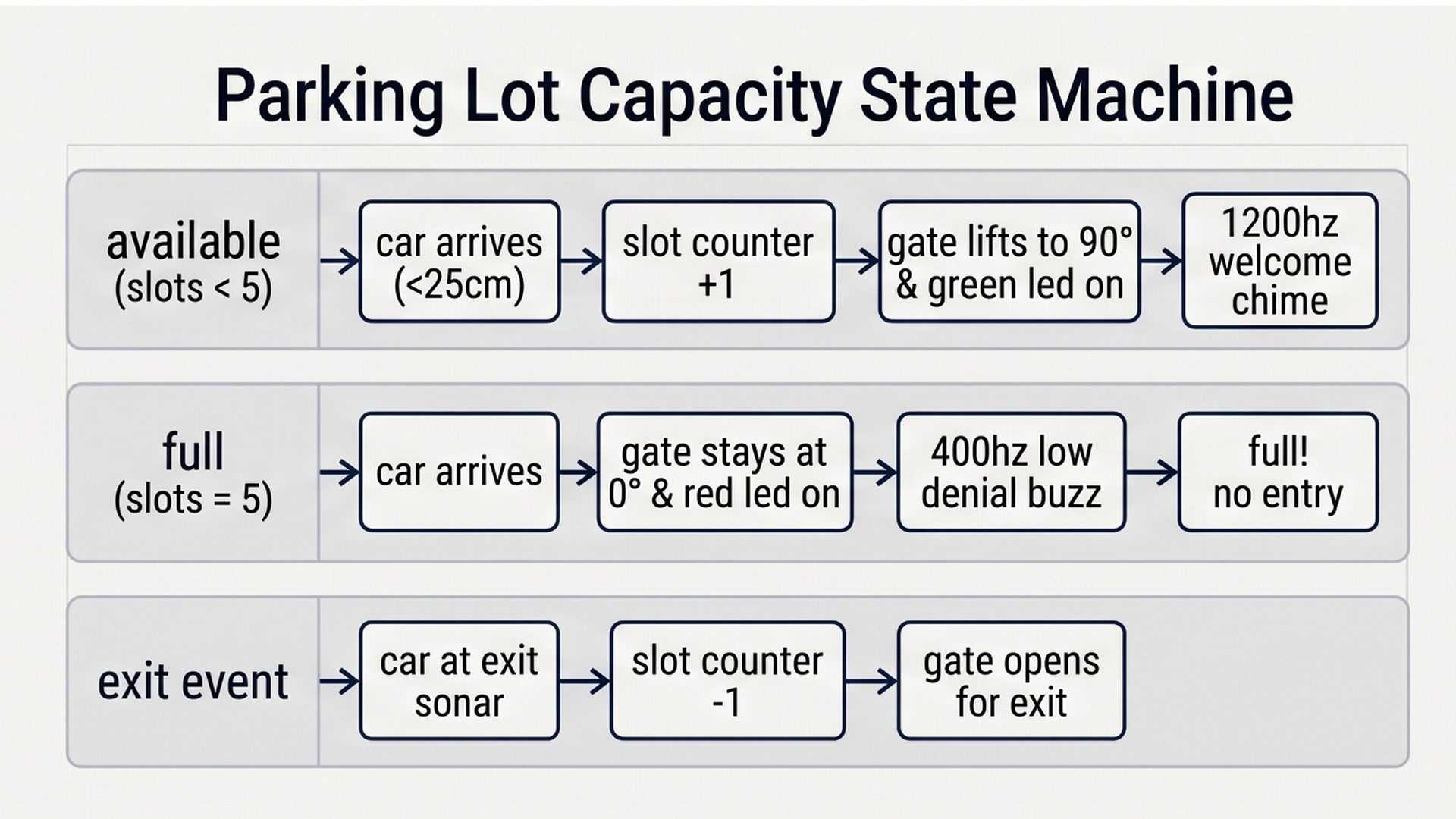
By enforcing an active vehicle holding delay and verifying vehicle clearance before lowering the barrier arm, the firmware prevents gate collisions with vehicles while maintaining smooth traffic flow. Let us now examine each section of the code in detail.
How the Code Works, Step by Step
Let us walk through each major part of the sketch so you know how the microcontroller thinks through every decision.
1. Measuring Distance Cleanly with readDistance()
Notice our helper function readDistance(trigPin, echoPin). To take a clean distance reading, it pulls the trigger pin LOW, then HIGH for 10 microseconds, then LOW again.
The Arduino then measures the echo pulse duration using pulseIn(echoPin, HIGH, 25000). Notice that third number: 25000. That is a timeout in microseconds (equivalent to 25 milliseconds or about 4 meters distance). Without this timeout, if no object was in front of the sensor, the Arduino would freeze and wait up to a full second! Setting a timeout keeps our program running super fast.
2. Preventing Double Counting with Software Locks
A real car is several meters long. When a car drives past a sensor, the sensor beam will see the car bumper, then the hood, then the roof, and then the trunk over a period of 1 to 2 seconds.
If we simply incremented every time distIn < 25, a single car driving slowly would increment the slot count 30 times in one second! To prevent this, we use a software lock: entryLocked = true. Once a car is detected, the count increments once, and the gate opens. The Arduino refuses to count another incoming car until distIn >= 35, proving the first car has completely moved past.
3. Capacity Checking and Access Decisions
When a vehicle arrives at the entrance, the code evaluates if (occupiedSlots < MAX_SLOTS):
- If true (room available): It increments
occupiedSlots++, lifts the barrier to 90 degrees withbarrierServo.write(90), plays a bright 1200 Hz tone, turns on the green LED, and notes the time withgateOpenTimer = currentMillis. - If false (lot is full): It refuses to move the servo, plays a low 400 Hz warning buzz, turns on the red LED, and prints
FULL! NO ENTRYon the LCD screen.
4. Automatic Re-closing with Non-Blocking Timers
How does the gate close after the car drives through? Inside loop(), we check: if (isGateOpen && (currentMillis - gateOpenTimer >= 2500)). If 2.5 seconds have passed AND both sensors confirm that no car is lingering directly under the barrier (distIn >= 25 && distOut >= 25), the servo rotates back to 0 degrees to seal the gate.
Part 4 — Practical Testing in the Simulator
Follow these quick steps to test every situation inside the IoTSimulator workspace:
- Test Normal Standby: Press the green Run button. The barrier arm rests horizontally at 0 degrees, the green LED is lit, and the LCD displays
PARK: 2/5 OCCUPIED. - Test Vehicle Entry: Click on the Entry Sonar component or move the interactive Car Actor close to the entrance (distance under 25 cm). Watch the servo barrier arm instantly lift up to 90 degrees, listen to the 1200 Hz chime, and notice the display increment to
PARK: 3/5. After 2.5 seconds, the barrier closes smoothly. - Test Parking Lot Full: Move the car to the entry gate two more times until the count reaches
5/5. Now move the car close to the entrance again. Notice how the barrier stays completely shut at 0 degrees, the red LED turns on, the buzzer emits a low 400 Hz denial tone, and the LCD warnsFULL! NO ENTRY. - Test Vehicle Exit: Move the car to the Exit Sonar component (distance under 25 cm). The barrier arm lifts to 90 degrees, the count drops back to
4/5, and the green LED turns back on, showing that a space is now available once again!
Part 5 — Troubleshooting Common Beginner Mistakes
If your physical build or simulation does not behave properly, check these frequent issues:
- Servo twitches or Arduino resets when gate opens: Even small SG90 micro servos draw up to 500mA of electrical current when starting to move. If your power supply is weak, this sudden current draw can cause a voltage dip on the 5V line, resetting the microcontroller. In real builds, placing a 100µF or 470µF electrolytic capacitor across the servo 5V and GND pins eliminates this jitter.
- Ultrasonic sensor returns erratic 0 cm or 150 cm readings: Ultrasonic waves bounce off surfaces like a mirror. If the sensor is aimed at soft cloth, foam, or an angled car bumper, the sound wave may bounce away rather than returning to the sensor cone. Always ensure the sensor faces flat surfaces squarely.
- The count increases twice for one car: If the barrier closes while the car is still moving through, the car can re-trigger the entrance sensor. Increase the gate open timer from 2500 ms to 3500 ms, or widen the reset distance threshold from 35 cm to 45 cm.
- Buzzer does not make sound on pin A0: Remember that on Arduino Uno, analog pin A0 can act as a standard digital pin. If you use
tone(buzzerPin, frequency), make sure you configurepinMode(buzzerPin, OUTPUT)insetup()first.
Part 6 — Taking It Further: Next Engineering Steps
Once you have mastered the dual-sonar parking system, consider taking your project to the next level with these upgrades:
- Add an RC522 RFID Card Reader: Require drivers to tap an authorized RFID card or employee badge before the barrier gate lifts.
- Connect an Overhead Infrared Sensor Array: Mount individual infrared sensors above each parking bay to detect which specific numbered stall (Bay 1, Bay 2, etc.) is occupied.
- Connect to Cloud Telemetry with MQTT: Connect your Arduino to an ESP8266 or Raspberry Pi Pico W to broadcast live parking occupancy numbers to a mobile app or public website so drivers can see open spaces before arriving.
More in Arduino Uno
Arduino Single-Axis Solar Tracker with Dual LDRs and Servo
Arduino Fire Alarm & Gas Leak Detector with Siren and Relay
Arduino Automatic Plant Watering & Soil Moisture Irrigation System
Arduino Digital Kitchen Scale with HX711 Load Cell and LCD
Arduino Flood Early Warning & Water Level Monitor with Ultrasonic
More in Ultrasonic (HC-SR04)
More in LCD1602
Arduino Single-Axis Solar Tracker with Dual LDRs and Servo
Arduino Fire Alarm & Gas Leak Detector with Siren and Relay
Arduino Automatic Plant Watering & Soil Moisture Irrigation System
Arduino Digital Kitchen Scale with HX711 Load Cell and LCD
Build a Keypad Door Lock with an Arduino Mega
More in Servo Motor
Arduino Single-Axis Solar Tracker with Dual LDRs and Servo
Arduino Touchless Smart Dustbin with Ultrasonic Sensor and Servo
Control a Servo Positioner with a Raspberry Pi Pico
Control a Pan and Tilt Servo with an Arduino Mega and Joystick
Control a Servo with an ESP32-C3 and Potentiometer
More in LED
Arduino Smart Solar Streetlight with LDR and PIR Motion Sensor
Build a 4-Key Piano Synthesizer with a Raspberry Pi Pico W
Build a Smart Climate Monitor with a Raspberry Pi Pico W
Control a Servo Positioner with a Raspberry Pi Pico
Build a Light Meter and Alarm with a Raspberry Pi Pico
More in Buzzer
Arduino Fire Alarm & Gas Leak Detector with Siren and Relay
Arduino Flood Early Warning & Water Level Monitor with Ultrasonic
Build a 4-Key Piano Synthesizer with a Raspberry Pi Pico W
Build a Light Meter and Alarm with a Raspberry Pi Pico