Arduino Automatic Plant Watering & Soil Moisture Irrigation System

Live project track
Have you ever left home for a long weekend vacation or business trip, only to come back to dry, drooping houseplants? Keeping indoor plants or small greenhouse beds healthy requires consistent soil moisture. But watering plants on a rigid daily timer can cause problems: on cool, cloudy days the soil stays damp, and timer-based watering leads to rotting roots.
A truly smart irrigation station does not water by the clock. It waters by listening directly to the soil. When the soil dries out, the system pumps fresh water into the plant pot. Once the soil reaches optimal moisture, it turns the pump off and returns to quiet standby.
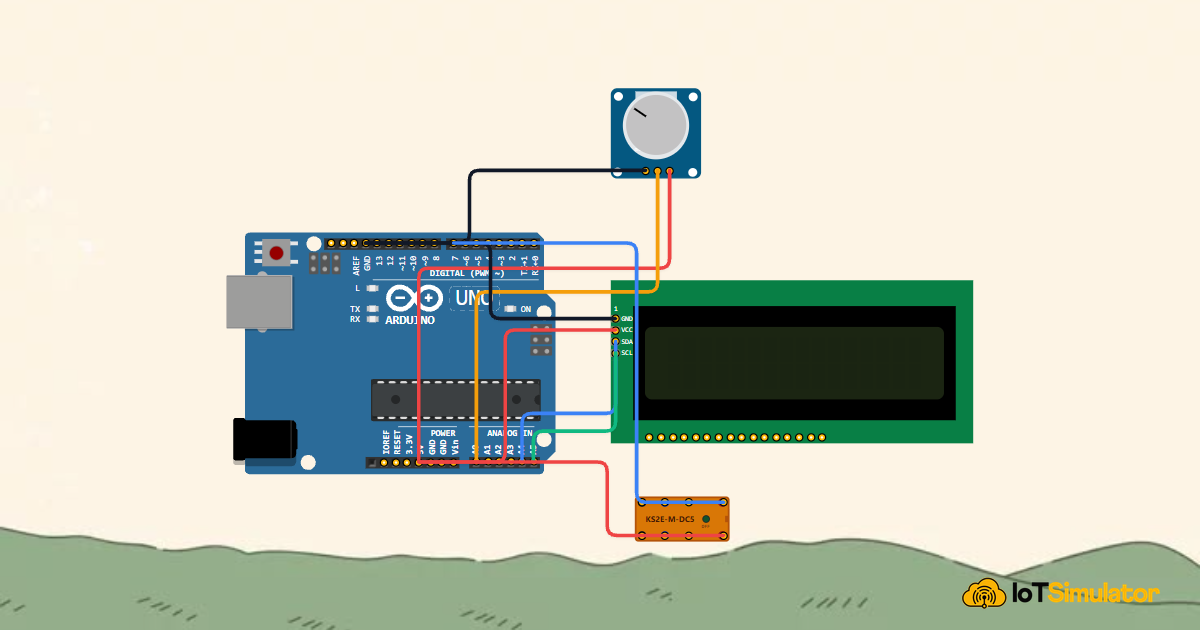
In this project, you will build an automated soil irrigation station using an Arduino Uno, an analog soil moisture probe, an I2C LCD screen, and a relay-controlled water pump. The core concept you will master is: hysteresis threshold control — converting analog soil conductivity into a moisture percentage and using dual thresholds to water plants smoothly without damaging the pump.
Before inserting soil probes and connecting the submersible irrigation pump, study the complete automated planter station architecture in the diagram below:
As visualized in the station overview, electrical conductivity through damp potting soil gives our microcontroller real-time feedback on hydration levels. In the next section, we examine the physics of soil resistance and how moisture thresholds protect root systems.
Part 1 — Understand the Core Idea: How Soil Conducts Electricity
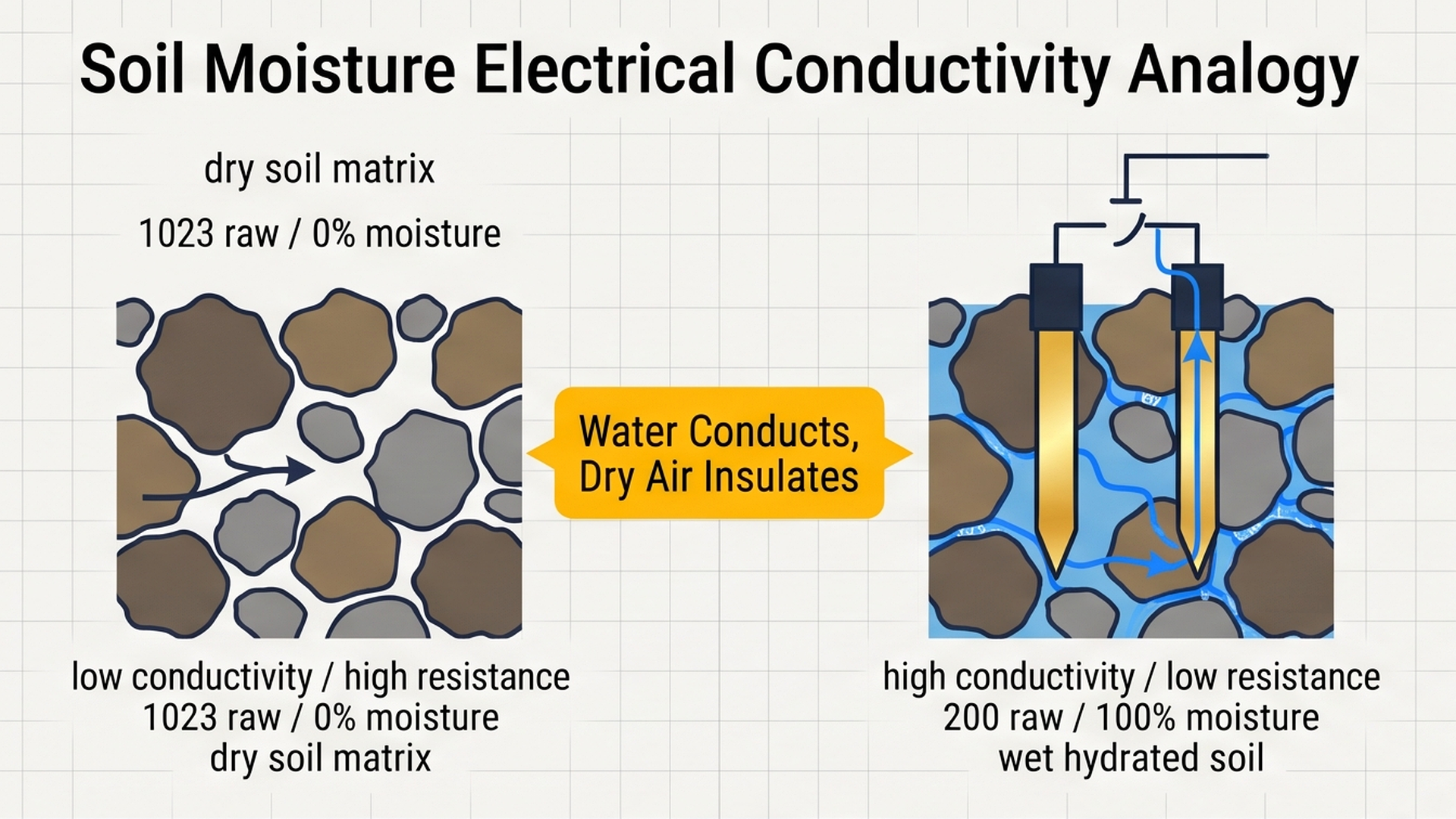
To understand how an electronic probe measures water in soil, think of a household kitchen sponge. When a sponge is bone dry, it feels light, stiff, and acts as an electrical insulator. But when you soak that same sponge in tap water, the water fills millions of tiny air pockets.
Pure tap water contains dissolved minerals that conduct electricity. Soil works the exact same way:
- Dry Soil (High Resistance): When soil dries out, air fills the spaces between dirt particles. Air is a poor electrical conductor. When the Arduino passes a small sensing voltage through the two metal prongs of the probe, very little electric current can jump across the gap. The sensor returns a high raw voltage reading (close to 1023).
- Wet Soil (Low Resistance): When you pour water onto the soil, moisture forms continuous liquid bridges between dirt minerals. Electricity flows easily across the prongs. The electrical resistance drops, and the sensor returns a much lower raw voltage reading.
By reading this changing voltage with the Arduino analog pin A0, we can calculate the exact percentage of moisture in the soil.
The moisture threshold and hysteresis curve below illustrates why smart watering controllers use separate trigger and shutoff limits rather than a single setpoint:
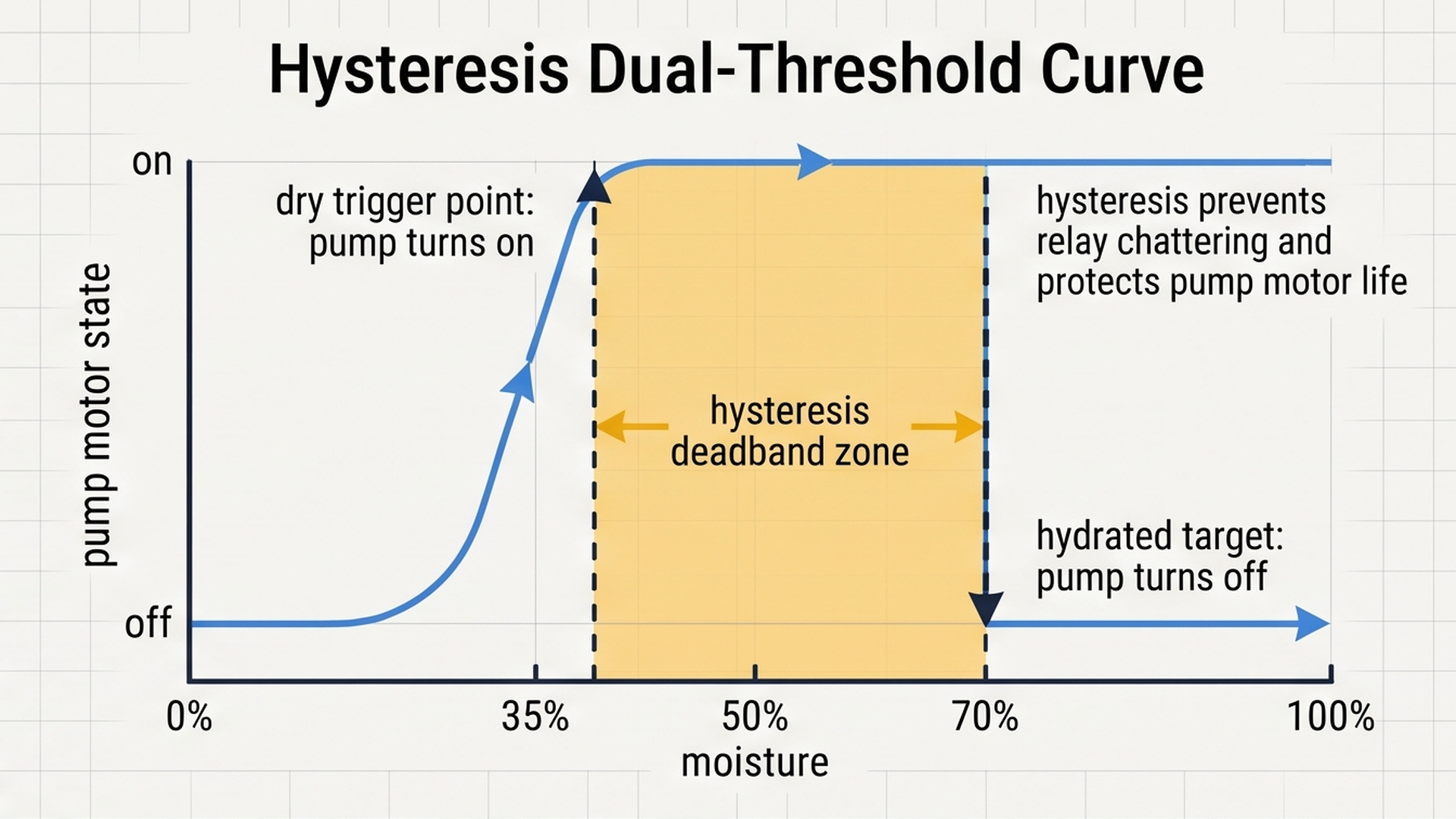
By activating irrigation when soil dryness drops below 35% and continuing to pump until moisture reaches a lush 65%, hysteresis prevents rapid on-off motor chatter, saving pump lifespan and preventing soil waterlogging.
What is Hysteresis and Why is it Essential?
Imagine what happens if you program your pump with a single cutoff number, such as 50%:
- The soil dries to 49%, so the pump turns ON.
- A single drop of water splashes near the sensor, raising the reading to 50.1%, so the pump immediately turns OFF.
- Two seconds later, the moisture diffuses slightly, dropping to 49.9%, so the pump turns ON again.
This rapid on-off switching is called relay chattering. It sounds like an angry machine gun, sparks the internal electrical contacts, and destroys both the relay and the water pump motor in a few days!
To eliminate chattering, professional engineers use hysteresis (dual-threshold control):
| Soil Moisture Level | Condition | Water Pump State | LCD Status | Action Taken |
|---|---|---|---|---|
| Under 35% | Soil is Dry | Turn ON (Energized) | Pump: [ON] PUMP | Pumps fresh water into root zone |
| 35% to 70% | Moisture Rising | Keep Current State | Pump: [ON] or [OFF] | Allows water to soak deeply without cycling |
| Above 70% | Soil is Saturated | Turn OFF (De-energized) | Pump: [OFF] IDLE | Shuts down pump into safe standby |
Hysteresis provides a wide 35% to 70% buffer zone, allowing the pump to complete a full watering cycle before resting quietly for hours or days.
Part 2 — Build the Circuit: Wiring Power, Sensor, and Relay
Before connecting individual signal lines, let us review how electricity moves through our automated garden setup:
- 5V (Positive Power Rail): Supplies clean operating power from the Arduino Uno to power the soil sensor probe, the I2C LCD character display, and the internal electromagnetic coil of the relay module.
- GND (Ground Line): Acts as the common electrical drainage path. All modules must connect their GND pins back to the Arduino ground lines so all measured voltages share the same 0V baseline.
To connect the analog soil probe, visual status indicators, and high-current 5V pump relay safely to the Arduino Uno, review the complete wiring diagram below:
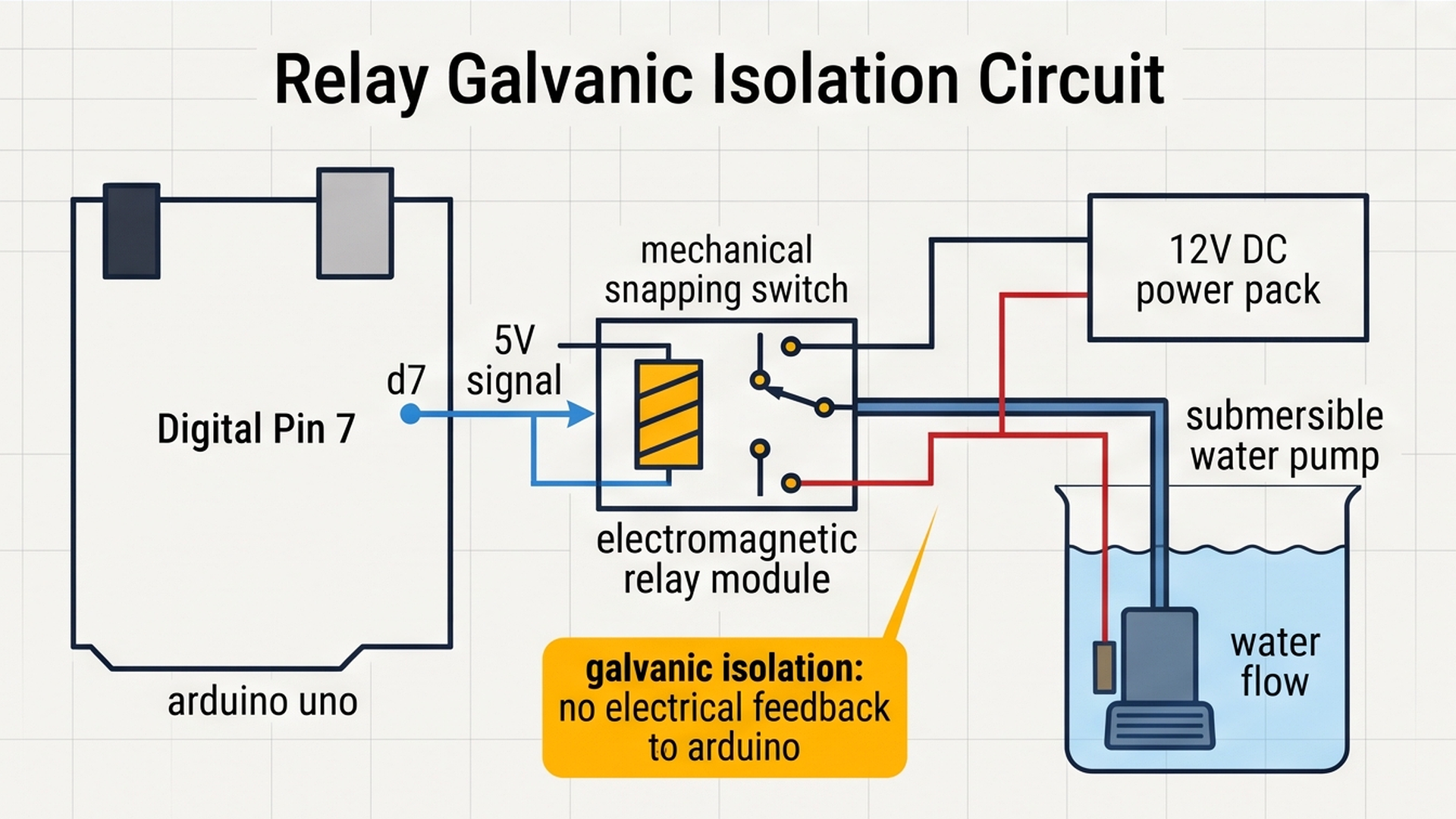
Follow the clear connection tables below to wire each module to your Arduino Uno:
Why Did We Choose These Specific Pins?
Understanding our pin choices will help you build reliable projects:
- Analog Pin A0 for the Soil Probe: Soil resistance varies smoothly across hundreds of electrical levels. Analog pin A0 connects to the internal 10-bit analog-to-digital converter (ADC), converting the probe voltage into fine-grained numbers from 0 to 1023.
- I2C Bus on A4 and A5: The I2C protocol allows us to control the full 32-character LCD display using just two shared wires, keeping the rest of our Arduino pins free.
- Digital Pin 7 for the Relay: The relay only requires a simple binary command: HIGH (5V) to close the switch contacts and run the pump, or LOW (0V) to turn the pump off. Pin 7 provides clean digital output control.
Part 3 — Program the Behavior: Complete Arduino Sketch
Here is the full, tested firmware for the automated plant watering station. You can copy this code directly into your sketch or run it straight inside the IoTSimulator workspace:
#include <Wire.h>
#include <LiquidCrystal_I2C.h>

// Hardware pin assignments matching our circuit
const int soilPin = A0;      // Analog soil moisture probe
const int relayPin = 7;      // KS2E relay control for water pump

// State tracker to maintain hysteresis memory
bool pumpRunning = false;

// Initialize 16x2 LCD display at standard I2C address 0x27
LiquidCrystal_I2C lcd(0x27, 16, 2);

void setup() {
  Serial.begin(9600);
  Serial.println("[IRRIGATION]: Automated Plant Watering Station Initializing...");

  // Configure relay pin as an output
  pinMode(relayPin, OUTPUT);
  digitalWrite(relayPin, LOW); // Start with water pump safely turned OFF

  // Initialize LCD display
  lcd.init();
  lcd.backlight();
  lcd.setCursor(0, 0);
  lcd.print("Smart Irrigation");
  lcd.setCursor(0, 1);
  lcd.print("System Ready... ");
  delay(1500);
  lcd.clear();

  Serial.println("[IRRIGATION]: Ready. Monitoring Soil Moisture.");
}

void loop() {
  // Step 1: Read raw sensor voltage (0 to 1023)
  int rawValue = analogRead(soilPin);

  // Step 2: Convert raw reading into moisture percentage (0% to 100%)
  int moisturePercent = map(rawValue, 0, 1023, 0, 100);

  // Step 3: Display current moisture percentage on Line 1
  lcd.setCursor(0, 0);
  lcd.print("Moist: ");
  lcd.print(moisturePercent);
  lcd.print("%   ");

  // Step 4: Apply Hysteresis Logic
  // Turn ON when dry (under 35%), Turn OFF when fully hydrated (above 70%)
  if (moisturePercent < 35 && !pumpRunning) {
    digitalWrite(relayPin, HIGH); // Turn water pump ON
    pumpRunning = true;
    Serial.print("[Action]: Soil is Dry (");
    Serial.print(moisturePercent);
    Serial.println("%). Pump Started.");
  } else if (moisturePercent > 70 && pumpRunning) {
    digitalWrite(relayPin, LOW);  // Turn water pump OFF
    pumpRunning = false;
    Serial.print("[Action]: Optimal Hydration (");
    Serial.print(moisturePercent);
    Serial.println("%). Pump Stopped.");
  }

  // Step 5: Update pump status message on Line 2
  lcd.setCursor(0, 1);
  if (pumpRunning) {
    lcd.print("Pump: [ON] PUMP ");
  } else {
    lcd.print("Pump: [OFF] IDLE");
  }

  // Pause 500ms between sensor samples
  delay(500);
}
To visualize the operational loop that samples soil hydration, manages pump run durations, and enforces soak delays, review the irrigation cycle diagram below:
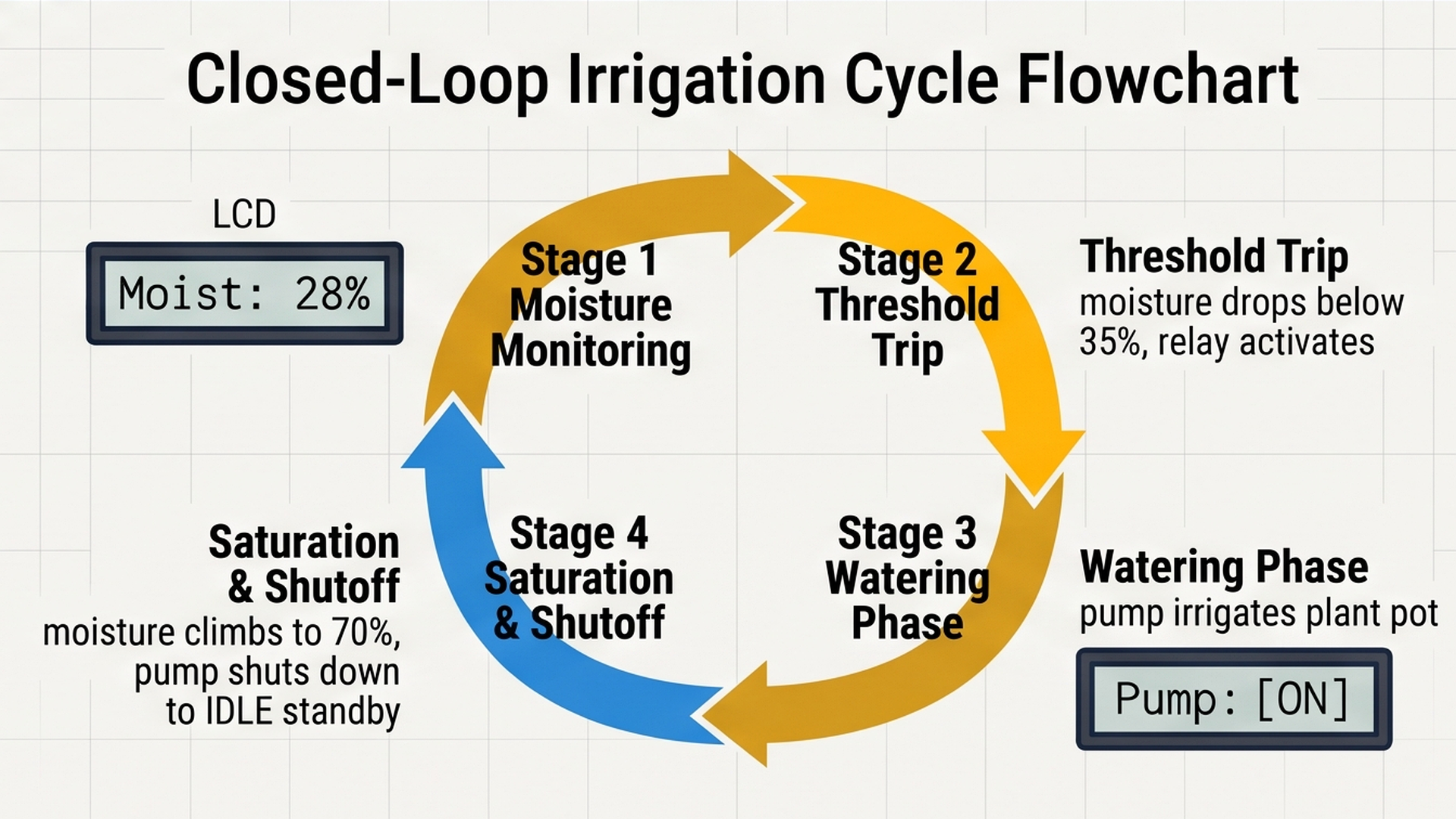
By combining hysteresis thresholds with maximum pump pulse timers and soil soak pauses, the firmware delivers consistent hydration without root rot or basin overflow. Now let us explore the complete firmware code line by line.
How the Code Works, Step by Step
Let us look closely at each part of the program to understand how the microcontroller makes decisions.
1. Libraries and State Variables
At the top of the file, we include Wire.h and LiquidCrystal_I2C.h to manage the serial communication protocol for our LCD display.
Notice the boolean variable bool pumpRunning = false;. This variable acts as the Arduino's memory. It remembers whether the pump is currently running or currently resting. Without this memory variable, the microcontroller could not implement hysteresis!
2. Safe Initialization in setup()
In setup(), we configure pinMode(relayPin, OUTPUT) and write digitalWrite(relayPin, LOW). This ensures the water pump never surges water unexpectedly when you first plug the Arduino into power.
The LCD is initialized, the backlight turns on, and a clean startup greeting appears for 1.5 seconds so you know the hardware is online.
3. Reading and Scaling Moisture with map()
Inside loop(), analogRead(soilPin) samples the probe voltage. We use the map() function to scale this raw reading into an intuitive percentage between 0% and 100%.
4. The Hysteresis Decision Engine
The core intelligence of our project is contained in these two simple conditions:
if (moisturePercent < 35 && !pumpRunning): If the soil is dry AND the pump is not already on, turn on the pump (digitalWrite(relayPin, HIGH)) and setpumpRunning = true.else if (moisturePercent > 70 && pumpRunning): If moisture rises past 70% AND the pump is currently on, shut off the pump (digitalWrite(relayPin, LOW)) and setpumpRunning = false.- What happens between 35% and 70%? Neither condition matches! This means the pump simply keeps doing whatever it was already doing. If it was watering, it continues watering. If it was resting, it stays resting. This guarantees smooth, stable operation.
Part 4 — Practical Testing in the Simulator
Follow these quick steps to test your automated watering system inside the IoTSimulator workspace:
- Test Normal Standby: Press the green Run button. The LCD display powers on and shows the initial moisture reading. If moisture is above 35%, line 2 displays
Pump: [OFF] IDLE. - Simulate Soil Drying Out: Click on the Soil Moisture Probe / Potentiometer component. Drag its slider downward until the moisture drops below 35%. Watch the relay immediately snap ON, the serial console print
Pump Started, and line 2 switch toPump: [ON] PUMP. - Verify Hysteresis (Rising Moisture): Slowly drag the slider back up to 45% and then 60%. Notice how the pump stays ON! Even though moisture is above 35%, it has not yet reached the 70% target.
- Test Saturated Shutoff: Drag the slider above 70%. The moment it hits 71%, the relay clicks off, line 2 switches back to
Pump: [OFF] IDLE, and the watering cycle is complete.
Part 5 — Troubleshooting Common Beginner Mistakes
If your physical watering station does not work smoothly, check these common beginner mistakes:
- Rapid sensor probe corrosion in real soil: Cheap resistive soil sensors have exposed copper or gold traces. If you leave DC voltage running through wet soil 24 hours a day, galvanic electrolysis will eat the metal pads away in less than two weeks! In real projects, connect the sensor VCC pin to an Arduino digital pin instead of constant 5V. Turn the digital pin HIGH only for 20 milliseconds when you take a reading, then turn it LOW. This eliminates corrosion and makes your probe last for years.
- Arduino resets or screen flickers when pump starts: DC motor pumps draw heavy current spikes and create inductive electrical kickback when their magnetic coils collapse. Always power the water pump from an external 9V or 12V battery pack or wall adapter, never directly from the Arduino 5V pin! Always ensure the relay module has an onboard flyback protection diode.
- Moisture readings jump wildly: Loose jumper wires or an ungrounded external power supply can cause electrical noise on analog pin A0. Ensure that the external pump power supply shares a common ground (GND) wire with the Arduino Uno.
- LCD shows black blocks or faint text: If your I2C LCD lights up but shows no letters, use a small screwdriver to gently adjust the blue contrast potentiometer located on the back of the I2C backpack board until the text appears sharp and clear.
Part 6 — Taking It Further: Next Engineering Steps
Once you have a working irrigation station, consider these powerful additions:
- Upgrade to a Capacitive Soil Moisture Sensor: Capacitive sensors measure moisture through an insulated solder mask using high-frequency resonance. Because no bare metal touches wet dirt, capacitive probes never corrode.
- Add a Water Reservoir Low-Level Float Switch: Place an inexpensive magnetic float switch inside your water reservoir. If the bucket runs out of water, the Arduino can display an empty warning and prevent the pump from running dry and overheating.
- Pair with a DHT22 Climate Sensor: Track ambient greenhouse air temperature and humidity alongside soil moisture to calculate plant transpiration rates and optimize watering schedules.
More in Arduino Uno
Arduino Single-Axis Solar Tracker with Dual LDRs and Servo
Arduino Fire Alarm & Gas Leak Detector with Siren and Relay
Arduino Smart Parking Barrier & Slot Counter with Ultrasonic Sensor
Arduino Digital Kitchen Scale with HX711 Load Cell and LCD
Arduino Flood Early Warning & Water Level Monitor with Ultrasonic
More in Potentiometer
More in LCD1602
Arduino Single-Axis Solar Tracker with Dual LDRs and Servo
Arduino Fire Alarm & Gas Leak Detector with Siren and Relay
Arduino Smart Parking Barrier & Slot Counter with Ultrasonic Sensor
Arduino Digital Kitchen Scale with HX711 Load Cell and LCD