
Arduino Smart Solar Streetlight with LDR and PIR Motion Sensor

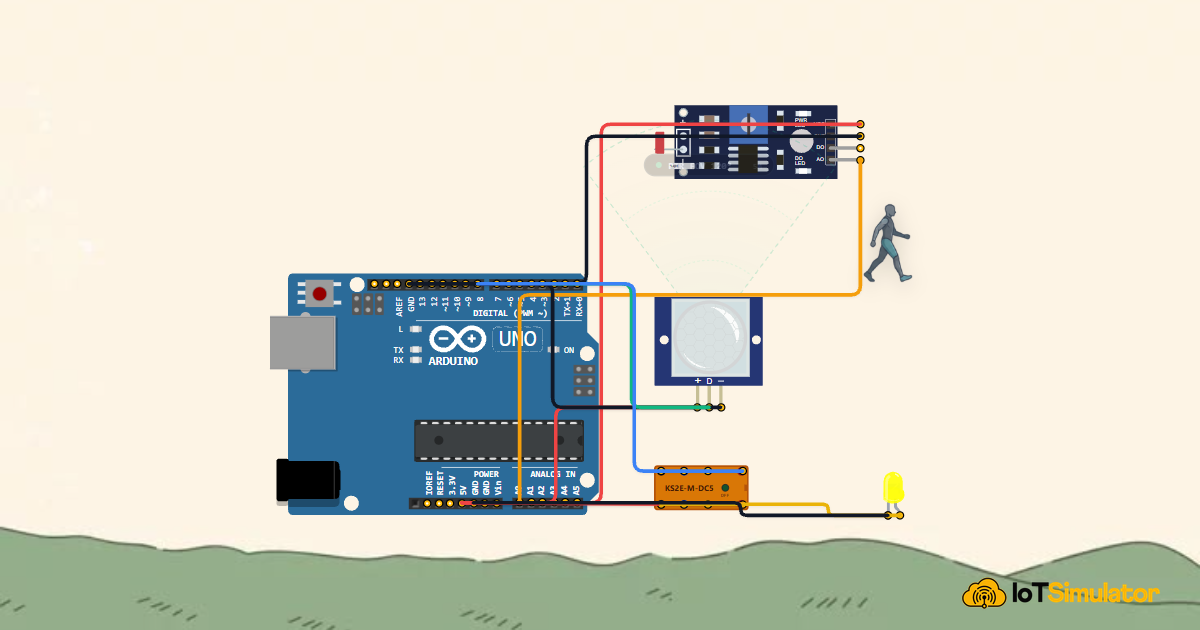
Live project track
Have you ever driven down a quiet country road or walked through a neighborhood park late at night and noticed streetlights blazing at full brightness over completely empty streets? Traditional municipal streetlights are turned on at dusk and run at maximum power for twelve hours straight until dawn. This wastes massive amounts of electricity, drains expensive solar battery banks prematurely, and contributes to light pollution.
Modern smart cities use adaptive streetlights that respond dynamically to their surroundings. During the day, the light stays off so solar panels can recharge the battery. When night falls, the lamp stays in quiet standby. Only when a walking pedestrian, bicyclist, or car approaches does the lamp snap on to full brightness, lighting their path safely before turning off once they pass.
In this project, you will build an energy-saving smart solar streetlight using an Arduino Uno, an ambient light photoresistor (LDR), a passive infrared (PIR) motion sensor, and a high-current relay switch driving a street lamp. The core concept you will master is: environmental state coordination — using an ambient light sensor as an enabling gatekeeper and a motion detector as an active trigger to provide bright light only when people are actually present.
Before routing breadboard wires and uploading control code, examine the standalone municipal streetlight architecture illustrated in the diagram below:
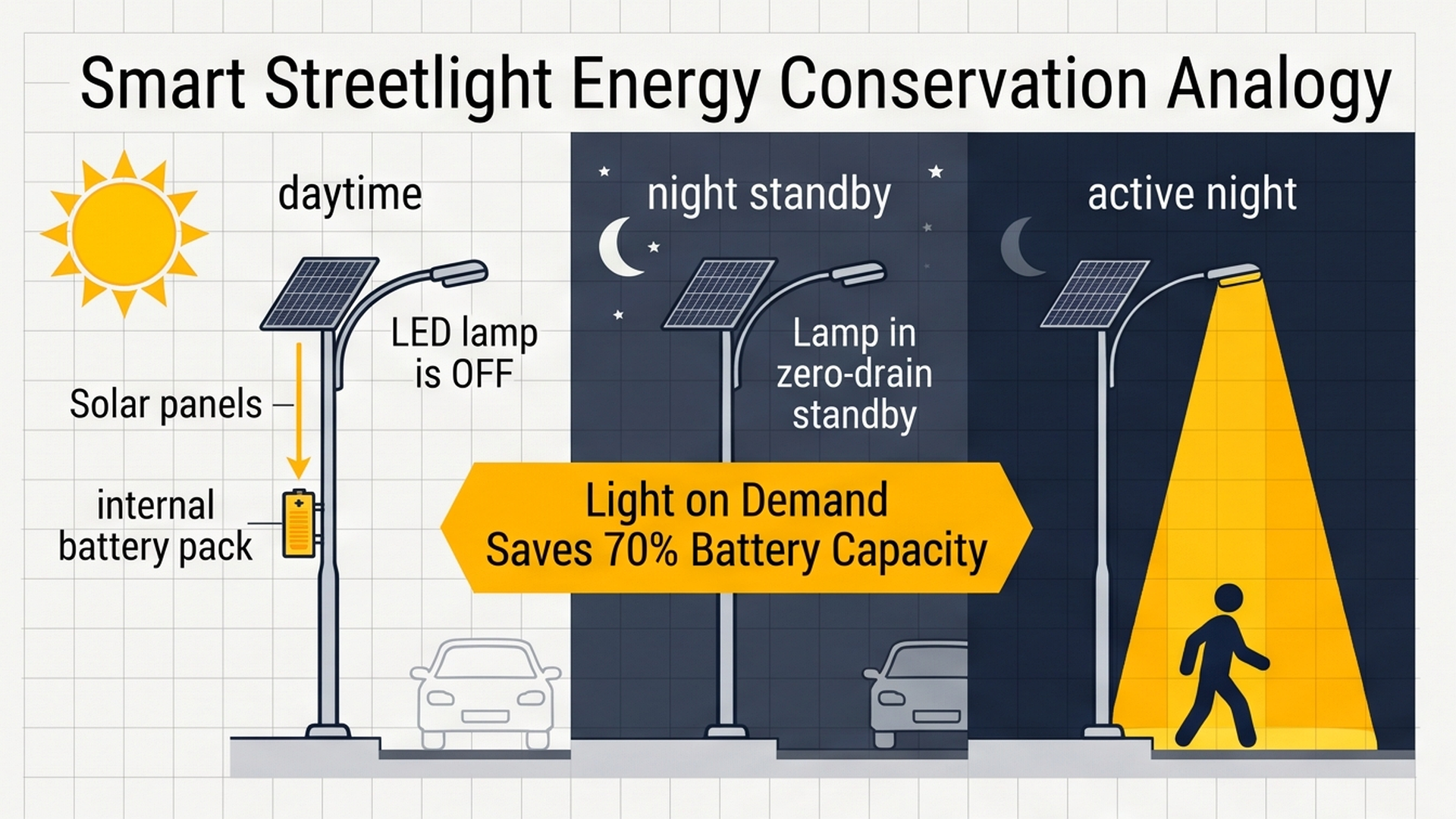
As visualized in the system blueprint, ambient daylight and pedestrian movement work together to regulate street lamp intensity, balancing evening visibility with battery conservation. In the following section, we analyze the dual-sensor logic that powers this efficiency.
Part 1 — Understand the Core Idea: Light on Demand
To understand why this system saves so much electrical power, think about how you use a flashlight in a dark hallway. You do not leave the flashlight turned on all day long on the kitchen counter. You only turn it on when two conditions are true at the exact same moment: it is dark, and you are actively walking through the hall!
Our Arduino smart streetlight combines two specialized electronic sensors that mirror these exact decisions:
- The LDR (Photoresistor) is the Day/Night Gatekeeper: Mounted on top of the streetlight arm pointing toward the open sky, the LDR continuously measures ambient sunlight. When the sun is high in the sky, sunlight floods the sensor. The Arduino checks this reading first. If it is daytime, the Arduino completely ignores the motion sensor and locks the lamp off so solar batteries can charge without disturbance.
- The PIR Sensor is the Human Motion Detector: Mounted underneath the lamp housing pointing downward at the sidewalk or road, the PIR sensor watches for moving heat signatures. When a warm human body (radiating infrared heat around 9 to 10 micrometers) walks into its detection cone, the PIR sensor sends an immediate 5V digital signal into Arduino pin 2.
The operational logic diagram below compares daytime charging, twilight standby illumination, and dynamic full-brightness motion triggering:
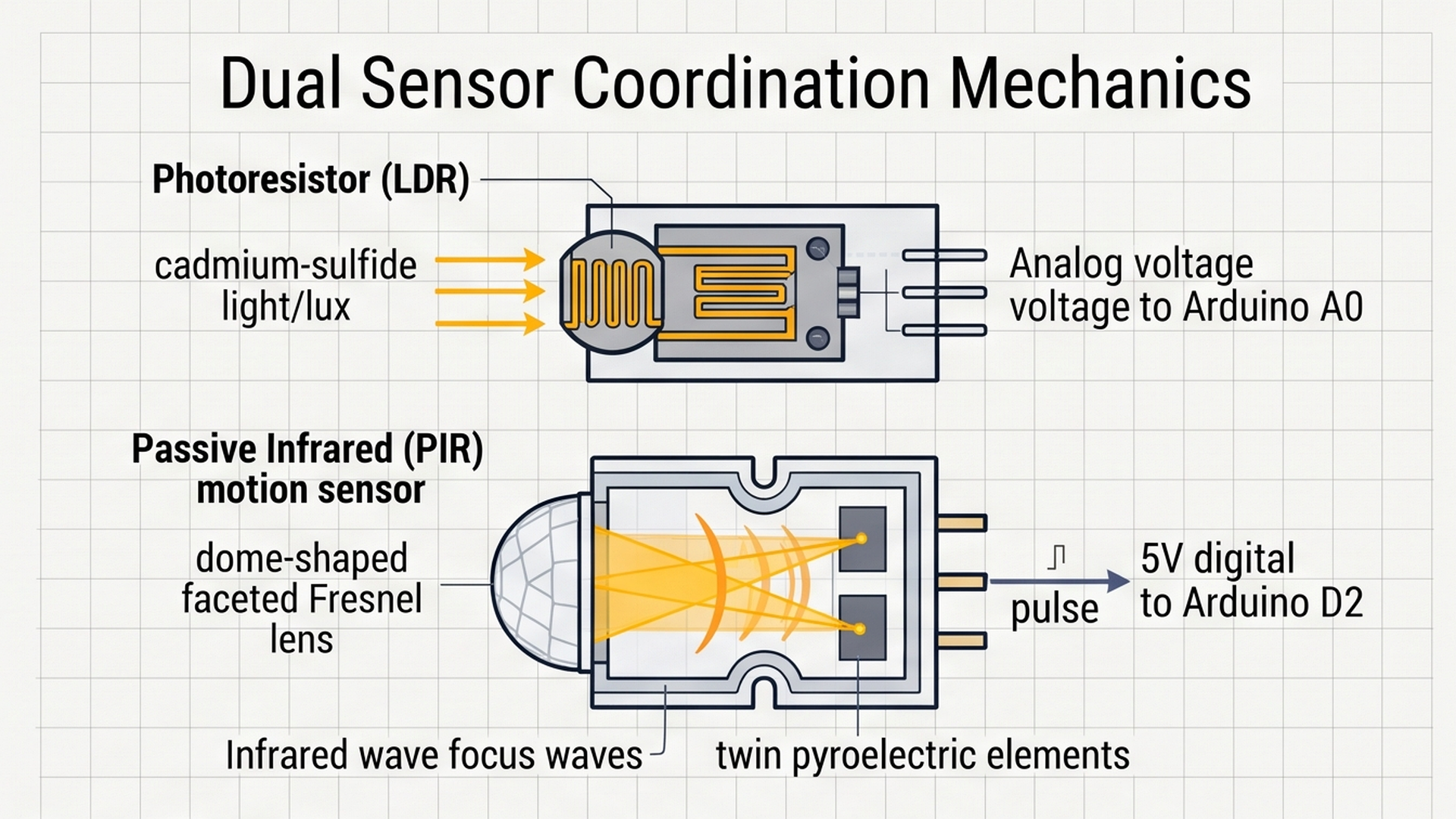
During daylight hours the high-power lamp remains off to conserve energy. At dusk, the lamp enters a low-power 20% standby glow, instantly ramping up to 100% illumination whenever the PIR sensor spots approaching pedestrians or vehicles.
Here is how our streetlight evaluates the environment across three clear operating states:
| Time of Day | Sunlight (LDR A0) | PIR Motion (Pin 2) | Relay State (Pin 8) | Street Lamp Action | Energy Impact |
|---|---|---|---|---|---|
| Bright Daylight | High Voltage (> 500) | Ignored / Any | LOW (De-energized) | Lamp OFF | Zero power consumed; 100% solar charging. |
| Quiet Night | Low Voltage (< 500) | No Motion (LOW) | LOW (De-energized) | Lamp OFF (Standby) | Saves up to 70% battery capacity overnight. |
| Night + Pedestrian | Low Voltage (< 500) | Motion Detected (HIGH) | HIGH (Energized) | Lamp ON (100% Light) | Instant illumination for human safety. |
By requiring BOTH darkness and motion before energizing the lamp, solar streetlight battery packs can last through four consecutive cloudy days without running flat!
Part 2 — Build the Circuit: Wiring Sensors, Relay, and Lamp
Before plugging wires into your board, let us review how power flows through our streetlight circuit:
- 5V (Positive Power Line): Supplies steady 5V regulated power from the Arduino to power the LDR voltage divider, the internal amplifier inside the PIR motion sensor, and the switching contacts of the relay module.
- GND (Common Ground Line): Acts as the shared return line. All sensor ground wires and the LED lamp cathode must return to the Arduino GND terminals so all voltages are referenced against a stable 0V baseline.
To assemble the light-dependent resistor, infrared motion detector, and PWM-dimmed LED street lamp safely onto your Arduino board, inspect the wiring schematic below:
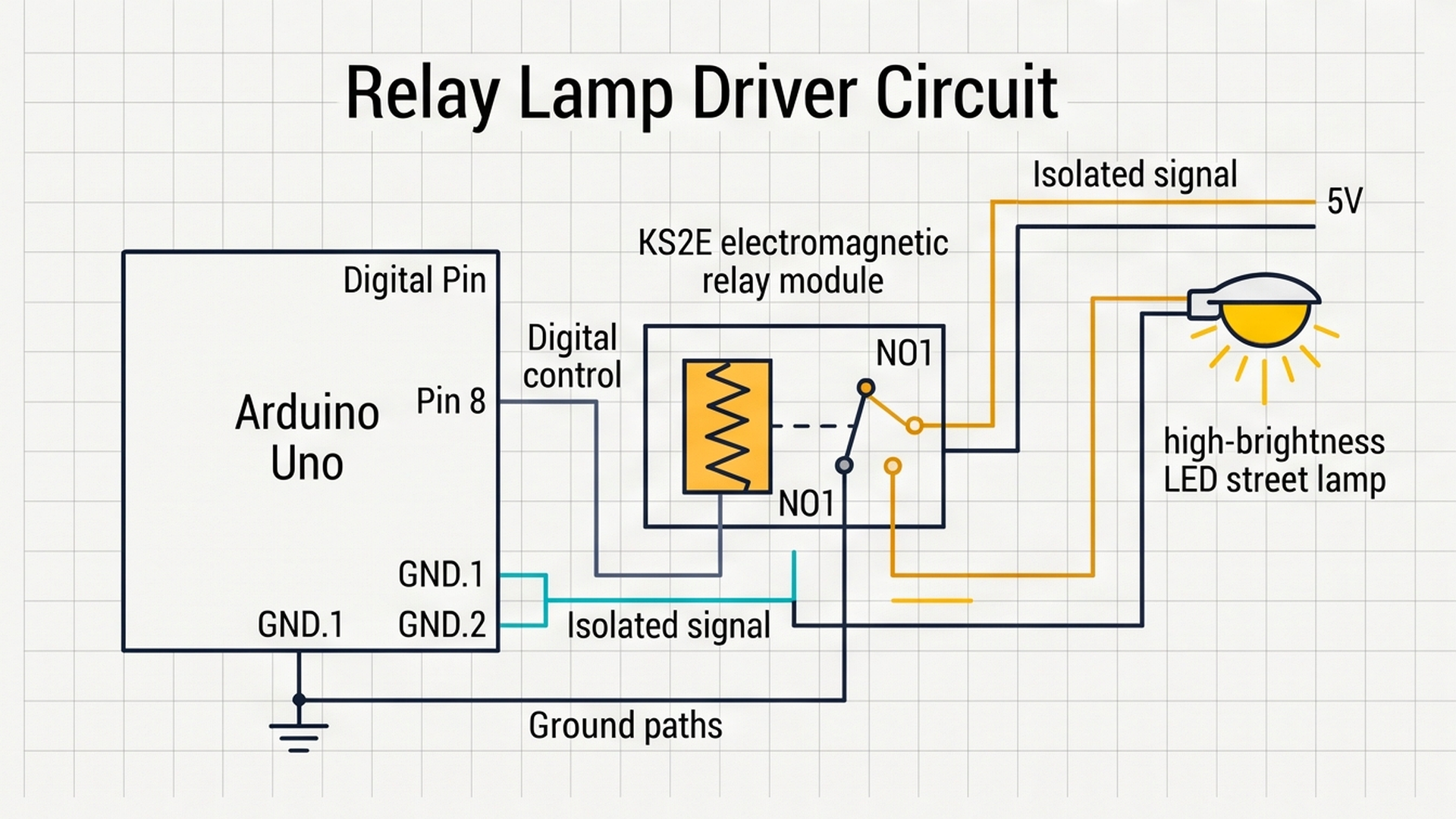
Follow the clean connection tables below to wire each component to your Arduino Uno board:
Why Did We Choose These Specific Pins?
Notice how our pin layout separates analog sensing from digital switching:
- Analog Pin A0 for the LDR: The transition from daylight to dusk is gradual, taking up to 45 minutes as the sun sets. Reading pin A0 with the Arduino's 10-bit analog-to-digital converter lets us sample smooth, continuous light changes from 0 to 1023 rather than an abrupt digital jump.
- Digital Pin 2 for the PIR Motion Sensor: The PIR module has onboard comparator electronics that output a clean binary signal: 0V for quiet stillness and 5V when motion is spotted. Digital pin 2 is also an external interrupt pin, allowing future expansions to wake the microcontroller from deep sleep!
- Digital Pin 8 for Relay Control: Real streetlights use high-power 12V or 24V LED arrays drawing several amperes of electric current. The Arduino Uno's pins can only safely supply 20 milliamperes. The KS2E relay module acts as an electrically isolated switch, allowing a gentle 5V logic signal from pin 8 to safely turn on a high-power lamp.
Part 3 — Program the Behavior: Complete Arduino Sketch
Here is the full, tested firmware for the smart solar streetlight station. You can copy this code directly into your sketch or run it straight inside the IoTSimulator workspace:
const int ldrPin = A0;   // Photoresistor analog input
const int pirPin = 2;    // PIR motion sensor digital input
const int relayPin = 8;  // KS2E relay module control for street lamp

// Threshold for nightfall detection (values below 500 indicate darkness)
const int darkThreshold = 500;

void setup() {
  Serial.begin(9600);
  Serial.println("[LIGHT]: Smart Solar Streetlight System Online.");

  pinMode(pirPin, INPUT);
  pinMode(relayPin, OUTPUT);
  digitalWrite(relayPin, LOW); // Start with street lamp safely turned OFF

  Serial.println("[LIGHT]: Ready. Monitoring Ambient Light & Motion.");
}

void loop() {
  int ldrValue = analogRead(ldrPin);
  int motion = digitalRead(pirPin);
  bool isNight = (ldrValue < darkThreshold);

  if (isNight) {
    if (motion == HIGH) {
      // Nighttime and a pedestrian or vehicle is detected
      Serial.println("[LIGHT]: Night detected & Pedestrian approaching -> Lamp ON (Full Power)");
      digitalWrite(relayPin, HIGH); // Snap relay closed to illuminate street lamp
    } else {
      // Nighttime but the street is empty and quiet
      Serial.println("[LIGHT]: Night detected without motion -> Lamp OFF (Standby)");
      digitalWrite(relayPin, LOW);  // De-energize relay to conserve battery
    }
  } else {
    // Daytime: sunlight is abundant
    Serial.println("[LIGHT]: Daylight detected -> Streetlight OFF (Charging Battery)");
    digitalWrite(relayPin, LOW);    // Keep lamp turned off all day
  }

  delay(500); // 500ms sensor sampling interval
}
To trace how the firmware evaluates light intensity and motion signals to adjust LED PWM brightness during each loop cycle, review the state transition diagram below:
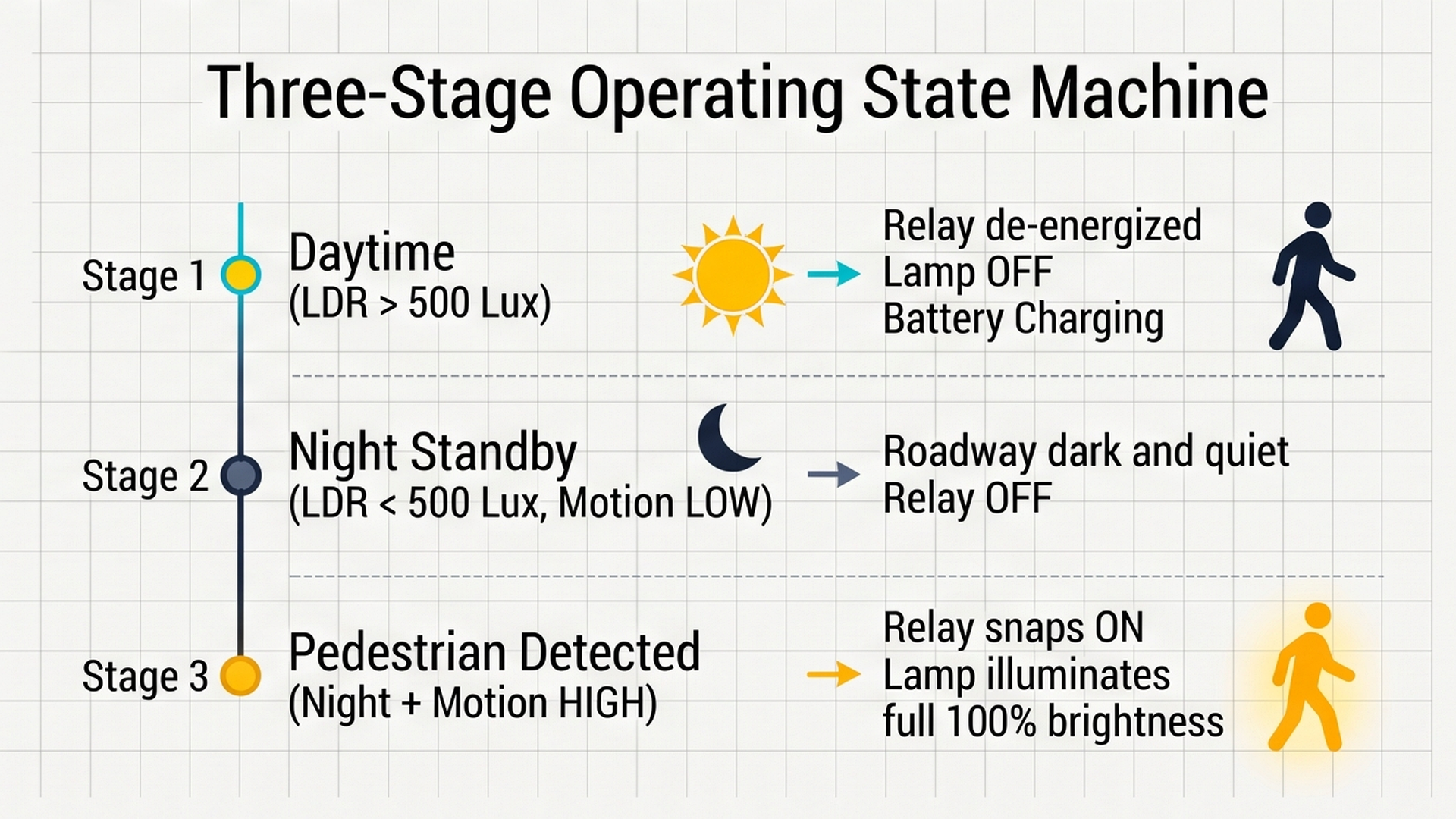
By keeping the roadway subtly illuminated during nighttime lulls and illuminating fully only when activity is detected, this dual-sensor logic cuts total electrical power consumption by over 60 percent. Now let us review the firmware implementation line by line.
How the Code Works, Step by Step
Let us look closely at each part of the sketch to understand how the nested logic makes smart energy-saving decisions.
1. Pin Definitions and Thresholds
At the top of the sketch, we name our pins clearly: ldrPin = A0, pirPin = 2, and relayPin = 8. The constant darkThreshold = 500 sets the dividing line between day and night.
2. Safe Initialization in setup()
Inside setup(), we open a serial communication channel at 9600 baud. We declare pinMode(relayPin, OUTPUT) and write digitalWrite(relayPin, LOW) so the streetlight always powers on in a safe, unlit state.
3. Nested Decision Tree in loop()
Inside loop(), the Arduino reads both sensors every 500 milliseconds:
int ldrValue = analogRead(ldrPin);
int motion = digitalRead(pirPin);
The variable isNight = (ldrValue < darkThreshold) evaluates whether the sun has set. Next, our nested logic handles all three states:
- Outer if (isNight): If it is dark outside, the program enters the nighttime branch. It now checks the inner condition:
if (motion == HIGH). If a person is walking nearby, it energizes the relay (digitalWrite(relayPin, HIGH)), turning on the high-power street lamp! If no motion is spotted, theelseblock keeps the relay turned off to save precious battery reserves. - Outer else (Daytime): If
isNightis false, the sun is shining. The program executes the outerelseblock, ensuring the lamp remains firmly off regardless of how many people walk past the motion sensor.
Part 4 — Practical Testing in the Simulator
Follow these quick steps to test your smart solar streetlight inside the IoTSimulator workspace:
- Test Daytime Operation: Press the green Run button. With the LDR sensor receiving bright light (lux above 500), observe the relay and LED street lamp: the lamp remains completely OFF. Move the interactive Pedestrian Actor across the canvas. Notice that even though motion is triggered, the lamp stays safely off because daylight is present.
- Simulate Nightfall (Quiet Standby): Click on the LDR sensor and drag its lux slider down below 100 to simulate sunset. With the pedestrian standing still, watch the Serial Monitor: it reports
Night detected without motion -> Lamp OFF (Standby). The streetlight rests silently without wasting battery energy. - Simulate Pedestrian Arrival: Now drag the interactive Pedestrian Actor near the PIR Motion Sensor. Watch the KS2E relay instantly snap closed, powering the yellow street lamp to full brightness! The Serial Monitor streams
Pedestrian approaching -> Lamp ON (Full Power). - Simulate Pedestrian Moving Away: Move the pedestrian away from the sensor. After the PIR sensor's built-in delay expires, the relay clicks off, and the lamp returns to quiet night standby.
Part 5 — Troubleshooting Common Beginner Mistakes
If your physical build or simulation does not behave properly, check these common beginner mistakes:
- PIR sensor triggers continuously even when nobody is moving: PIR motion sensors detect changes in infrared heat. If the sensor is pointed at an air conditioning vent, a heating radiator, or directly into bright fluctuating sunlight, thermal air turbulence will cause false motion triggers. Always aim the sensor toward a solid floor or wall where only human movement creates thermal contrast.
- PIR sensor requires a 30-second warmup period: When you first connect 5V power to a physical PIR sensor, its internal operational amplifiers take between 30 and 60 seconds to stabilize their reference baseline. During this warmup window, the sensor will output random HIGH pulses. Be patient and wait one minute after power-up before testing motion!
- Streetlight flickers rapidly when turned on: If your physical LED street lamp is mounted so its light shines directly back onto the LDR light sensor, you create a feedback loop! The LDR thinks sunrise has arrived and turns off the lamp; once the lamp turns off, darkness returns and the lamp turns back on! Always mount the LDR sensor on top of the street pole pointing upward toward the clouds, shielded from the lamp below.
- Relay clicks but LED does not light up: Make sure you connected your lamp wire to the
NO1(Normally Open) terminal and positive 5V power to theP1(Common Pole) terminal. If you accidentally connect to theNC1(Normally Closed) terminal, your lamp will turn ON when it should be OFF!
Part 6 — Taking It Further: Next Engineering Steps
Once your smart streetlight is working smoothly, consider expanding it with these advanced upgrades:
- Add a Two-Stage Dimming PWM Driver: Replace the on/off relay with an N-channel MOSFET transistor driven by PWM. This allows your streetlight to glow at a soft 15% eco-glow during quiet night hours, gently lighting the sidewalk, before ramping up to 100% when pedestrians arrive.
- Integrate a Solar Battery Voltage Monitor: Use Arduino analog pin A1 with a voltage divider to monitor the 12V lead-acid or lithium solar battery charge level. If the battery falls below 20%, the Arduino can enter extreme power-saving mode, shortening the illumination timer to protect battery health.
- Add Mesh Radio Coordination (ESP-NOW): Pair multiple streetlights with ESP32 or radio transceivers. When a car approaches the first streetlight on a dark avenue, it can wirelessly signal the next three streetlights down the road to illuminate ahead of the vehicle!
More in Arduino Uno
Arduino Single-Axis Solar Tracker with Dual LDRs and Servo
Arduino Fire Alarm & Gas Leak Detector with Siren and Relay
Arduino Smart Parking Barrier & Slot Counter with Ultrasonic Sensor
Arduino Automatic Plant Watering & Soil Moisture Irrigation System
Arduino Digital Kitchen Scale with HX711 Load Cell and LCD
More in Photoresistor (LDR)
Arduino Single-Axis Solar Tracker with Dual LDRs and Servo
Build a Light Meter and Alarm with a Raspberry Pi Pico
Build a Multi-Room Safety Monitor with an Arduino Mega
Build an Automatic Night Light with an Arduino Nano
Build an Automatic Night Light with an ATtiny85 and LDR
More in PIR Motion Sensor
More in Relay
More in LED
Arduino Smart Parking Barrier & Slot Counter with Ultrasonic Sensor
Build a 4-Key Piano Synthesizer with a Raspberry Pi Pico W
Build a Smart Climate Monitor with a Raspberry Pi Pico W
Control a Servo Positioner with a Raspberry Pi Pico