Arduino Single-Axis Solar Tracker with Dual LDRs and Servo

Live project track
Have you ever noticed how a sunflower in a garden turns its face toward the morning sunrise and slowly tracks the sun all the way to evening? In nature, plants do this naturally because facing the sun directly captures the most light possible.
Standard solar panels on house rooftops are bolted down at one fixed angle. When the morning sun rises or the evening sun sets, light hits the panel at a steep, glancing angle. Because of this, fixed panels lose up to 40% of the clean electricity they could make each day.
In this project, you will build a smart single-axis solar tracker with an Arduino Uno, two light-detecting photoresistors (LDRs), an SG90 micro servo motor, and an I2C LCD screen. The core concept to learn is simple: when you place a small wall between two light sensors, moving sunlight casts a shadow on one sensor. The Arduino measures that difference and steers the servo until both sensors receive equal light again.
The visual overview below compares the natural heliotropic behavior of sunflowers with our electronic dual-sensor tracking system:
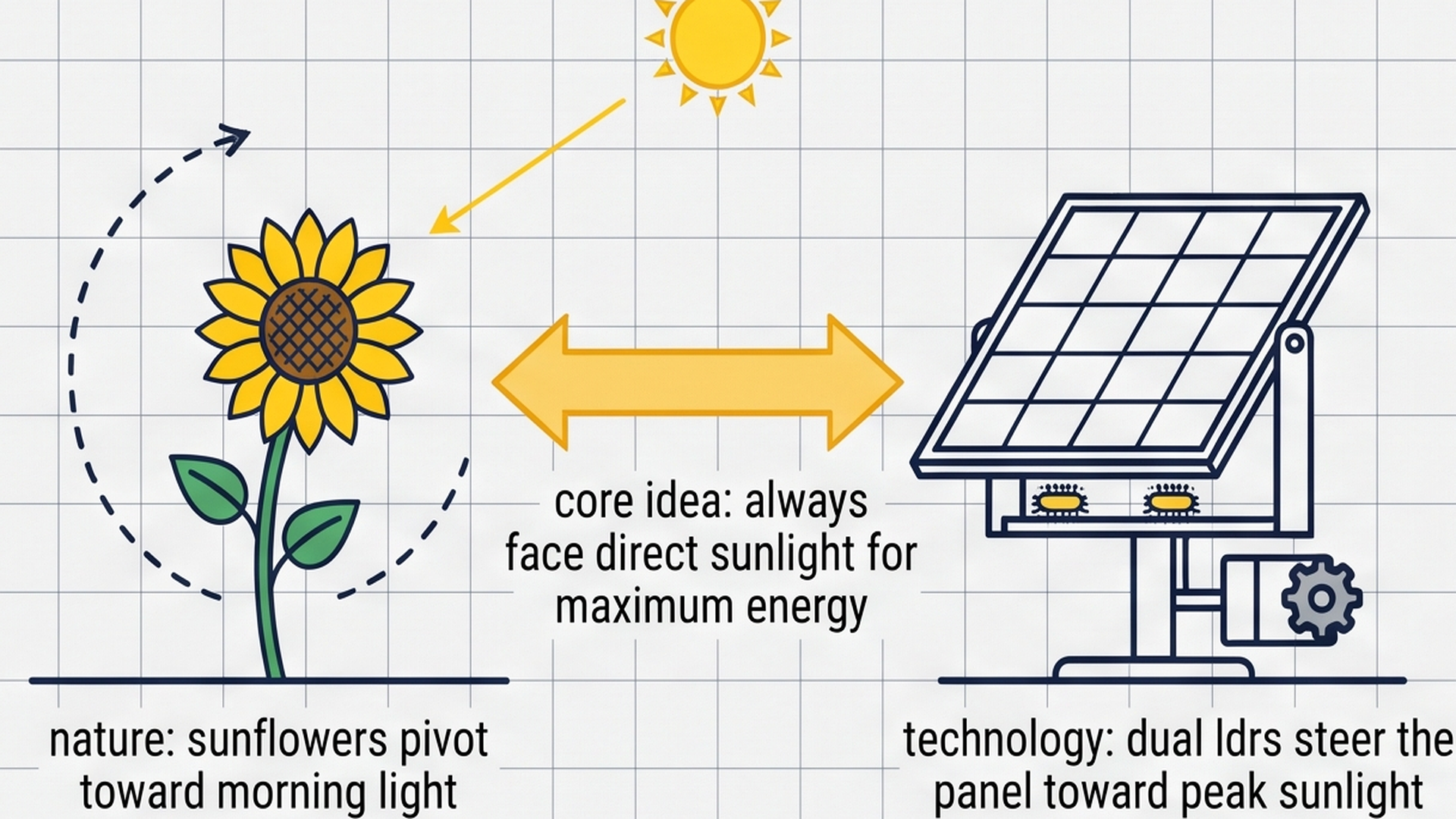
Just as a growing sunflower uses auxin plant hormones to turn its petals toward the morning sun, our automated tracker uses the electrical voltage difference between two light sensors to aim the solar panel squarely at the brightest point in the sky. In the following section, we explore how this steering signal is generated.
How Sunlight Creates a Steering Signal
Think of balancing a seesaw on a playground. If two children of the same weight sit on both ends, the seesaw stays level. But if one child is heavier, that side drops down. To level the seesaw again, you have to push back up until both sides match.
Our solar tracker uses this exact balancing idea. Two Light Dependent Resistors (called LDRs for short) sit side by side on a small pivot frame. Between them sits a thin, opaque wall made of cardboard or plastic.
When the sun is straight overhead at noon, light shines evenly on both sensors. Both LDRs send nearly identical voltage readings to the Arduino. But when the sun shifts to the east or west, the center wall casts a dark shadow over one of the sensors.
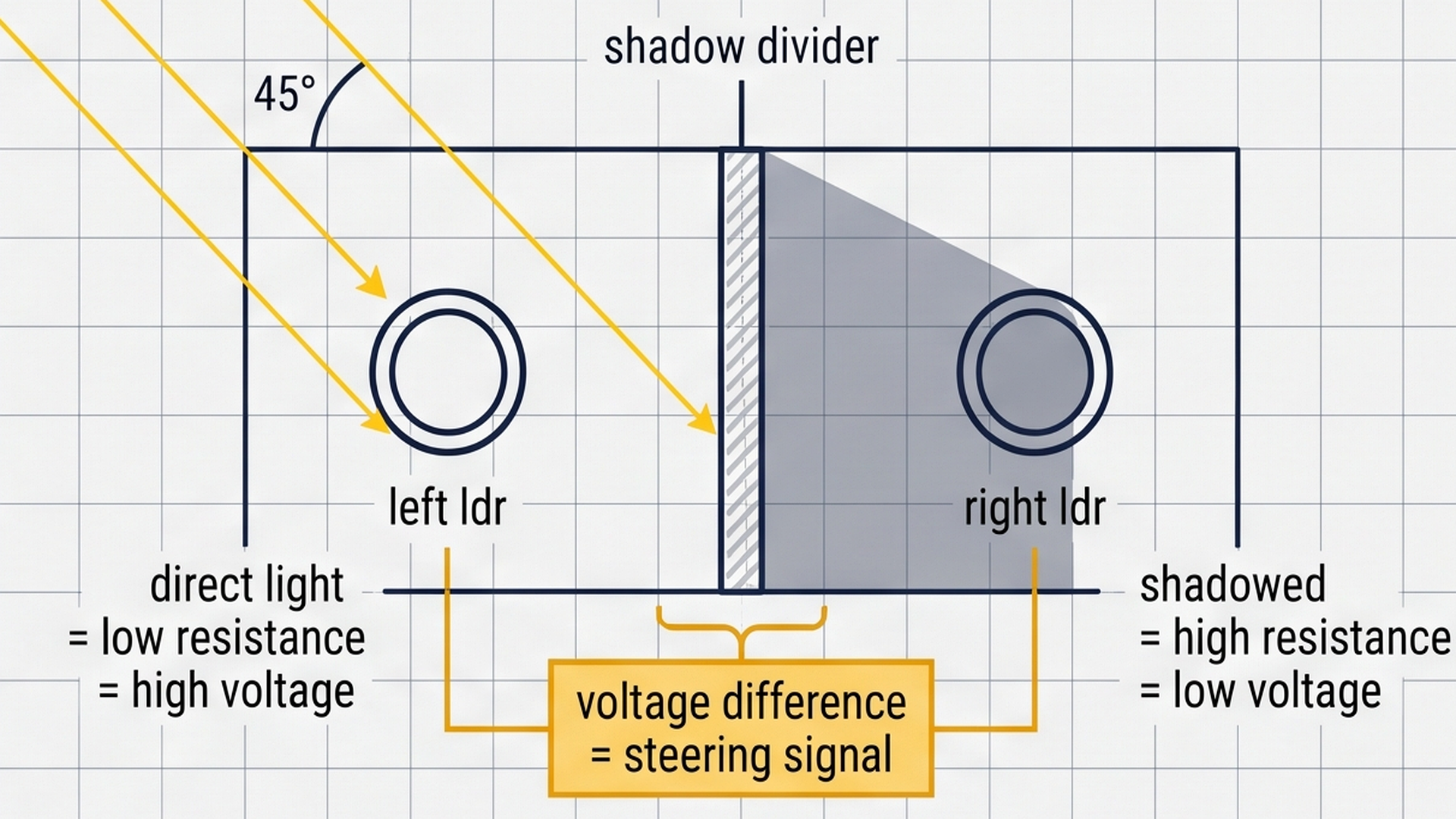
An LDR changes its electrical resistance based on how much light hits its surface. When bright light shines on an LDR, electricity flows through it easily, producing a high analog voltage. When shade or darkness covers the LDR, its resistance shoots up, producing a lower voltage.
By comparing the left sensor reading with the right sensor reading, the Arduino knows instantly which way the sun has moved:
| Sun Position | Left LDR Voltage | Right LDR Voltage | Difference (Left - Right) | Servo Motor Action |
|---|---|---|---|---|
| Sun to the Left (East) | High (~ 850 counts) | Shadowed (~ 200 counts) | Positive (+650) | Pivots Left toward sunrise |
| Directly Overhead (Noon) | Balanced (~ 850 counts) | Balanced (~ 850 counts) | Near Zero (±15) | Holds still (Motor rests) |
| Sun to the Right (West) | Shadowed (~ 200 counts) | High (~ 850 counts) | Negative (-650) | Pivots Right toward sunset |
The opaque wall between the sensors is essential. Without a barrier to cast a shadow, both sensors would see similar ambient light, and the tracker would not know which way to steer.
The Arduino converts the analog voltage from each sensor into a digital number between 0 and 1023. Subtracting the right reading from the left reading gives a single number called diff. If diff is positive, the left side is brighter. If diff is negative, the right side is brighter.
Preventing Motor Jitter with a Deadband Zone
If you tell a servo motor to move on every single tiny number change, it will never stop buzzing. Natural sunlight is never 100% steady. Small tree leaves, moving clouds, and electronic noise cause sensor readings to flicker by a few numbers every millisecond.
If the motor tries to react to every flicker, the tiny plastic gears inside the SG90 servo will grind, heat up, and wear out quickly. It also wastes precious battery power that the solar panel is trying to collect.
To keep the motor quiet and healthy, we add a simple rule in the code called a deadband (or tolerance zone). We tell the Arduino: 'Do not move the motor unless the light difference is bigger than 35 counts.'
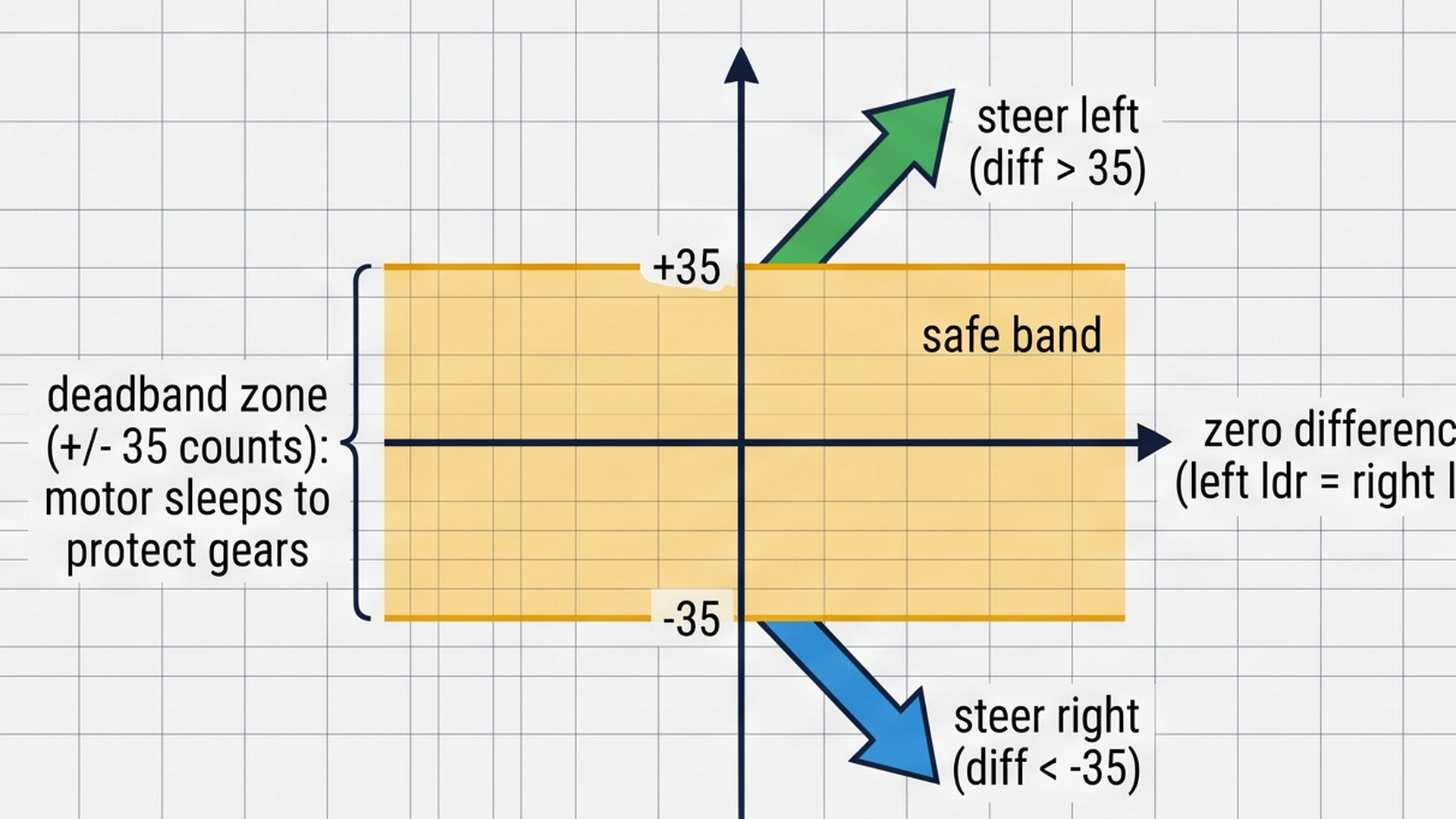
When the light difference is small (between -35 and +35), the Arduino leaves the servo in peace. The motor shuts off its driving pulse and stays quiet. Only when the sun moves far enough across the sky to create a clear shadow does the Arduino step the motor 2 degrees toward the light.
- Difference larger than +35: The left sensor has clear sunlight. The servo takes a small step to the left.
- Difference between -35 and +35: The tracker is facing the sun. The servo holds its position silently.
- Difference smaller than -35: The right sensor has clear sunlight. The servo takes a small step to the right.
Steering the Servo Across a 180-Degree Arc
An SG90 micro servo is a motor that can turn to an exact angle between 0 degrees and 180 degrees. Unlike a toy DC motor that spins continuously, a servo motor uses an internal potentiometer and control circuit to hold whatever position you tell it to hold.
We map the 180-degree sweep of the servo directly to the sun's path across the sky:
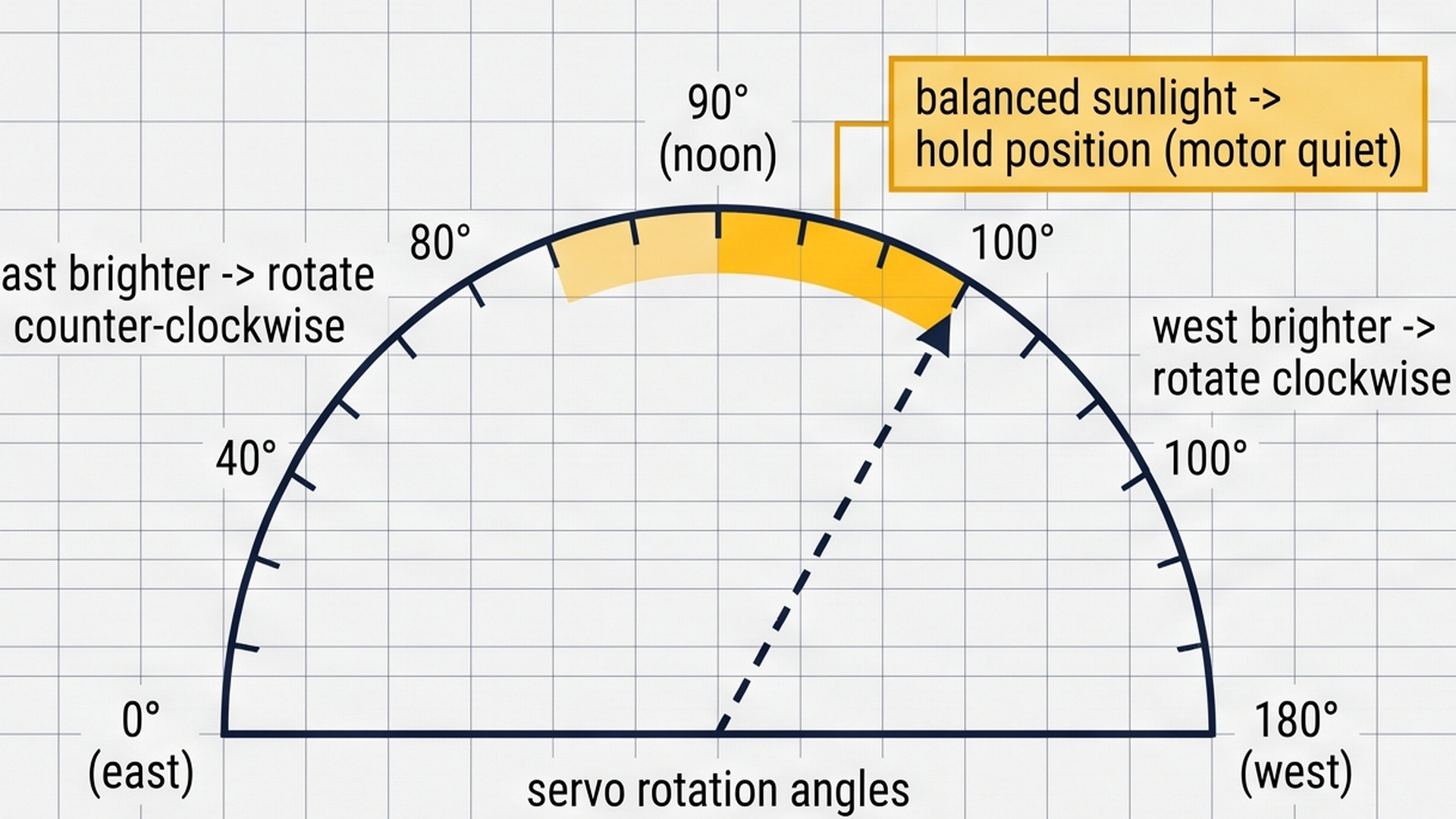
When the system turns on in the morning, the servo starts at 90 degrees, pointing straight up. As the morning sun rises in the east, the left sensor gets bright, and the code steps the angle down toward 10 degrees. By midday, the sun moves overhead, bringing the servo back to 90 degrees. In late afternoon, the right sensor catches the sunset, nudging the servo toward 170 degrees.
We also add physical angle limits in the code. We never tell the servo to go below 10 degrees or above 170 degrees. This prevents the motor horn from hitting the workbench frame or straining its plastic gears.
Building the Solar Tracker Circuit
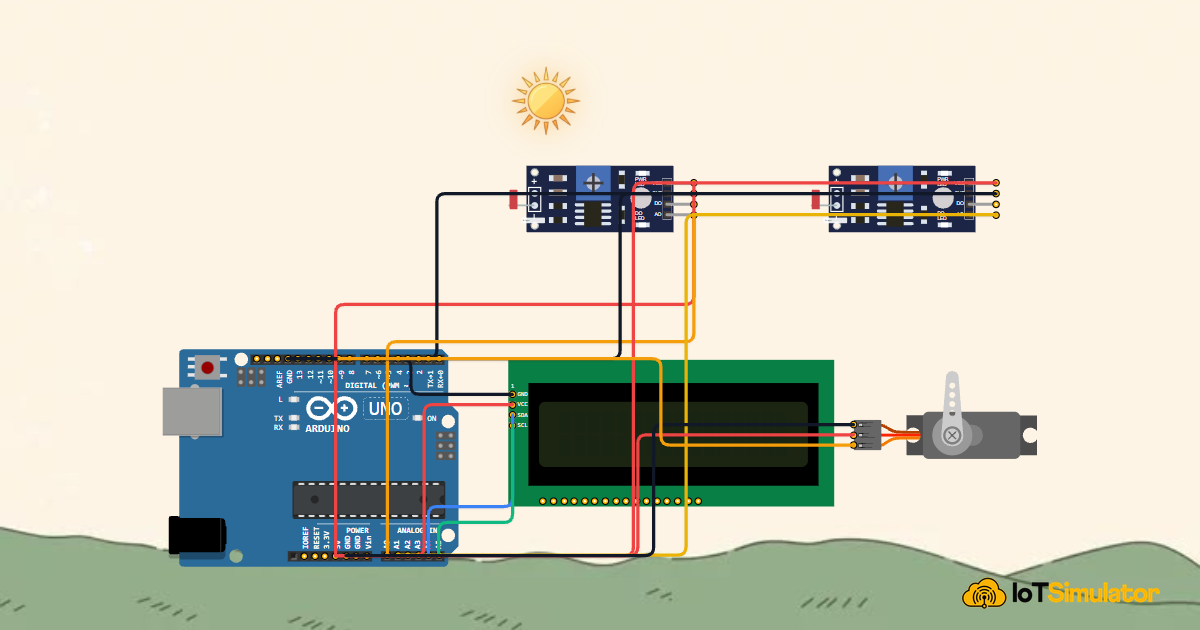
Every electronic project needs a clear power plan. The Arduino Uno board gets 5V power from your computer's USB cable. It then shares that power with all parts through its 5V and GND pins.
5V is the positive power supply pin. Think of it like the positive terminal of a battery where clean electrical current comes from. GND stands for Ground. It is the return path that electricity needs to complete its journey back to the board. Every sensor, display, and motor must share this common ground so they all agree on what zero volts means.
Here is how the four main parts connect to the Arduino Uno:
If you build this with loose LDR components instead of pre-assembled sensor modules, you must add a 10k ohm resistor in series with each LDR to form a voltage divider. Pre-built sensor boards already have this resistor on board.
The Complete Solar Tracker Sketch
Here is the full Arduino sketch. It reads both light sensors, computes the difference, updates the LCD screen, and steps the servo motor toward the light:
#include <Wire.h>
#include <LiquidCrystal_I2C.h>
#include <Servo.h>

const int ldrLeftPin = A0;
const int ldrRightPin = A1;
const int servoPin = 9;

LiquidCrystal_I2C lcd(0x27, 16, 2);
Servo trackerServo;

int currentAngle = 90;
const int tolerance = 35;
unsigned long lastTelemetryTime = 0;

void setup() {
  Serial.begin(9600);
  Serial.println("[TRACKER]: 1-Axis Solar Tracker Initializing...");

  trackerServo.attach(servoPin);
  trackerServo.write(currentAngle);

  lcd.init();
  lcd.backlight();
  lcd.setCursor(0, 0);
  lcd.print(" SOLAR TRACKER  ");
  lcd.setCursor(0, 1);
  lcd.print(" SYSTEM ACTIVE  ");
  delay(80);
  lcd.clear();

  Serial.println("[TRACKER]: Ready. Tracking Optimal Light Angle.");
}

void loop() {
  unsigned long currentMillis = millis();

  int leftVal = analogRead(ldrLeftPin);
  int rightVal = analogRead(ldrRightPin);
  int diff = leftVal - rightVal;

  // Kemudikan servo menuju intensitas cahaya terkuat
  if (diff > tolerance && currentAngle > 10) {
    currentAngle -= 2;
    trackerServo.write(currentAngle);
  } else if (diff < -tolerance && currentAngle < 170) {
    currentAngle += 2;
    trackerServo.write(currentAngle);
  }

  // Update tampilan LCD secara responsif
  lcd.setCursor(0, 0);
  lcd.print("L:");
  lcd.print(leftVal);
  lcd.print(" R:");
  lcd.print(rightVal);
  lcd.print("       ");

  lcd.setCursor(0, 1);
  lcd.print("SERVO: ");
  lcd.print(currentAngle);
  lcd.print((char)223); // Simbol derajat
  if (diff > tolerance) {
    lcd.print(" [LEFT] ");
  } else if (diff < -tolerance) {
    lcd.print(" [RIGHT]");
  } else {
    lcd.print(" [LOCK] ");
  }

  // Stream Telemetry
  if (currentMillis - lastTelemetryTime >= 1000) {
    lastTelemetryTime = currentMillis;
    Serial.print("[Telemetry]: LDR_Left=");
    Serial.print(leftVal);
    Serial.print(" | LDR_Right=");
    Serial.print(rightVal);
    Serial.print(" | Diff=");
    Serial.print(diff);
    Serial.print(" | ServoAngle=");
    Serial.print(currentAngle);
    Serial.print(" | Tracking=");
    Serial.println(abs(diff) > tolerance ? "ACTIVE" : "LOCKED");
  }

  delay(50);
}
How the Code Works, Step by Step
Let us look at each part of the sketch so you understand exactly what the code is doing.
Including Libraries and Naming Pins
At the very top of the sketch, we include three libraries that give the Arduino extra capabilities:
#include <Wire.h>
#include <LiquidCrystal_I2C.h>
#include <Servo.h>

const int ldrLeftPin = A0;
const int ldrRightPin = A1;
const int servoPin = 9;

LiquidCrystal_I2C lcd(0x27, 16, 2);
Servo trackerServo;
Wire.h handles the I2C communication protocol. LiquidCrystal_I2C.h lets us talk to the LCD screen using just two wires instead of sixteen. Servo.h generates the microsecond timing pulses that control the servo motor.
We also give friendly names to the pins. ldrLeftPin is pin A0, ldrRightPin is pin A1, and servoPin is digital pin 9. Giving pins names makes the sketch much easier to read than using raw numbers throughout the code.
Setting Starting Values and Tolerance
Next, we declare the variables that store the tracker's status:
int currentAngle = 90;
const int tolerance = 35;
unsigned long lastTelemetryTime = 0;
currentAngle = 90 starts the tracker pointing straight up toward the sky. tolerance = 35 sets our deadband buffer so the motor only moves when sunlight is noticeably brighter on one side.
lastTelemetryTime stores a timestamp using the Arduino's built-in millisecond clock, allowing us to send diagnostic text to the computer once per second without freezing the rest of the sketch.
Setup Prepares Hardware on Startup
The setup() function runs once as soon as the Arduino receives power:
void setup() {
  Serial.begin(9600);
  trackerServo.attach(servoPin);
  trackerServo.write(currentAngle);

  lcd.init();
  lcd.backlight();
  lcd.setCursor(0, 0);
  lcd.print(" SOLAR TRACKER  ");
  lcd.setCursor(0, 1);
  lcd.print(" SYSTEM ACTIVE  ");
  delay(80);
  lcd.clear();
}
trackerServo.attach(servoPin) tells the Arduino to output servo signals on pin 9. trackerServo.write(currentAngle) moves the servo arm to its neutral 90-degree position right away.
Next, lcd.init() wakes up the LCD screen controller, and lcd.backlight() turns on its blue LED backlight so you can read the screen clearly. A brief greeting confirms that the system is ready to track light.
Reading Sensors and Calculating Light Difference
The loop() function runs over and over again, hundreds of times every second:
int leftVal = analogRead(ldrLeftPin);
int rightVal = analogRead(ldrRightPin);
int diff = leftVal - rightVal;
analogRead() checks the voltage on the sensor pin and turns it into a number between 0 (completely dark) and 1023 (very bright). We store both numbers in leftVal and rightVal.
Subtracting right from left produces diff. If both sensors see equal light (for example, 850 on the left and 845 on the right), diff is only 5. Since 5 is smaller than our tolerance of 35, the code knows the panel is already well-aligned.
Steering the Servo Motor
When the light difference is bigger than the tolerance, the motor takes action:
if (diff > tolerance && currentAngle > 10) {
  currentAngle -= 2;
  trackerServo.write(currentAngle);
} else if (diff < -tolerance && currentAngle < 170) {
  currentAngle += 2;
  trackerServo.write(currentAngle);
}
If diff > tolerance, the left side is brighter. The code subtracts 2 degrees from currentAngle, nudging the panel to the left. The condition currentAngle > 10 acts as a safety stop so the motor never twists past its physical limit.
If diff < -tolerance, the right side is brighter. The code adds 2 degrees to currentAngle, turning the panel to the right. Taking small 2-degree steps ensures smooth, gentle movement that looks realistic and prevents mechanical strain.
Updating the LCD Dashboard
The LCD screen provides continuous visual feedback without needing a computer attached:
lcd.setCursor(0, 0);
lcd.print("L:");
lcd.print(leftVal);
lcd.print(" R:");
lcd.print(rightVal);

lcd.setCursor(0, 1);
lcd.print("SERVO: ");
lcd.print(currentAngle);
lcd.print((char)223); // Degree symbol
Row 0 displays both live sensor values side by side. Row 1 shows the current servo angle followed by a small degree symbol (character code 223).
Next to the angle, the screen prints a clear status tag: [LEFT] when steering left, [RIGHT] when steering right, and [LOCK] when sunlight is balanced and the tracker is sitting happily on target.
Testing Your Tracker in the Simulator
You can test this entire project inside the IoTSimulator workspace right in your browser:
- Step 1: Click the green Run button in the workspace toolbar. You will see the LCD light up with the boot message and the servo arm move straight up to 90 degrees.
- Step 2: Look at the top of the canvas for the Sunlight Actor. Drag the sun slider toward the left side. Notice the left LDR value climb while the right value drops.
- Step 3: Watch the LCD switch from
[LOCK]to[LEFT]. The servo motor will smoothly step downward toward 10 degrees to follow the light. - Step 4: Now drag the sun over to the right side. The LCD shows
[RIGHT], and the servo pivots all the way across to the right until both values match.
Troubleshooting Common Mistakes
If you build this project and the tracker behaves strangely, check these common issues first:
- Motor turns away from the light instead of toward it: Your sensor wires are swapped. Either swap the A0 and A1 wires on the board, or swap
ldrLeftPinandldrRightPinin the code. - Motor twitches and never stops humming: Your
tolerancevalue is too low. Increasetolerancefrom 35 to 50 in the sketch to give the sensors a wider resting window. - LCD lights up blue but shows no text: The I2C address might be different on your physical module. Most modules use address
0x27, but some use0x3F. You can scan for the address with a quick I2C scanner sketch. - Servo resets or the board disconnects: A servo motor draws a burst of electrical current when it starts moving. If your USB port cannot supply enough current, add a 100uF or 470uF electrolytic capacitor across the servo's 5V and GND pins to smooth out power dips.
Taking Your Tracker Further
Once you have mastered this single-axis tracker, here are three exciting ways to expand your project:
- Upgrade to Dual-Axis Tracking: Add two more LDRs (Top and Bottom) and a second servo motor. Your tracker will now follow the sun both horizontally across the horizon and vertically up into the summer sky.
- Add a Solar Panel Voltage Sensor: Connect a real small solar cell to analog pin A2 through a voltage divider. Show both the servo angle and the real generated milliwatts on the LCD so you can measure how much extra energy tracking gives you.
- Nighttime Return to Dawn: Add an
ifcondition that detects when both sensors read deep darkness (night). The tracker can automatically pivot all the way back to 10 degrees (East) so it is already waiting for tomorrow's sunrise.
More in Arduino Uno
Arduino Fire Alarm & Gas Leak Detector with Siren and Relay
Arduino Smart Parking Barrier & Slot Counter with Ultrasonic Sensor
Arduino Automatic Plant Watering & Soil Moisture Irrigation System
Arduino Digital Kitchen Scale with HX711 Load Cell and LCD
Arduino Flood Early Warning & Water Level Monitor with Ultrasonic
More in Photoresistor (LDR)
Arduino Smart Solar Streetlight with LDR and PIR Motion Sensor
Build a Light Meter and Alarm with a Raspberry Pi Pico
Build a Multi-Room Safety Monitor with an Arduino Mega
Build an Automatic Night Light with an Arduino Nano
Build an Automatic Night Light with an ATtiny85 and LDR
More in LCD1602
Arduino Fire Alarm & Gas Leak Detector with Siren and Relay
Arduino Smart Parking Barrier & Slot Counter with Ultrasonic Sensor
Arduino Automatic Plant Watering & Soil Moisture Irrigation System
Arduino Digital Kitchen Scale with HX711 Load Cell and LCD
Build a Keypad Door Lock with an Arduino Mega
More in Servo Motor
Arduino Smart Parking Barrier & Slot Counter with Ultrasonic Sensor
Arduino Touchless Smart Dustbin with Ultrasonic Sensor and Servo
Control a Servo Positioner with a Raspberry Pi Pico
Control a Pan and Tilt Servo with an Arduino Mega and Joystick