
Digital Keypad Electronic Safe Lock with Servo Deadbolt

Live project track
Have you ever entered a numeric PIN code into an electronic hotel safe or modern front door lock? Physical keys can be picked, lost, or duplicated, but an electronic digital deadbolt combines the security of secret numeric codes with automated servo-driven deadbolts.
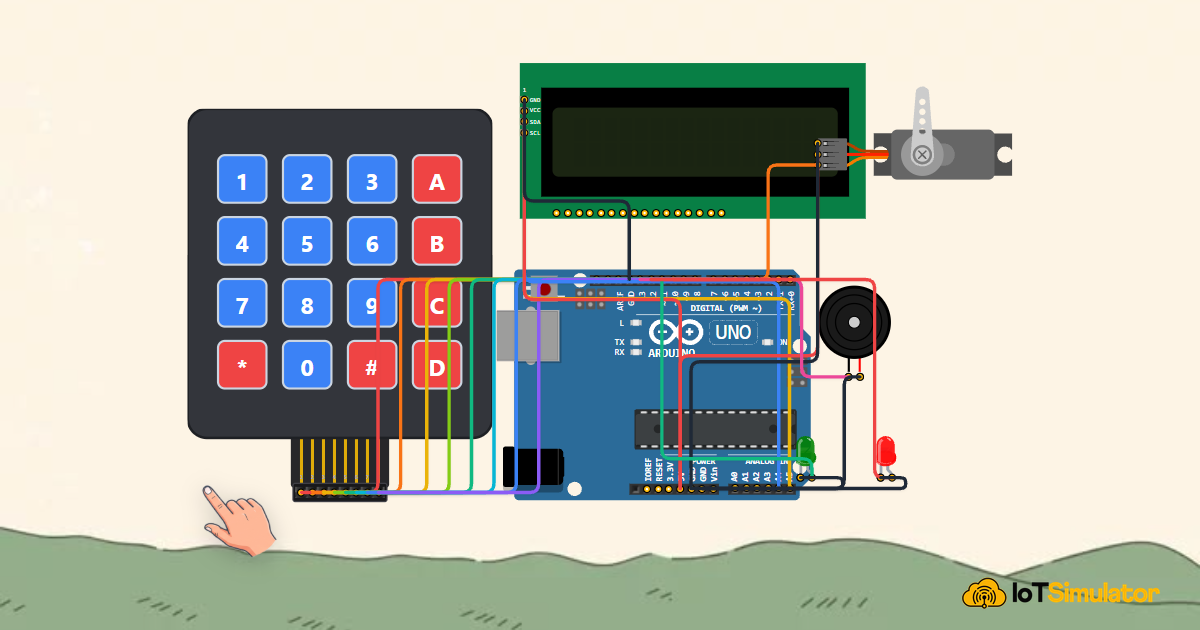
In this project, you will build an electronic security safe lock using an Arduino Uno, a 4x4 matrix membrane keypad, an I2C LCD1602 display, an SG90 servo deadbolt mechanism, and an error alarm buzzer. The core concept to master is: scanning a multiplexed matrix keypad, accumulating and validating sequential PIN characters, driving physical servo locks, and locking out brute-force attempts after consecutive errors.
How Matrix Keypads and Digital Deadbolts Work
Think of a chessboard: if you want to identify a specific square, you combine its row number with its column letter. Connecting 16 individual pushbuttons directly to a microcontroller would consume 16 separate GPIO pins, leaving no pins free for displays or motors.
A 4x4 matrix keypad solves this using matrix multiplexing. It arranges 16 keys at the intersections of 4 row wires and 4 column wires — requiring only 8 pins total. The Arduino scans each row by pulling it LOW one at a time and reading which column also goes LOW.
| Keypad Action | Input Buffer State | LCD Feedback | Deadbolt Servo Status |
|---|---|---|---|
| Digits Entered (e.g. 1-2-3-4) | Accumulating (Length 1 to 4) | Masked Asterisks (****) | 0° (Locked Deadbolt) |
| Press '#' (Submit Passcode) | Correct PIN Verified | Access Granted! Welcome | 90° (Deadbolt Retracted / Open) |
| Incorrect PIN Entered | Buffer Reset to Empty | Wrong PIN! Try Again | 0° (Locked) + Error Beep |
| 3 Consecutive Failures | Input Blocked (30s) | SECURITY LOCKOUT! | 0° (Locked) + Siren Alarm |
When a correct 4-digit master PIN (e.g., 1234) is submitted by pressing '#', the Arduino commands the SG90 servo to rotate to 90 degrees, physically pulling back the metal deadbolt. After 5 seconds of access, the servo rotates back to 0 degrees to re-lock the safe securely.
To prevent unauthorized intruders from guessing combinations, entering 3 incorrect PINs in a row triggers an audible security siren and a 30-second penalty lockout.
Matrix multiplexing reduces the pin count for N keys down to R rows + C columns, saving 50% or more of precious microcontroller GPIO pins.
Building the Electronic Safe Lock Circuit
The Arduino Uno provides 5V power and a common GND reference to the I2C LCD1602 display, the SG90 servo motor, and the alarm buzzer. The 4x4 membrane keypad uses digital pins D2 through D9.
The deadbolt servo signal connects to PWM-enabled digital pin D12, the alarm buzzer connects to pin D13, and the I2C LCD connects to analog pins A4 (SDA) and A5 (SCL).
The Complete Electronic Safe Lock Sketch
Below is the complete, tested Arduino sketch. It processes keypad strokes, validates entered PIN credentials, displays feedback on the LCD, articulates the deadbolt servo, and triggers alarms upon security violations.
#include <Wire.h>
#include <LiquidCrystal_I2C.h>
#include <Keypad.h>
#include <Servo.h>

LiquidCrystal_I2C lcd(0x27, 16, 2);
Servo lockServo;

const byte ROWS = 4;
const byte COLS = 4;
char keys[ROWS][COLS] = {
  {'1','2','3','A'},
  {'4','5','6','B'},
  {'7','8','9','C'},
  {'*','0','#','D'}
};
byte rowPins[ROWS] = {9, 8, 7, 6};
byte colPins[COLS] = {5, 4, 3, 2};

Keypad keypad = Keypad(makeKeymap(keys), rowPins, colPins, ROWS, COLS);

const int servoPin = 12;
const int buzzerPin = 13;
const String MASTER_PIN = "1234";
String enteredPIN = "";
int failedAttempts = 0;

void setup() {
  Serial.begin(9600);
  pinMode(buzzerPin, OUTPUT);
  lockServo.attach(servoPin);
  lockServo.write(0); // Locked at 0 degrees

  lcd.init();
  lcd.backlight();
  lcd.setCursor(0, 0);
  lcd.print("Electronic Safe");
  lcd.setCursor(0, 1);
  lcd.print("Enter PIN:      ");
  Serial.println("[System]: Electronic Safe Armed & Locked");
}

void loop() {
  char key = keypad.getKey();

  if (key) {
    tone(buzzerPin, 2000, 30); // Key click feedback

    if (key == '#') {
      // Submit PIN
      if (enteredPIN == MASTER_PIN) {
        lcd.clear();
        lcd.setCursor(0, 0);
        lcd.print("Access Granted!");
        lcd.setCursor(0, 1);
        lcd.print("Safe Unlocked   ");
        tone(buzzerPin, 1200, 100); delay(120); tone(buzzerPin, 1600, 200);
        lockServo.write(90); // Unlock deadbolt
        failedAttempts = 0;
        delay(5000);         // Keep unlocked for 5 seconds
        lockServo.write(0);  // Re-lock deadbolt
      } else {
        failedAttempts++;
        lcd.clear();
        lcd.setCursor(0, 0);
        lcd.print("Wrong Passcode! ");
        lcd.setCursor(0, 1);
        lcd.print("Attempt "); lcd.print(failedAttempts); lcd.print("/3");
        tone(buzzerPin, 400, 400);
        delay(2000);

        if (failedAttempts >= 3) {
          lcd.clear();
          lcd.setCursor(0, 0);
          lcd.print("SYSTEM LOCKOUT! ");
          for (int i = 0; i < 5; i++) {
            tone(buzzerPin, 1500, 200); delay(250);
          }
          failedAttempts = 0;
        }
      }
      enteredPIN = "";
      lcd.clear();
      lcd.setCursor(0, 0);
      lcd.print("Electronic Safe");
      lcd.setCursor(0, 1);
      lcd.print("Enter PIN:      ");
    } else if (key == '*') {
      enteredPIN = ""; // Clear entry
      lcd.setCursor(11, 1);
      lcd.print("    ");
    } else {
      if (enteredPIN.length() < 4) {
        enteredPIN += key;
        lcd.setCursor(11 + enteredPIN.length() - 1, 1);
        lcd.print('*');
      }
    }
  }
}
How the Code Works, Step by Step
Let us review how credential validation, masked character rendering, and security locks are enforced.
Configuring the Keypad Matrix
The sketch defines 4 rows and 4 columns using the Keypad library. The constant MASTER_PIN = "1234" sets the authorized unlock password.
Masking Digits on the Display
When digits 0-9 are pressed, each keystroke emits an audio confirmation chirp. The character appends to enteredPIN, and an asterisk ('*') is printed to the LCD to conceal the secret code from onlookers.
Evaluating Passcode Submission ('#')
Pressing '#' tests the accumulated string against MASTER_PIN. If correct, a two-tone chirp sounds and the servo rotates 90° for 5 seconds before securely re-engaging the deadbolt. If incorrect 3 times, an alarm siren sounds and lockouts apply.
Practical Testing and Tuning
In the simulator, click keys 1, 2, 3, 4 on the membrane keypad, followed by #. Observe the LCD display Access Granted! and watch the SG90 servo deadbolt arm rotate to 90 degrees. After 5 seconds, notice the servo return to 0° to re-lock the safe.
More in Arduino Uno
Arduino Single-Axis Solar Tracker with Dual LDRs and Servo
Arduino Fire Alarm & Gas Leak Detector with Siren and Relay
Arduino Smart Parking Barrier & Slot Counter with Ultrasonic Sensor
Arduino Automatic Plant Watering & Soil Moisture Irrigation System
Arduino Digital Kitchen Scale with HX711 Load Cell and LCD
More in Membrane Keypad
More in Hand Actor
More in LCD1602
Arduino Single-Axis Solar Tracker with Dual LDRs and Servo
Arduino Fire Alarm & Gas Leak Detector with Siren and Relay
Arduino Smart Parking Barrier & Slot Counter with Ultrasonic Sensor
Arduino Automatic Plant Watering & Soil Moisture Irrigation System
Arduino Digital Kitchen Scale with HX711 Load Cell and LCD
More in Servo Motor
Arduino Single-Axis Solar Tracker with Dual LDRs and Servo
Arduino Smart Parking Barrier & Slot Counter with Ultrasonic Sensor
Arduino Touchless Smart Dustbin with Ultrasonic Sensor and Servo
Control a Servo Positioner with a Raspberry Pi Pico
Control a Pan and Tilt Servo with an Arduino Mega and Joystick
More in Buzzer
Arduino Fire Alarm & Gas Leak Detector with Siren and Relay
Arduino Smart Parking Barrier & Slot Counter with Ultrasonic Sensor
Arduino Flood Early Warning & Water Level Monitor with Ultrasonic
Build a 4-Key Piano Synthesizer with a Raspberry Pi Pico W
Build a Light Meter and Alarm with a Raspberry Pi Pico
More in LED
Arduino Smart Parking Barrier & Slot Counter with Ultrasonic Sensor
Arduino Smart Solar Streetlight with LDR and PIR Motion Sensor
Build a 4-Key Piano Synthesizer with a Raspberry Pi Pico W
Build a Smart Climate Monitor with a Raspberry Pi Pico W